
1. Introduction
Thank you for choosing the Usha 2802 1000W Dry Iron. This manual provides essential information for the safe and efficient use of your appliance. Please read it thoroughly before first use and keep it for future reference.
The Usha 2802 dry iron is designed for effective and effortless ironing, featuring a non-stick soleplate and a thermal safety fuse for enhanced durability and user safety.
2. Important Safety Instructions
WARNING: To reduce the risk of fire, electric shock, or injury, always follow basic safety precautions when using electrical appliances.
- Read all instructions before using the iron.
- Do not leave the iron unattended while it is connected to the power supply or while it is hot.
- Always unplug the iron from the electrical outlet before filling with water (if applicable for other models, though this is a dry iron), cleaning, or when not in use.
- Do not operate the iron with a damaged cord or if the iron has been dropped or damaged. Contact authorized service personnel for repair.
- This appliance is not intended for use by persons (including children) with reduced physical, sensory, or mental capabilities, or lack of experience and knowledge, unless they have been given supervision or instruction concerning use of the appliance by a person responsible for their safety.
- Children should be supervised to ensure that they do not play with the appliance.
- Keep the iron and its cord out of reach of children when it is switched on or cooling down.
- Do not immerse the iron, cord, or plug in water or other liquids.
- Use the iron only for its intended household use.
- Avoid touching hot metal parts, hot water, or steam.
- The iron must be used and rested on a stable surface.
- When placing the iron on its stand, ensure that the surface on which the stand is placed is stable.
- The iron features a thermal safety fuse for overheat protection.
- The iron has a shock-proof plastic handle and body for user safety.
3. Product Overview
Familiarize yourself with the components of your Usha 2802 Dry Iron.
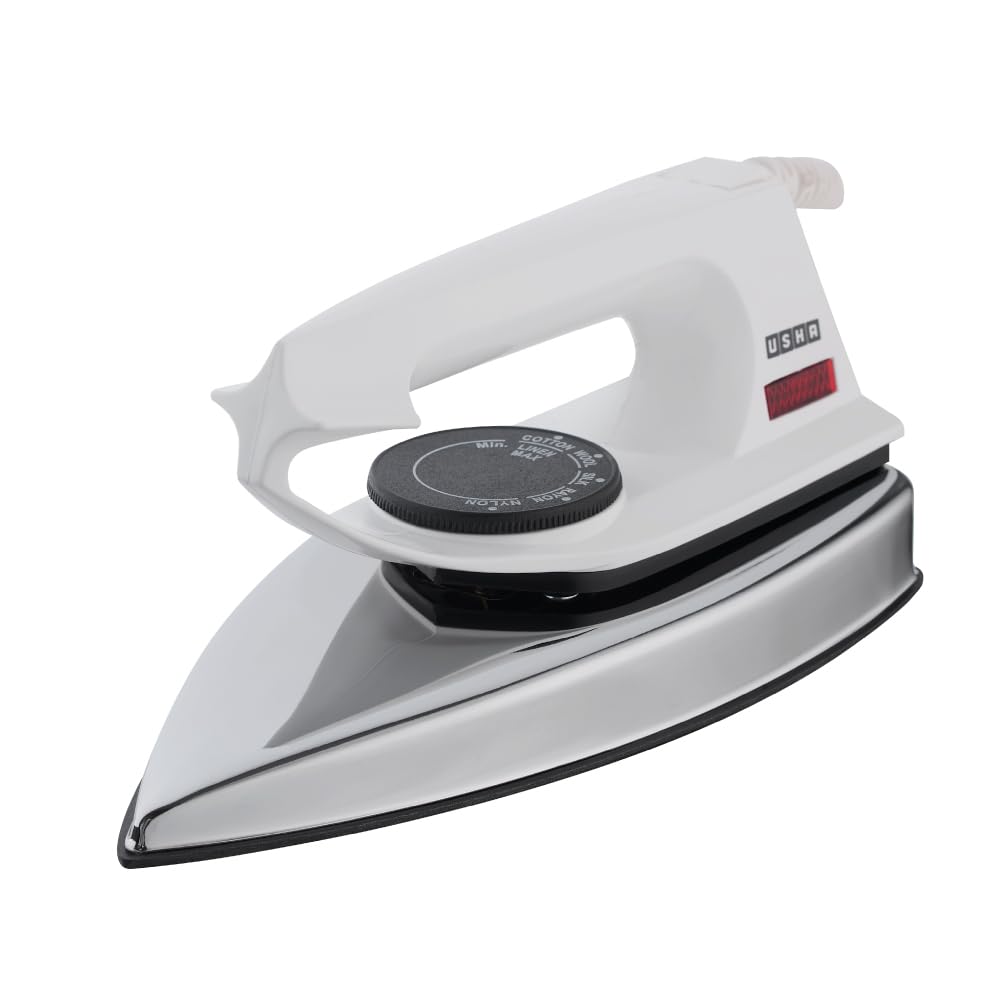
Figure 3.1: Front view of the Usha 2802 Dry Iron. This image shows the overall design of the iron, highlighting its sleek and compact form factor.

Figure 3.2: The Usha 2802 Dry Iron, emphasizing its 1000W power for faster heating and hassle-free ironing.

Figure 3.3: Close-up of the iron's soleplate, illustrating the Non-Stick PTFE coating designed for seamless gliding on fabric without causing harm or wear.

Figure 3.4: Top view of the iron, highlighting the thermostat dial with 5 fabric settings and the 1.8m long swivel cord for better reach and ease of use.
Key Components:
- Soleplate: The heating surface of the iron, featuring a non-stick PTFE coating.
- Temperature Control Dial: Used to select the desired temperature setting for different fabric types.
- Handle: Ergonomically designed, shock-proof plastic handle for comfortable grip.
- Pilot Lamp (LED Indicator Light): Illuminates when the iron is heating and turns off when the set temperature is reached.
- Swivel Cord: A 180° swivel cord for flexible movement and tangle-free ironing.
4. Setup
Before using your Usha 2802 Dry Iron for the first time, please follow these steps:
- Unpack: Carefully remove the iron from its packaging. Retain the packaging for storage or future transport.
- Inspect: Check the iron for any visible damage. If any damage is found, do not use the appliance and contact customer support.
- Clean Soleplate: Wipe the soleplate with a damp cloth to remove any manufacturing residues. Ensure it is completely dry before plugging in.
- First Use Odor: It is normal for a slight odor to be emitted during the first few uses as the heating elements cure. This will dissipate quickly.
5. Operating Instructions
Follow these steps for safe and effective ironing:
- Prepare Garment: Ensure the garment is clean and dry. Sort clothes according to fabric type to iron similar fabrics together. Start with fabrics requiring lower temperatures.
- Place Iron on Heel Rest: Always place the iron on its heel rest on a stable, heat-resistant surface when not in use during ironing.
- Set Temperature: Rotate the temperature control dial to the desired setting based on the fabric type. Refer to the 'Fabric Temperature Guide' below.
- Plug In: Insert the power plug into a suitable electrical outlet (240V, 50Hz). The LED indicator light will illuminate, indicating the iron is heating.
- Wait for Heating: Allow the iron to heat up. The LED indicator light will turn off once the set temperature is reached, indicating the iron is ready for use. It will cycle on and off during use to maintain the temperature.
- Ironing: Begin ironing the garment. For best results, iron in smooth, even strokes.
- After Use: Once ironing is complete, rotate the temperature control dial to the 'MIN' or 'OFF' position. Unplug the iron from the electrical outlet.
- Cool Down: Allow the iron to cool down completely on its heel rest before storing.
Fabric Temperature Guide:
The temperature control dial offers settings suitable for various fabrics. Always check the garment's care label first.

Figure 5.1: Close-up of the temperature control dial, showing settings for various fabric types like Nylon, Silk, Wool, Cotton, and Linen.
| Fabric Type | Temperature Setting | Recommendation |
|---|---|---|
| Nylon, Synthetics | Low | Use a pressing cloth. |
| Silk | Low to Medium | Iron on the reverse side while damp. |
| Wool | Medium | Use a damp pressing cloth. |
| Cotton | Medium to High | Iron while damp for best results. |
| Linen | High | Iron while very damp. |
Always test on an inconspicuous area of the garment first.
6. Maintenance and Cleaning
Proper maintenance ensures the longevity and performance of your iron.
- Unplug and Cool: Always ensure the iron is unplugged and completely cool before cleaning.
- Clean Soleplate: If the soleplate has starch or other residue, wipe it with a damp cloth and a non-abrasive cleaner. Do not use harsh scouring pads or metallic cleaners as they can damage the non-stick coating. For stubborn marks, a specialized iron soleplate cleaner can be used following its instructions.
- Clean Body: Wipe the exterior of the iron with a soft, damp cloth. Do not use abrasive cleaners or solvents.
- Storage: Store the iron upright on its heel rest in a dry, safe place. Ensure the cord is neatly wrapped around the cord wrap area (if present) or loosely coiled. Do not wrap the cord tightly around the hot iron.
7. Troubleshooting
Before contacting customer service, please check the following common issues and solutions:
| Problem | Possible Cause | Solution |
|---|---|---|
| Iron does not heat up. | Not plugged in; Power outlet fault; Temperature dial set to 'OFF' or 'MIN'; Thermal fuse tripped. | Ensure iron is securely plugged in. Check power outlet with another appliance. Turn temperature dial to desired setting. If thermal fuse tripped, contact service center. |
| Iron is not hot enough. | Temperature dial set too low for fabric; Not enough time to heat up. | Increase temperature setting. Allow more time for the iron to reach the set temperature (LED indicator will turn off). |
| Iron smokes or emits odor during first use. | Manufacturing residues burning off. | This is normal for first use and will stop after a short period. Ensure good ventilation. |
| Soleplate is dirty or sticky. | Residue from starch or fabric. | Clean the soleplate as described in the 'Maintenance and Cleaning' section. |
8. Specifications
| Feature | Detail |
|---|---|
| Model Name | Electric Iron 2802 |
| Model Number | 4022128021N |
| Brand | USHA |
| Type | Dry Iron |
| Wattage | 1000 Watts |
| Voltage | 240 Volts |
| Frequency | 50 Hz |
| Soleplate | Non-Stick PTFE Coated |
| Special Features | Lightweight, Overheat Protection (Thermal Safety Fuse), Power Indicator Light, Temperature Control, 180° Swivel Cord, Shock-proof plastic handle & body |
| Product Dimensions (L x W) | 39L x 20W Centimeters |
| Item Weight | 750 Grams |
| Included Components | Iron, Instruction Manual, Warranty Card |
| Country of Origin | India |
9. Warranty and Support
Your Usha 2802 Dry Iron comes with a warranty to ensure your peace of mind.
Warranty Information:
- Warranty Period: 1 year on product.
- The warranty covers manufacturing defects under normal household use.
- Please retain your purchase receipt and warranty card for any warranty claims.
- The warranty does not cover damage caused by misuse, neglect, unauthorized repairs, or normal wear and tear.
Customer Support:
For any queries, service requests, or to report an issue with your Usha 2802 Dry Iron, please contact Usha customer support:
- Toll Free No.: 1800 1033 111
- Manufacturer Contact Information: Registered Office: Surya Kiran Building, 19 K.G. Marg, New Delhi-110 001, India.
- Importer Contact Information: USHA International LTD. Plot No. 15, Institutional Area, Sector 32, Gurugram 122 001, Haryana (India). Tel +91-124-4583100.
