
Introduction
Thank you for purchasing the Silverlit Hover Racer. This remote-controlled vehicle is designed for exciting play on both land and water, featuring a dual propeller system for excellent speed and full-function control. Please read this manual carefully before operating your Hover Racer to ensure safe and optimal performance.
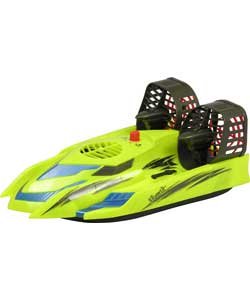
Image: The Silverlit Hover Racer, a remote-controlled vehicle, displayed on a blue background. It features a streamlined body and visible propellers, indicating its capability for both land and water operation.
Important Safety Information
- WARNING: Not suitable for children under 3 years due to small parts. Recommended for ages 5 and up.
- Always operate the Hover Racer in open areas, away from people, pets, and obstacles.
- Do not operate near electrical wires or power outlets.
- Ensure the battery compartment is securely closed before operating in water.
- Do not immerse the remote control in water.
- Adult supervision is recommended, especially for younger children.
- Use only the specified batteries and charging methods.
- Remove batteries from the Hover Racer and remote control when not in use for extended periods.
Package Contents
Please check that all items are present in your package:
- 1 x Silverlit Hover Racer vehicle
- 1 x Remote Control
- 1 x Rechargeable battery for Hover Racer (included)
- Instruction Manual (this document)
Note: 6 x AA batteries for the remote control are not included and must be purchased separately.
Setup
1. Remote Control Battery Installation
- Locate the battery compartment on the back of the remote control.
- Using a screwdriver, open the battery compartment cover.
- Insert 6 x AA batteries, ensuring correct polarity (+/-).
- Replace the battery compartment cover and secure it with the screw.
2. Hover Racer Battery Charging
The Hover Racer uses a rechargeable battery. The remote control acts as the charger.
- Ensure the remote control has fresh AA batteries installed.
- Locate the charging cable on the remote control (usually stored in a compartment).
- Connect the charging cable to the charging port on the Hover Racer.
- The remote control will indicate when charging is in progress (e.g., an LED light).
- Charge until the indicator light changes or turns off, signifying a full charge. Refer to the remote control's specific instructions for charging indicators.
- Disconnect the charging cable and store it back in the remote control.
Important: Do not overcharge the battery.
3. Pairing the Hover Racer and Remote Control
Typically, Silverlit products automatically pair.
- Turn on the Hover Racer using its power switch.
- Turn on the remote control using its power switch.
- The indicator lights on both devices should flash and then become solid, indicating a successful connection. If not, turn both off and try again.
Operating Instructions
Basic Controls
The remote control allows for full-function control: forward, backward, left, and right.
- Forward/Backward: Use the left joystick (or designated control) to move the Hover Racer forward or backward.
- Left/Right: Use the right joystick (or designated control) to steer the Hover Racer left or right.
- The dual propeller system provides excellent speed and maneuverability.
Operating on Land
The Hover Racer glides smoothly over flat, dry surfaces.
- Ensure the operating area is clear of debris, loose gravel, or tall grass that could obstruct movement or damage propellers.
- Practice basic controls in an open space to get accustomed to its handling.
Operating on Water
The Hover Racer features a water-resistant body, allowing it to operate on water surfaces.
- Only operate in calm, shallow water, free from strong currents, weeds, or other obstacles.
- Ensure all battery compartments and covers are securely sealed before placing the Hover Racer in water.
- Avoid operating in saltwater, as it can cause corrosion over time.
- After water play, always rinse the Hover Racer with fresh water and allow it to air dry completely before storage.
Low Battery Signal
The remote control is equipped with a low power battery signal. When the Hover Racer's battery is low, the remote control will provide an indication (e.g., flashing light, audible alert). When this occurs, bring the Hover Racer back to you and recharge its battery.
Maintenance and Care
- Cleaning: After use, especially in water, gently wipe the Hover Racer with a damp cloth. For water operation, rinse with fresh water and dry thoroughly. Do not use harsh chemicals.
- Storage: Store the Hover Racer and remote control in a cool, dry place away from direct sunlight. Remove batteries from both devices if storing for extended periods.
- Propellers: Regularly check propellers for any damage or debris. Clear any obstructions carefully.
- Battery Care: Follow charging instructions carefully. Do not leave batteries charging unattended.
Troubleshooting
| Problem | Possible Cause | Solution |
|---|---|---|
| Hover Racer does not respond. |
|
|
| Short operating range. |
|
|
| Hover Racer moves slowly or erratically. |
|
|
| Water leakage (after water play). |
|
|
Specifications
| Brand | Silverlit |
| Model | Hover Racer |
| ASIN | B014LKTX0W |
| Dimensions (Hover Racer) | Approx. H25.4 x W40.64 x L12.7 cm (H10 x W16 x L5 inches) |
| Power Source (Hover Racer) | 1 x Rechargeable battery (included) |
| Power Source (Remote Control) | 6 x AA batteries (not included) |
| Recommended Age | 5 years and up (Manufacturer recommended age: 3 years and older, but product description states 5 years and up) |
| Features | Dual propeller system, full-function control (forward, backward, left, right), land and water operation, water-resistant body, low battery signal on remote control. |
Warranty and Support
For warranty information and customer support, please refer to the documentation included with your purchase or visit the official Silverlit website. Keep your proof of purchase for any warranty claims.
Manufacturer: Silverlit