
1. Introduction
This manual provides comprehensive instructions for the installation, operation, and maintenance of the ICP DAS X002 Prototype Board. Please read this manual thoroughly before using the device to ensure proper functionality and safety.
2. Product Overview
The ICP DAS X002 is a versatile prototype board designed for developing and testing custom electronic circuits. It features a combination of pre-routed circuitry and a large prototyping area, making it suitable for various industrial and scientific applications.
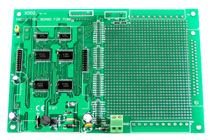
Figure 1: An overhead view of the ICP DAS X002 Prototype Board, showing its green PCB, integrated circuits, connectors, and a large prototyping area.
3. Setup
Follow these steps to set up your ICP DAS X002 Prototype Board:
- Unpacking: Carefully remove the prototype board from its packaging. Inspect for any visible damage.
- Power Supply: Connect a compatible power supply to the designated power input terminals. Ensure the voltage and current ratings match the board's requirements. Refer to the specifications section for details.
- Mounting (Optional): If permanent installation is required, use appropriate standoffs and screws to mount the board securely in an enclosure or on a surface.
- Initial Connections: Before applying power, make all necessary signal and data connections to the board's I/O terminals or headers.
4. Operating Instructions
Once the board is set up, you can begin developing and testing your circuits.
- Circuit Design: Plan your circuit layout on the prototyping area. Utilize the pre-routed sections for common functionalities if applicable.
- Component Placement: Solder or insert components into the prototyping grid. Ensure correct polarity for diodes, capacitors, and integrated circuits.
- Wiring: Use appropriate gauge wires to connect components. Double-check all connections before applying power.
- Power On: Apply power to the board. Observe any indicator LEDs for proper operation.
- Testing: Use multimeters, oscilloscopes, or other diagnostic tools to verify circuit functionality.
5. Maintenance
The ICP DAS X002 Prototype Board is designed for durability, but proper maintenance can extend its lifespan.
- Cleaning: Keep the board free from dust and debris. Use a soft, dry brush or compressed air for cleaning. Avoid liquid cleaners unless specifically designed for electronics.
- Storage: When not in use, store the board in an anti-static bag in a dry, temperature-controlled environment.
- Inspection: Periodically inspect solder joints and component connections for signs of wear or damage.
6. Troubleshooting
If you encounter issues with your prototype board, consider the following common troubleshooting steps:
| Problem | Possible Cause | Solution |
|---|---|---|
| Board not powering on | Incorrect power supply connection; Faulty power supply; Blown fuse (if applicable) | Verify power connections and voltage; Test power supply; Check and replace fuse if necessary. |
| Circuit not functioning as expected | Incorrect wiring; Faulty components; Design error | Double-check all connections against your schematic; Test individual components; Review circuit design. |
| Intermittent operation | Loose connections; Cold solder joints; Environmental factors (temperature, humidity) | Inspect and re-solder connections; Ensure stable operating environment. |
7. Specifications
Key specifications for the ICP DAS X002 Prototype Board:
- Model Number: X002
- Manufacturer: ICP DAS
- Item Weight: 3 Pounds
- ASIN: B014K1GZH6
- First Available: August 14, 2014
- Description: Prototype Board
8. Warranty and Support
For warranty information and technical support, please refer to the official ICP DAS website or contact their customer service department. Keep your purchase receipt for warranty claims.
Manufacturer: ICP DAS
Seller: ICP DAS USA (Seller Information)
