
AUO M170ETN01.1
AUO M170ETN01.1 LCD Panel User Manual
Model: M170ETN01.1 | Brand: AUO
Introduction
This manual provides essential information for the proper installation, operation, and maintenance of your AUO M170ETN01.1 LCD Panel. Please read this manual thoroughly before use to ensure optimal performance and longevity of the product.
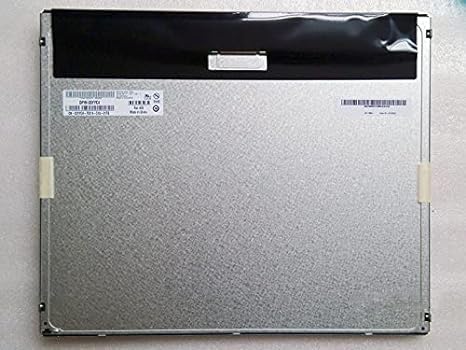
Figure 1: Rear view of the AUO M170ETN01.1 LCD Panel. This image displays the metallic back panel, which houses the internal components and connection interfaces. The top section is covered by a black protective material, and a label with product information is visible on the left side.
Product Features
- Display Size: 17 inches
- Resolution: High resolution 1280x1024 (SXGA)
- Brightness: 250 Nits
- Viewing Angle: Wide viewing angle 85/85/80/80 (Typ.)(CR≥10)
- Contrast Ratio: High contrast 1000:1
- Color Depth: 16.7 Million colors
- Surface: Anti-glare, Glossy screen surface
- Interface: LVDS interface
- Includes LED driver
- Top Grade A+, brand new, 100% original panel
Setup and Installation
This section outlines the steps for safely setting up and installing the AUO M170ETN01.1 LCD Panel into a compatible desktop monitor system.
- Preparation: Ensure the power to the host system (e.g., desktop monitor housing) is disconnected. Work on a clean, static-free surface.
- Handle with Care: The LCD panel is a delicate component. Avoid touching the display surface directly. Hold the panel by its edges.
- Mounting: Carefully align the AUO M170ETN01.1 panel with the mounting points within the monitor casing. Secure it using the appropriate screws, ensuring not to overtighten.
- Connect LVDS Cable: Locate the LVDS (Low-Voltage Differential Signaling) connector on the back of the LCD panel. Gently connect the LVDS cable from the monitor's main board to this connector, ensuring it is fully seated and latched if applicable.
- Connect LED Driver/Backlight Cable: Connect the backlight cable from the monitor's power supply or inverter board to the LED driver input on the LCD panel. Verify the correct polarity if not keyed.
- Secure Connections: Double-check all cable connections to ensure they are firm and properly aligned.
- Reassembly: Carefully reassemble the monitor casing, ensuring no cables are pinched.
Note: Professional installation is recommended for users unfamiliar with monitor component replacement.
Operating Instructions
Once installed, the AUO M170ETN01.1 LCD Panel operates as part of your desktop monitor system. Its functionality is primarily controlled by the monitor's internal electronics and the connected computer's display settings.
- Power On: Connect the monitor's power cable and turn on the monitor using its power button.
- Display Output: Ensure your computer is connected to the monitor via a compatible video cable (e.g., VGA, DVI, HDMI, DisplayPort, depending on your monitor's inputs).
- Resolution Settings: For optimal display quality, set your computer's display resolution to 1280 x 1024 pixels. This is the native resolution of the M170ETN01.1 panel.
- Brightness/Contrast Adjustment: Use the monitor's on-screen display (OSD) menu to adjust brightness, contrast, and other image settings to your preference.
- Viewing Angle: The panel offers wide viewing angles. Adjust your seating position for the best visual experience.
Maintenance
Proper maintenance helps extend the lifespan and maintain the performance of your LCD panel.
- Cleaning the Screen:
- Turn off the monitor and unplug it before cleaning.
- Use a soft, lint-free cloth (e.g., microfiber cloth) slightly dampened with water or a specialized LCD screen cleaner.
- Gently wipe the screen surface. Avoid applying excessive pressure.
- Do not use harsh chemicals, alcohol, ammonia-based cleaners, or abrasive materials, as these can damage the anti-glare coating.
- Dust Removal: Regularly dust the monitor casing and vents to prevent dust buildup, which can affect cooling.
- Avoid Direct Sunlight: Do not expose the monitor to direct sunlight or excessive heat, as this can degrade the LCD panel over time.
- Power Management: Utilize your computer's power management settings to put the monitor into sleep mode when not in use, conserving energy and extending backlight life.
Troubleshooting
This section addresses common issues you might encounter with the AUO M170ETN01.1 LCD Panel.
| Problem | Possible Cause | Solution |
|---|---|---|
| No image on screen |
|
|
| Image is blurry or distorted |
|
|
| Dead pixels or stuck pixels |
|
|
If the problem persists after attempting these solutions, please refer to the Support section or consult a qualified technician.
Specifications
| Model Number | M170ETN01.1 |
| Brand | AUO |
| Screen Size | 17 Inches |
| Resolution | 1280 x 1024 Pixels (SXGA) |
| Aspect Ratio | 5:4 |
| Image Brightness | 250 lm (Nits) |
| Contrast Ratio | 1000:1 |
| Color Depth | 16.7 Million |
| Viewing Angle | 85/85/80/80 (Typ.)(CR≥10) |
| Screen Surface | Anti-glare, Glossy |
| Interface | LVDS |
| Product Dimensions | 14.11 x 11.67 x 0.41 inches |
| Item Weight | 2.79 pounds |
Warranty and Support
The AUO M170ETN01.1 LCD Panel is provided as a component. Warranty coverage typically depends on the seller or the final product (e.g., desktop monitor) into which it is integrated.
- Warranty Information: Please refer to the warranty policy provided by your point of purchase or the manufacturer of the complete monitor system. The product is described as "Top Grade A+, brand new, 100% original."
- Technical Support: For technical assistance regarding the integration or performance of this LCD panel, it is recommended to contact the manufacturer of the device it is installed in, or a qualified computer hardware technician.
- Product ASIN: B014IUWX7K (for reference when contacting seller/support)
Related documentsM170ETN01.1


Ask a question about this manual
Ask about setup, troubleshooting, compatibility, parts, safety, or missing instructions. Manuals+ will review the question and use this page’s manual context to help answer it.