
1. Introduction
This manual provides detailed instructions for the installation, operation, and maintenance of the Visionis FPC-5323 One Door Access Control Kit. This kit is designed for single-door access control in swinging door applications, utilizing a 300lbs magnetic lock and the VIS-3002 indoor keypad/reader with a mini controller. The system supports up to 1,000 users and offers multiple access methods including PIN codes, proximity cards, and keytags, ensuring enhanced security for your premises.
2. Product Components
The Visionis FPC-5323 kit includes the following components:
- (1) VIS-ML300LED: 300lbs Indoor Electric Magnetic Lock with LED Sensor.
- (1) VIS-ZL300: L and Z Bracket for 300lbs Electromagnetic Lock.
- (1) VIS-3002: Access Control Indoor Only Digital Touch Keypad + Reader Standalone with Mini Controller, Wiegand 26, No Software, EM Cards, 1000 Users.
- (1) VIS-MINI-CNTRL: 1 Door Controller for Access Control Systems with No Software. Supports up to 1,000 users.
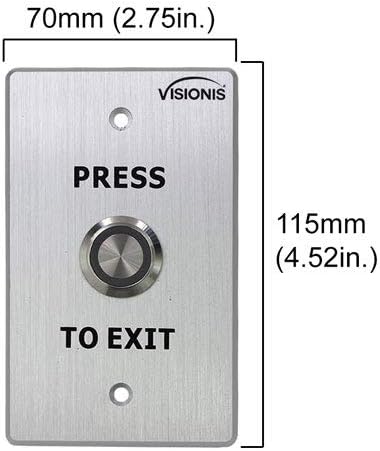
- (1) VIS-7001: Indoor + Outdoor Weather, Waterproof Rated IP65 Stainless Steel Door Bell Type Round Request To Exit Button with LED Light, NC, COM, NO Outputs.
- (1) VIS-8006: External Hardwire Doorbell for Keypad/Reader Access Control.
- (1) VISCP200: 12V 2Amp Power Supply Transformer, UL Listed.
- (10) VS-VIS-APROXCARD/26: Access Control Proximity Contactless Smart Entry Card, 1.8mm thick, 26 bit, 125khz.
- (10) VS-VIS-KEYTAG: Access Control Proximity Contactless Smart Entry Keyfob, 26 bit, 125khz.




3. Setup and Installation
Proper installation is crucial for the optimal performance and security of your access control system. It is recommended that installation be performed by a qualified technician. The FPC-5323 kit is designed for doors that open inwards.
3.1 Wiring Diagram Overview
Refer to the detailed wiring diagrams provided with your kit for specific connection instructions. The VIS-3002 keypad connects to the VIS-MINI-CNTRL mini controller, which then controls the magnetic lock and integrates with the exit button and doorbell.

3.2 Magnetic Lock Installation
Ensure the magnetic lock (VIS-ML300LED) and its armature plate are correctly aligned and make full contact when the door is closed. The L and Z brackets (VIS-ZL300) are essential for proper mounting on inswinging doors.
3.3 Keypad Mounting
Mount the VIS-3002 keypad at a convenient height near the door. Ensure all wiring connections are secure and protected from environmental factors.
3.4 Video Resource
VIS-3002 Product Overview: This video provides a general overview of the VIS-3002 keypad, its features, and potential applications. While not a full installation guide, it offers visual context for the product.
4. Operating Instructions
The VIS-3002 keypad offers multiple ways to gain access:
- PIN Code: Enter your assigned PIN code on the keypad.
- Proximity Card/Keytag: Present your EM card or keytag to the reader area on the keypad.
- Card + PIN: For enhanced security, some configurations may require both a card/keytag presentation and a PIN code entry.
- NFC (Phone as Card): The keypad supports NFC functionality, allowing compatible phones with built-in NFC to act as a proximity card. This feature is not compatible with iOS devices.

4.1 Request to Exit Button (VIS-7001)
To exit the secured area, simply press the VIS-7001 Request to Exit button. This will momentarily release the magnetic lock, allowing the door to open.
4.2 External Doorbell (VIS-8006)
The VIS-8006 external doorbell provides an audible alert when activated from the keypad, allowing visitors to signal their presence.
5. Programming (Keypad)
The VIS-3002 keypad allows for programming of user PINs, proximity cards, and keytags. Refer to the specific programming instructions in the user manual included with the VIS-3002 keypad for detailed steps.
5.1 Entering Programming Mode
Typically, you will need to enter a master code to access programming mode. For many Visionis keypads, this involves pressing * followed by the master code and then #.
5.2 Adding Users
Follow the keypad's specific menu options to add new user PINs or enroll new proximity cards/keytags. Each user will be assigned a unique identifier or PIN.
5.3 Deleting Users
To remove access for a user, enter programming mode and follow the instructions to delete their specific PIN or card/keytag from the system's memory.
6. Maintenance
Regular maintenance ensures the longevity and reliable operation of your access control system.
- Cleaning: Wipe the keypad and other components with a soft, dry cloth. Avoid abrasive cleaners or solvents.
- Connection Checks: Periodically inspect all wiring connections to ensure they are secure and free from corrosion or damage.
- Magnetic Lock Alignment: Ensure the magnetic lock and armature plate remain properly aligned and make full contact. Any gaps can reduce holding force.
- Power Supply: Verify the power supply (VISCP200) is functioning correctly and providing stable 12V power to the system.
7. Troubleshooting
If you encounter issues with your Visionis access control system, refer to the following common troubleshooting steps:
- Door Not Locking/Unlocking:
- Check power supply to all components.
- Ensure the magnetic lock and armature plate are in full contact. Adjust if necessary.
- Verify wiring connections between the keypad, mini controller, and magnetic lock.
- Keypad Not Responding:
- Check power to the keypad.
- Ensure the keypad is securely mounted and not tampered with.
- Card/Keytag Not Granting Access:
- Confirm the card/keytag is properly enrolled in the system.
- Ensure the card/keytag is presented correctly to the reader.
- Programming Issues:
- Double-check the master code and programming sequence. For many keypads, a * is needed before the master code and a # after it.
- Refer to the specific programming section of the VIS-3002 user manual.
- Anti-Tamper Alarm: The VIS-3002 keypad features an anti-tamper alarm that activates if the unit is illegally removed or torn down. If this alarm sounds, inspect the keypad's mounting and connections.
8. Specifications
| Component | Specification |
|---|---|
| VIS-3002 Keypad | |
| User Capacity | 1,000 users |
| Input/Output | Wiegand 26 |
| Input Voltage | DC 12V |
| Operating Temperature | -45°C ~ 55°C (-49°F ~ 131°F) |
| Operating Humidity | 0% ~ 95% |
| Searching Time (Card) | Less than 0.1s |
| Supported Frequencies | 125KHz (EM cards), 13.56MHz (MFR cards) |
| VIS-ML300LED Magnetic Lock | |
| Holding Force | 300lbs |
| Application | Indoor Use |
| VIS-MINI-CNTRL Mini Controller | |
| User Capacity | Up to 1,000 users |
| Software | No software required |
| VISCP200 Power Supply | |
| Output | 12V 2Amp |
| Certification | UL Listed |
9. Warranty and Support
For warranty information, technical support, or service inquiries, please contact Visionis customer support. Details can typically be found on the Visionis website or in the product packaging.


