
1. Product Overview
The Usha Efikas Compacto 35-Watt Tower Fan is designed to provide efficient air circulation in various room settings. Featuring a sleek black design, this tower fan includes a remote control for convenient operation and offers multiple comfort wind modes.
Package Contents:
- Motor unit
- Blades (pre-installed within the unit)
- Instruction Manual
- Warranty Card
- Remote Control
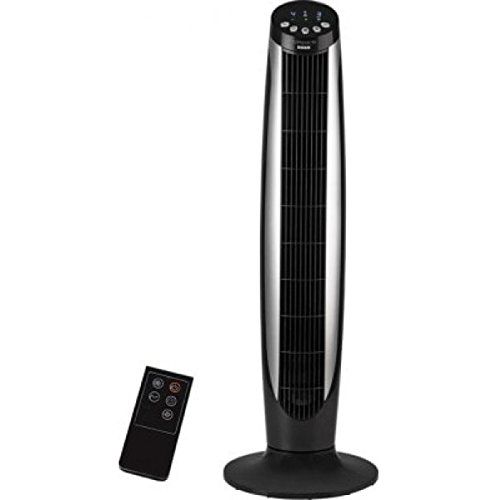
Image 1.1: Usha Efikas Compacto Tower Fan and its accompanying remote control. The fan is a tall, slender black unit with a silver-colored front grille, standing on a round black base. The remote control is a small, rectangular black device with several buttons, positioned to the left of the fan.
2. Important Safety Instructions
Read all instructions carefully before using the appliance. Failure to follow these instructions may result in electric shock, fire, or serious injury.
- Electrical Safety: Ensure the voltage specified on the fan's rating label matches your local power supply. Do not operate the fan with a damaged cord or plug. Do not immerse the fan, cord, or plug in water or other liquids.
- Placement: Always place the fan on a stable, flat surface to prevent it from tipping over. Do not place the fan near curtains, drapes, or any objects that may be drawn into the fan. Maintain adequate clearance from walls and furniture for proper airflow.
- Usage: Do not insert fingers or any objects through the grille when the fan is operating. Unplug the fan from the power outlet when not in use, when moving it, or before cleaning. This appliance is for household use only and not for commercial or industrial applications.
- Children and Pets: Keep the fan out of reach of children and pets. Close supervision is necessary when the fan is used near children.
- Maintenance: Do not attempt to repair or disassemble the fan yourself. Refer all servicing to qualified service personnel.
3. Parts Identification
Familiarize yourself with the components of your Usha Efikas Compacto Tower Fan.
- Main Fan Body: Contains the motor, blades, and internal components.
- Air Outlet Grille: Front section where air is expelled.
- Control Panel: Located on the top of the fan, with push buttons for manual operation.
- LED Display: Integrated into the control panel, shows current settings.
- Base: Provides stability for the tower fan.
- Power Cord: Connects the fan to an electrical outlet.
- Remote Control: Allows for convenient operation from a distance.
- Remote Parking Slot: A designated slot on the fan for storing the remote control.
Image 3.1: Visual representation of the Usha Efikas Compacto Tower Fan and its remote control, highlighting the main components. The fan features a top-mounted control panel and a stable round base. The remote control is shown separately.
4. Setup and Assembly
The Usha Efikas Compacto Tower Fan requires minimal assembly. Follow these steps to set up your fan:
- Unpack: Carefully remove all components from the packaging. Retain packaging for future storage or transport.
- Assemble Base (if separate): If the base is not pre-attached, align the base sections with the main fan body and secure them according to the markings or screw holes. Ensure the power cord passes through the designated channel in the base. (Note: Some models may have the base pre-assembled or require simple click-in attachment.)
- Place Fan: Position the assembled fan on a firm, level surface. Ensure it is away from obstacles that might impede airflow or cause it to tip over.
- Connect Power: Insert the power plug into a suitable electrical outlet (230 Volts, 50 Hz).
- Insert Remote Batteries: Open the battery compartment on the remote control and insert the required batteries (not included, typically AAA or CR2032) ensuring correct polarity (+/-).
5. Operating Instructions
Your Usha Efikas Compacto Tower Fan can be operated using the control panel on top of the unit or the provided remote control.
Control Panel Buttons:
- Power Button (●): Press to turn the fan ON or OFF.
- Speed Button (▲/▼): Adjust fan speed (Low, Medium, High).
- Mode Button (M): Cycle through wind modes: Normal, Natural, Sleep.
- Oscillation Button (↻): Activate or deactivate the oscillation function.
- Timer Button (T): Set the auto-off timer (e.g., 1 hour, 2 hours, up to 7 hours).
Remote Control:
The remote control duplicates all functions available on the control panel, allowing for convenient operation from a distance. Ensure the remote is pointed towards the fan's receiver for optimal performance.
- Remote Parking Slot: A dedicated slot is provided on the fan unit to securely store the remote control when not in use, preventing it from being misplaced.
Wind Modes Explained:
- Normal Mode: Provides a constant, steady airflow at the selected speed.
- Natural Mode: Simulates natural breeze by varying fan speed intermittently.
- Sleep Mode: Operates at a lower, quieter speed, often gradually decreasing speed over time, ideal for nighttime use.
6. Care and Maintenance
Regular cleaning and proper care will ensure the longevity and efficient operation of your Usha Efikas Compacto Tower Fan.
- Before Cleaning: Always unplug the fan from the power outlet before cleaning or performing any maintenance.
- Exterior Cleaning: Wipe the exterior surfaces of the fan with a soft, damp cloth. Do not use abrasive cleaners, waxes, or solvents as they may damage the finish.
- Grille Cleaning: Use a vacuum cleaner with a brush attachment to remove dust and debris from the air inlet and outlet grilles. For stubborn dust, a soft brush can be used.
- Storage: If storing the fan for an extended period, clean it thoroughly, then cover it with a plastic bag or return it to its original packaging to protect it from dust. Store in a cool, dry place.
- No Lubrication: The fan motor is permanently lubricated and requires no additional lubrication.
7. Troubleshooting Guide
If you experience issues with your Usha Efikas Compacto Tower Fan, refer to the following common problems and solutions:
| Problem | Possible Cause | Solution |
|---|---|---|
| Fan does not turn on. | No power supply. Power cord not securely plugged in. | Check if the power outlet is working. Ensure the power cord is firmly plugged into the outlet and the fan. |
| Weak or no airflow. | Air inlets/outlets are blocked. Fan speed set too low. | Clean any dust or obstructions from the grilles. Increase the fan speed setting. |
| Remote control not working. | Batteries are dead or incorrectly inserted. Obstruction between remote and fan. | Replace batteries, ensuring correct polarity. Remove any objects blocking the signal path. Ensure remote is pointed at the fan. |
| Fan makes unusual noise. | Fan not on a level surface. Internal obstruction or damage. | Place the fan on a stable, flat surface. Unplug the fan and check for any visible obstructions. If noise persists, contact customer support. |
If the problem persists after trying these solutions, please contact Usha customer support for assistance.
8. Product Specifications
Technical details for the Usha Efikas Compacto 35-Watt Tower Fan:
| Feature | Detail |
|---|---|
| Brand | USHA |
| Model Number | Efikas Tower Fan |
| Colour | Black |
| Electric Fan Design | Blower |
| Power Source | Electric |
| Wattage | 35 Watts |
| Voltage | 230 Volts |
| Noise Level | 60 dB |
| Switch Type | Remote |
| Item Weight | 5 kg 40 g |
| Item Dimensions (LxWxH) | 20 x 20 x 50 Centimeters |
| Included Components | Motor, blades, instruction manual and warranty card |
| Manufacturer | Usha International Ltd. |
9. Warranty and Customer Support
Your Usha Efikas Compacto 35-Watt Tower Fan comes with a manufacturer's warranty.
- Warranty Period: 1 year on product from the date of purchase.
- Warranty Coverage: This warranty covers manufacturing defects in materials and workmanship under normal use. It does not cover damage resulting from misuse, accident, alteration, neglect, or unauthorized repair.
- Claiming Warranty: Please retain your purchase receipt and warranty card for any warranty claims. Contact Usha customer support for service or inquiries.
Customer Support:
For technical assistance, service, or spare parts, please contact Usha International Ltd. customer service. Refer to the warranty card or Usha's official website for the most current contact information.
Manufacturer: Usha International Ltd.