
Introduction
Thank you for purchasing the Acctim Adelphi 15082 Red LED Mains Electric Bedside Alarm Clock. This manual provides detailed instructions for setting up, operating, and maintaining your new alarm clock. Please read this manual thoroughly before use and retain it for future reference.
Product Overview and Features
The Acctim Adelphi 15082 is a compact and reliable bedside alarm clock designed for ease of use. Its key features include:
- Bold Red LED Display (0.6 inches / 16mm high)
- Mains powered operation
- Battery backup function (requires 1x AA battery, not included)
- Crescendo alarm with Hi-Lo volume option
- Snooze function
- Easy-to-set controls
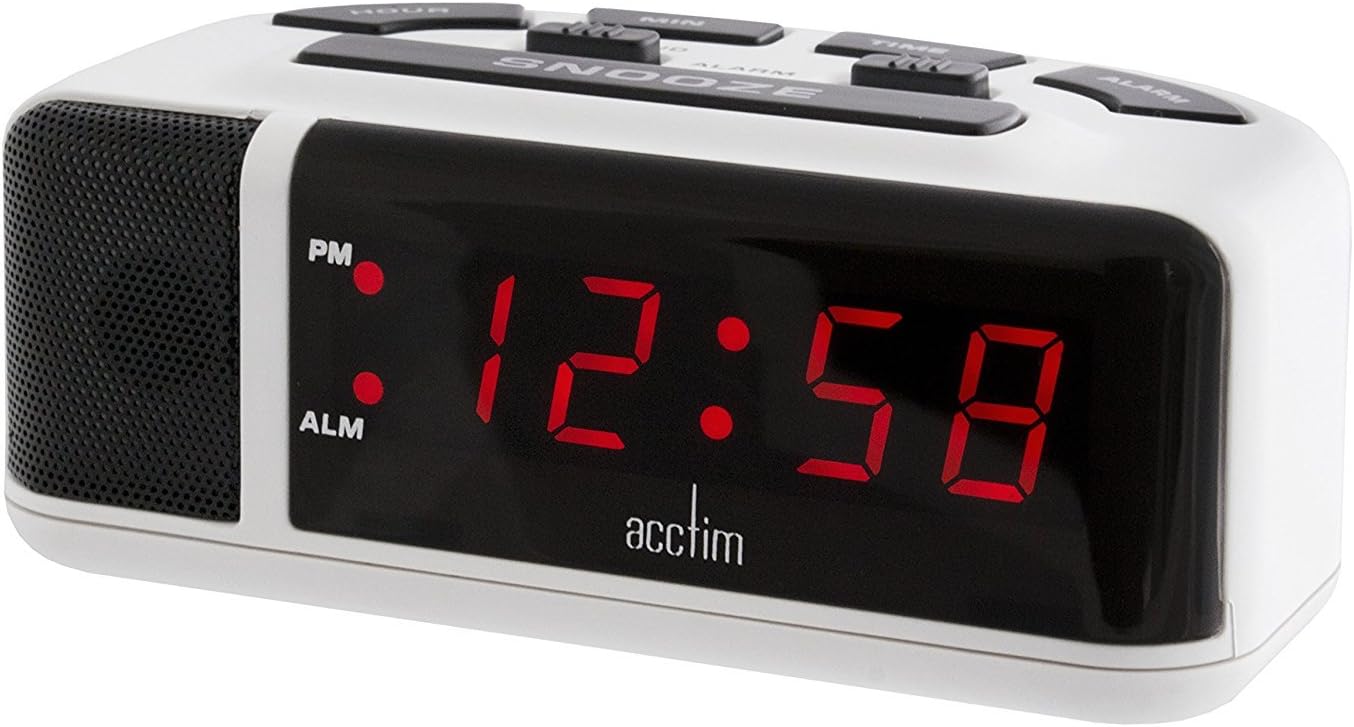
Figure 1: Front view of the Acctim Adelphi 15082 Red LED Alarm Clock. This image shows the large, clear red LED display and the overall compact design of the clock.
Setup
1. Power Connection
- Mains Power: Connect the integrated UK 3-pin plug to a standard 240V AC wall outlet. The LED display will illuminate.
- Battery Backup: For timekeeping during power outages, insert 1x AA battery (not included) into the battery compartment located on the underside of the clock. Ensure correct polarity (+/-). The battery backup will not power the LED display but will maintain the time settings.
2. Initial Time Setting
Upon first connection to mains power, the display may show a default time or flash. To set the correct time:
- Press and hold the TIME button.
- While holding TIME, press the HOUR button repeatedly to adjust the hour. Observe the PM indicator for afternoon hours.
- While holding TIME, press the MIN button repeatedly to adjust the minutes.
- Release the TIME button once the correct time is set.

Figure 2: Top view of the Acctim Adelphi 15082, illustrating the layout of the HOUR, MIN, TIME, ALARM, and SNOOZE buttons, along with the alarm ON/OFF and SOFT/LOUD switches.
Operating Instructions
Setting the Alarm
- Press and hold the ALARM button. The alarm time will appear on the display.
- While holding ALARM, press the HOUR button repeatedly to adjust the alarm hour.
- While holding ALARM, press the MIN button repeatedly to adjust the alarm minutes.
- Release the ALARM button once the desired alarm time is set.
Activating/Deactivating the Alarm
Locate the ALARM OFF/ON switch on the top of the clock (refer to Figure 2).
- Slide the switch to ON to activate the alarm. An "ALM" indicator will appear on the display.
- Slide the switch to OFF to deactivate the alarm. The "ALM" indicator will disappear.
Snooze Function
When the alarm sounds, press the large SNOOZE button on the top of the clock. The alarm will temporarily stop and sound again after approximately 9 minutes.
Alarm Volume (Hi-Lo)
The alarm features a crescendo sound, gradually increasing in volume. You can select between two volume levels:
- Locate the SOFT/LOUD switch on the top of the clock (refer to Figure 2).
- Slide the switch to SOFT for a lower alarm volume.
- Slide the switch to LOUD for a higher alarm volume.
Maintenance
Cleaning
To clean the clock, gently wipe the surface with a soft, dry cloth. Do not use abrasive cleaners, solvents, or chemical sprays, as these may damage the finish or electronic components.
Battery Replacement
If the clock experiences a power outage and the time is not maintained, the AA backup battery may need replacement. To replace the battery:
- Disconnect the clock from the mains power supply.
- Carefully turn the clock over to access the battery compartment.
- Open the battery compartment cover.
- Remove the old AA battery and dispose of it responsibly.
- Insert a new AA battery, ensuring correct polarity (+/-).
- Close the battery compartment cover.
- Reconnect the clock to the mains power supply.
Troubleshooting
| Problem | Possible Cause | Solution |
|---|---|---|
| Display is blank. | No mains power. | Ensure the clock is securely plugged into a working wall outlet. Check the power supply. |
| Time is incorrect after a power outage. | Backup battery is dead or missing. | Replace the AA backup battery. Reset the time manually. |
| Alarm does not sound. | Alarm is not activated or set incorrectly. | Ensure the ALARM OFF/ON switch is in the ON position. Verify the alarm time is set correctly. |
| Alarm is too quiet/loud. | Volume setting is incorrect. | Adjust the SOFT/LOUD switch to the desired volume level. |
Specifications
- Model Number: jo3436941
- Brand: Acctim
- Display Type: Digital LED (Red)
- Display Height: 0.6 inches (16mm)
- Power Source: Mains Electric (240V AC, UK 3-pin plug)
- Battery Backup: 1x AA battery (not included)
- Dimensions (L x W x H): Approximately 120 x 66 x 50 mm (4.72 x 2.6 x 1.97 inches)
- Weight: Approximately 340 g
- Special Features: Alarm, Snooze, Hi-Lo Alarm Volume
Warranty and Support
For information regarding warranty coverage, please refer to the documentation provided at the time of purchase or contact your retailer. For technical support or further assistance, please visit the official Acctim website or contact their customer service department.
