
Product Overview
The Targus 3D Protective Case and Stand (Model THZ595GL) is designed to provide robust protection and versatile functionality for your iPad Mini 1, 2, 3, or 4. This case features military-grade drop protection, a flexible tray for secure fit, reinforced corners, and precision cutouts for full access to device features. Its soft textured interior doubles as a non-slip base for various viewing angles and protects the screen when closed. A magnetic closure ensures the case remains securely fastened.

Image: The Targus 3D Protective Case in black, shown in its closed position, featuring a textured geometric pattern on the front cover.
Package Contents
- 1 x Targus 3D Protective Case and Stand (Model THZ595GL)
No additional accessories are typically included with the case itself, as it is designed to protect and enhance the functionality of your existing iPad Mini device.
Setup Instructions
- Prepare your iPad Mini: Ensure your iPad Mini (1st, 2nd, 3rd, or 4th generation) is clean and free of dust or debris before installation.
- Align the iPad: Gently align your iPad Mini with the flexible tray of the case. The camera and ports should match the cutouts on the case.
- Insert the iPad: Carefully press the iPad into the flexible tray, starting with one corner and working your way around. The flexible material will allow the iPad to snap securely into place. Ensure all edges are fully seated within the case's frame.
- Verify Fit: Check that all buttons, ports, and the camera lens are accessible and unobstructed by the case. The reinforced corners should snugly fit around your device.
- Close the Cover: Fold the front cover over the screen. The magnetic closure will secure it in place.

Image: An iPad Mini securely placed within the Targus case, demonstrating its upright standing position for viewing.
Operating Instructions
Using the Stand Function:
The Targus 3D Protective Case offers multiple viewing angles for your iPad Mini. The soft textured interior provides a non-slip base to hold your device securely in various positions.
- Viewing Mode: Fold the front cover back and position the iPad's edge into one of the grooves or against the textured interior of the cover to achieve your desired viewing angle. This is ideal for watching videos or making video calls.
- Typing Mode: For a more comfortable typing experience, fold the cover to create a lower, angled stand. This elevates the iPad slightly for ergonomic typing.

Image: A close-up view of the iPad Mini within the Targus case, highlighting the precise cutouts for ports and controls.
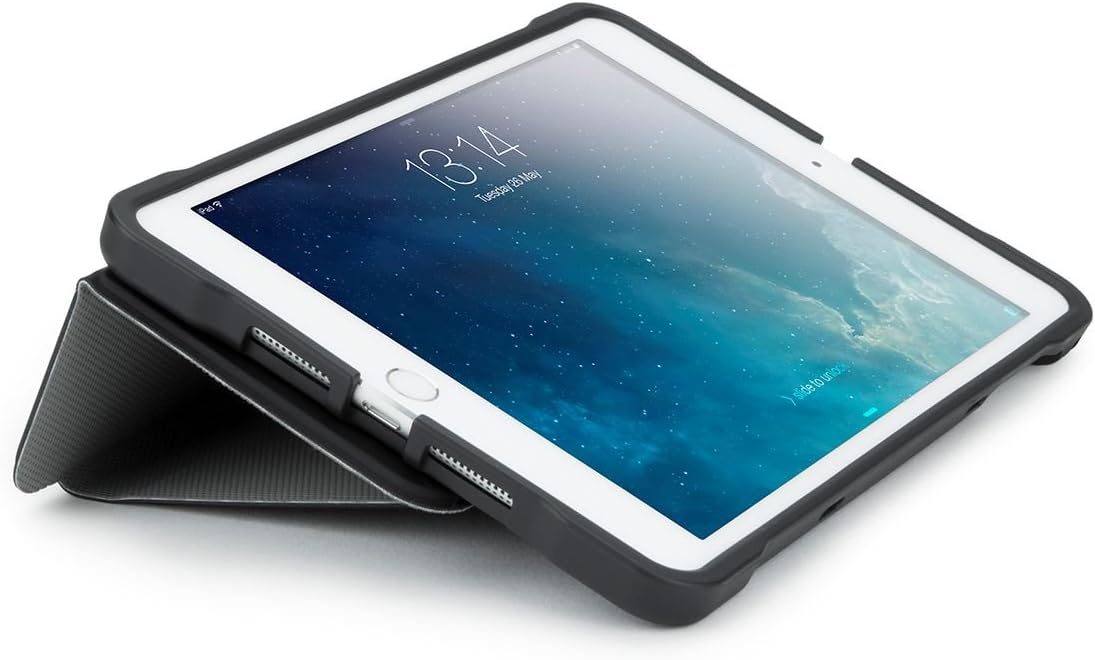
Image: The iPad Mini positioned in the Targus case at a low angle, suitable for comfortable typing.
Sleep/Wake Function:
For iPad Mini 3, 2, and original iPad Mini models, the case supports the automatic sleep/wake function. Opening the cover will wake your iPad, and closing it will put it to sleep, helping to conserve battery life.
Maintenance
To ensure the longevity and appearance of your Targus 3D Protective Case, follow these simple maintenance guidelines:
- Cleaning: Wipe the exterior of the case with a soft, damp cloth. For stubborn dirt, a mild soap solution can be used, followed by wiping with a clean, damp cloth. Avoid harsh chemicals or abrasive cleaners, as these can damage the material.
- Interior: Periodically check the interior tray for any dust or debris that might accumulate. Remove your iPad and gently wipe the interior with a soft, dry cloth.
- Storage: When not in use, store the case in a cool, dry place away from direct sunlight or extreme temperatures.
Troubleshooting
| Problem | Possible Cause | Solution |
|---|---|---|
| iPad does not fit securely in the tray. | Incorrect iPad model or improper installation. | Ensure your iPad is a Mini (1, 2, 3, or 4). Re-insert the iPad, ensuring all corners and edges are fully seated. Apply gentle, even pressure. |
| Sleep/Wake function not working. | Feature not supported by iPad model or iPad settings. | This feature is only compatible with iPad Mini 3, 2, and original iPad Mini. Check your iPad's settings (Settings > Display & Brightness > Lock/Unlock) to ensure the "Lock/Unlock" or "Cover Lock/Unlock" feature is enabled. |
| Case stand is unstable. | Improper positioning or uneven surface. | Ensure the iPad's edge is firmly seated in the textured interior of the cover. Use on a flat, stable surface. |
| Magnetic closure not holding. | Obstruction or misalignment. | Check for any debris between the cover and the iPad. Ensure the cover is aligned correctly when closing. |
Specifications
- Model Number: THZ595GL
- Compatible Devices: iPad Mini 1, iPad Mini 2, iPad Mini 3, iPad Mini 4
- Color: Black
- Material: Flexible tray with semi-rigid exterior
- Protection: Military-grade 4ft. drop testing (MIL-STD 810G)
- Features: Infinite viewing angles, comfortable typing position, precision-cut access to controls/ports/camera, convenient sleep/wake function (for compatible models), secure magnetic wrap closure.
- Item Weight: 8.8 ounces (approx. 249 grams)
- Product Dimensions: 5.8 x 0.6 x 9.39 inches (approx. 14.7 x 1.5 x 23.8 cm)

Image: The rear view of the Targus 3D Protective Case, showcasing its geometric pattern and precise cutouts for the camera and other features.
Warranty Information
Targus products are designed for quality and durability. For specific warranty details regarding your Targus 3D Protective Case and Stand, please refer to the official Targus website or contact Targus customer support. Warranty terms typically cover manufacturing defects and material flaws under normal use.
Keep your purchase receipt as proof of purchase for any warranty claims.
Customer Support
If you encounter any issues or have questions not covered in this manual, please contact Targus customer support for assistance.
- Targus Official Website: www.targus.com
- Refer to the website for contact numbers, email support, and FAQs specific to your region.
