
1. Introduction
Thank you for choosing the Memphis Audio SE2000.1V2 Street Edge Monoblock Amplifier. This manual provides detailed instructions for the proper installation, operation, and maintenance of your amplifier. Please read this manual thoroughly before attempting installation or operation to ensure optimal performance and safety.
2. Safety Information
Important Safety Instructions:
- Always have a qualified professional install car audio equipment.
- Disconnect the vehicle's negative battery terminal before starting any installation.
- Ensure all wiring is properly routed and secured to prevent damage or short circuits.
- Use appropriate gauge power and ground wires as specified in this manual.
- Do not mount the amplifier in areas exposed to direct sunlight, excessive heat, moisture, or dust.
- Never operate the amplifier if it is damaged or malfunctioning. Refer to the troubleshooting section or contact support.
3. Package Contents
Verify that your package contains the following items:
- Memphis Audio SE2000.1V2 Monoblock Amplifier unit
- Mounting hardware (screws, brackets)
- Remote Bass Knob (for MONO models)
- User Manual
4. Product Features
The Memphis Audio SE2000.1V2 amplifier includes the following key features:
- Subsonic Filter: Protects subwoofers from damaging ultra-low frequencies.
- Remote Bass Knob: Allows for convenient adjustment of bass levels from the driver's seat.
- Variable Crossovers: Provides flexibility in tuning the amplifier's frequency response.
- Extruded Aluminum Heatsink: Efficiently dissipates heat for reliable performance.

An angled view of the Memphis Audio SE2000.1V2 amplifier, showcasing its compact design and the layout of its input/output and power connection panels.
5. Installation and Setup
5.1. Mounting the Amplifier
Choose a mounting location that is dry, well-ventilated, and away from direct heat sources. Ensure sufficient airflow around the heatsink for proper cooling. Secure the amplifier firmly using the provided mounting hardware to prevent movement during vehicle operation.
5.2. Wiring Connections
Proper wiring is crucial for amplifier performance and safety. Refer to the diagram below for connection points.
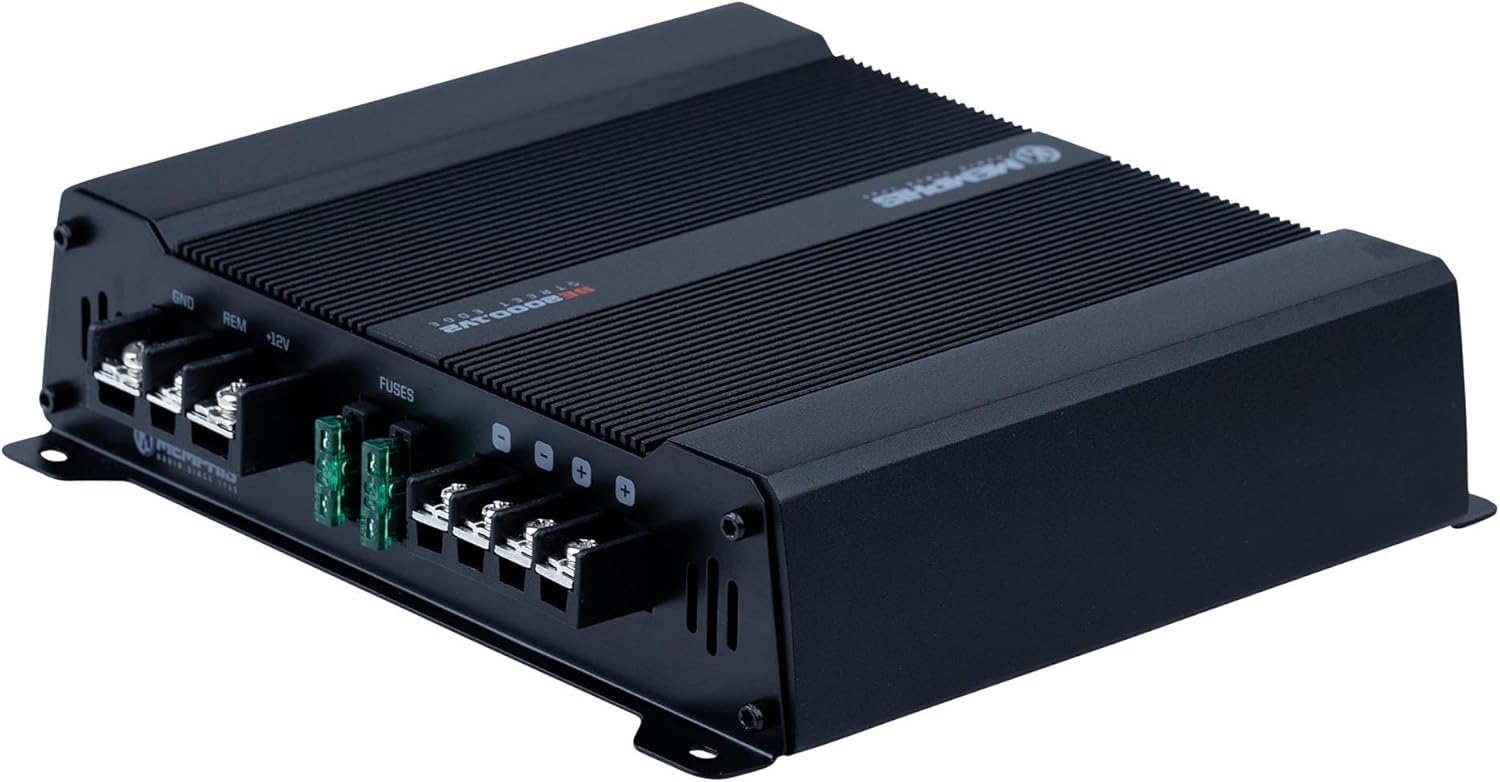
View of the amplifier's rear panel, showing the power input terminals (GND, REM, +12V), fuse slots, and speaker output terminals for connection.
- Power (+12V): Connect a direct wire from the vehicle's positive battery terminal to the +12V terminal on the amplifier. An inline fuse (not supplied) must be installed within 18 inches of the battery.
- Ground (GND): Connect a short wire (less than 3 feet) from the GND terminal to a clean, unpainted metal surface on the vehicle's chassis. Ensure a solid, low-resistance connection.
- Remote (REM): Connect a wire from the head unit's remote turn-on output to the REM terminal. This turns the amplifier on and off with the head unit.
- Speaker Output: Connect your subwoofer(s) to the speaker output terminals. Observe correct polarity (+ to + and - to -). This is a monoblock amplifier, designed for a single channel output.
- RCA Input: Connect the RCA cables from your head unit's subwoofer output to the amplifier's RCA input jacks.
6. Operating Instructions
Once all connections are securely made and verified, turn on your vehicle's ignition and head unit. The amplifier should power on, indicated by a status LED. If the amplifier does not power on, refer to the troubleshooting section.
7. Controls and Adjustments
The SE2000.1V2 amplifier features several controls to fine-tune your audio system. Adjust these settings carefully to achieve optimal sound quality.

Close-up view of the amplifier's front panel, detailing the RCA input/output connections, and control knobs for Gain, Bass Boost, LPF, Subsonic Filter, Phase Shift, and the Remote Bass Knob port.
- GAIN: This control matches the amplifier's input sensitivity to the output of your head unit. Start with the gain at minimum and slowly increase it until you hear distortion, then back off slightly.
- BASS BOOST: Adjusts the bass level at a specific frequency. Use sparingly to avoid distortion and speaker damage.
- LPF (Low Pass Filter): Sets the upper frequency limit for the amplifier. Frequencies above this setting will be attenuated. Typically set between 80Hz and 120Hz for subwoofers.
- SUB SONIC: A high-pass filter for subwoofers, removing ultra-low frequencies that are inaudible and can damage subwoofers. Set below the LPF setting, typically between 20Hz and 30Hz.
- PHASE SHIFT: Adjusts the phase of the subwoofer output relative to the main speakers (0° to 180°). This helps to blend the subwoofer output seamlessly with the rest of the audio system.
- REMOTE: Port for connecting the optional remote bass knob, allowing for convenient bass level adjustment.
8. Troubleshooting
If you experience issues with your amplifier, consult the following table before contacting technical support:
| Problem | Possible Cause | Solution |
|---|---|---|
| No Power | Blown fuse, poor power/ground connection, no remote signal. | Check amplifier fuses and inline battery fuse. Verify +12V, GND, and REM connections. |
| No Sound Output | RCA cables disconnected, speaker wires shorted or disconnected, gain too low. | Check RCA connections. Inspect speaker wiring for shorts or breaks. Increase gain setting. |
| Distorted Sound | Gain set too high, damaged speaker, improper crossover settings. | Reduce gain. Check speaker for damage. Adjust LPF and Subsonic settings. |
| Amplifier Overheats | Insufficient ventilation, impedance too low, prolonged high output. | Ensure proper airflow around amplifier. Verify speaker impedance matches amplifier's capabilities. Reduce volume or output. |
9. Specifications
Technical specifications for the Memphis Audio SE2000.1V2 Monoblock Amplifier:
| Specification | Value |
|---|---|
| Model Number | SE2000.1V2 |
| Brand | Memphis |
| Number of Channels | 1 (Monoblock) |
| Output Power | 800 Watts (Peak, specific @ 1 ohm not detailed in specs) |
| Voltage | 8 Volts (Minimum Operating) |
| Maximum Supply Voltage | 8 Volts (This seems to be a misinterpretation of typical 12V car systems, likely a minimum operating voltage or a data entry error. Standard car audio operates at 12-14.4V.) |
| Mounting Type | Freestanding |
| Specification Met | FCC |
| UPC | 702588006015 |
| Package Dimensions | 10.9 x 9.5 x 3.1 inches |
| Item Weight | 4.3 pounds |
| Date First Available | December 25, 2015 |
10. Maintenance
The Memphis Audio SE2000.1V2 amplifier requires minimal maintenance. Keep the amplifier clean and free of dust and debris. Periodically check all wiring connections to ensure they remain secure. Do not use harsh chemicals or abrasive cleaners on the amplifier's surface.
11. Warranty and Support
For warranty information and technical support, please refer to the warranty card included with your product or visit the official Memphis Audio website. Keep your purchase receipt as proof of purchase for any warranty claims.


