
1. Introduction
Thank you for choosing the Techwood TAB-886 Stick Vacuum Cleaner. This manual provides detailed instructions for the safe and efficient use, maintenance, and troubleshooting of your appliance. Please read this manual thoroughly before first use and keep it for future reference.
The Techwood TAB-886 is a versatile 2-in-1 stick vacuum cleaner designed for effective cleaning of various surfaces. It features cyclonic suction, a permanent dust bin, and a HEPA filter for improved air quality.
2. Safety Instructions
To reduce the risk of fire, electric shock, or injury, always follow basic safety precautions when using an electrical appliance.
- Read all instructions before using the appliance.
- Do not use outdoors or on wet surfaces. This vacuum cleaner is for dry use only.
- Do not allow to be used as a toy. Close attention is necessary when used by or near children.
- Use only as described in this manual. Use only manufacturer's recommended attachments.
- Do not use with a damaged cord or plug. If the appliance is not working as it should, has been dropped, damaged, left outdoors, or dropped into water, return it to a service center.
- Do not pull or carry by cord, use cord as a handle, close a door on cord, or pull cord around sharp edges or corners. Do not run appliance over cord. Keep cord away from heated surfaces.
- Do not unplug by pulling on cord. To unplug, grasp the plug, not the cord.
- Do not handle plug or appliance with wet hands.
- Do not put any object into openings. Do not use with any opening blocked; keep free of dust, lint, hair, and anything that may reduce airflow.
- Keep hair, loose clothing, fingers, and all parts of body away from openings and moving parts.
- Do not pick up anything that is burning or smoking, such as cigarettes, matches, or hot ashes.
- Do not pick up flammable or combustible liquids, such as gasoline, or use in areas where they may be present.
- Do not pick up toxic material (e.g., chlorine bleach, ammonia, drain cleaner).
- Do not use without dust bin and/or filters in place.
- Turn off all controls before unplugging.
- Use extra care when cleaning on stairs.
- Store the appliance indoors in a cool, dry place.
3. Product Overview
The Techwood TAB-886 is a powerful and versatile cleaning tool. Familiarize yourself with its main components and features:
- Cyclonic Suction: Provides strong and consistent cleaning performance.
- Removable Handheld Unit: The central unit detaches for convenient handheld cleaning.
- Permanent Dust Bin: A bagless design with an easy-to-empty dust collection bin.
- HEPA Filter: Captures fine dust and allergens for cleaner exhaust air.
- 600W Power: Ensures effective dirt and debris pickup.
- Large 2-Position Brush: Adjustable brush head for optimal cleaning on different floor types.
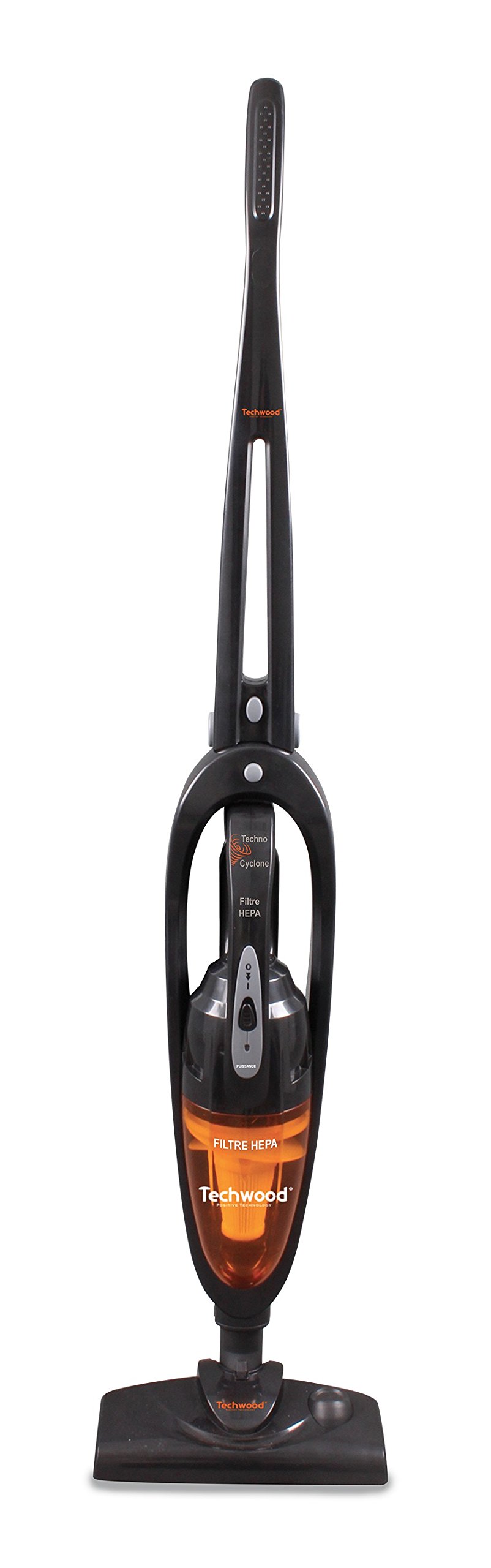
Figure 1: Assembled Techwood TAB-886 Stick Vacuum Cleaner. Shows the main unit, handle, dust bin, and floor brush.

Figure 2: Packaging of the Techwood TAB-886, illustrating its 2-in-1 functionality as a stick vacuum and a detachable handheld unit.
4. Setup
Follow these steps to assemble your Techwood TAB-886 vacuum cleaner:
- Unpack: Carefully remove all components from the packaging. Check that all parts are present and undamaged.
- Assemble the Stick Unit: Insert the handle into the main motor unit until it clicks securely into place.
- Attach the Floor Brush: Connect the floor brush to the bottom of the main motor unit. Ensure it is firmly attached.
- Check Dust Bin and Filter: Verify that the permanent dust bin and HEPA filter are correctly installed within the main unit.
- Power Connection: Connect the power cord to a standard 240V electrical outlet. Ensure the cord is not tangled or obstructed.
Your vacuum cleaner is now ready for use. To use as a handheld vacuum, simply detach the main motor unit from the handle and floor brush.
5. Operating Instructions
Operating your Techwood TAB-886 is straightforward:
- Power On/Off: Plug the vacuum cleaner into an electrical outlet. Press the power button located on the main unit to turn the appliance on. Press it again to turn it off.
- Adjusting the Floor Brush: The large floor brush has 2 positions. Adjust it according to the surface you are cleaning. Use the appropriate setting for carpets or hard floors.
- Stick Vacuum Mode: Use the assembled unit for cleaning floors, carpets, and larger areas. Guide the vacuum cleaner across the surface, ensuring the brush makes contact.
- Handheld Vacuum Mode: To use the handheld unit, detach the main motor unit from the handle and floor brush. This mode is ideal for cleaning furniture, car interiors, stairs, or hard-to-reach areas.
- Emptying the Dust Bin: For optimal performance, regularly empty the permanent dust bin after each use or when it reaches its maximum capacity. Refer to the Maintenance section for detailed instructions.
Important: This vacuum cleaner is designed for dry vacuuming only. Do not attempt to vacuum liquids or wet debris.
6. Maintenance
Regular maintenance ensures the longevity and optimal performance of your Techwood TAB-886.
6.1 Emptying the Dust Bin
- Ensure the vacuum cleaner is unplugged from the power outlet.
- Locate the dust bin release button on the main unit. Press it to detach the dust bin.
- Hold the dust bin over a waste receptacle and open the bottom flap to empty the contents.
- Close the flap securely and reattach the dust bin to the main unit until it clicks into place.
6.2 Cleaning the HEPA Filter
The HEPA filter should be cleaned periodically, depending on usage, to maintain suction power.
- Unplug the vacuum cleaner and remove the dust bin as described above.
- Carefully remove the HEPA filter from the dust bin.
- Tap the filter gently over a waste bin to remove loose dust and debris.
- If heavily soiled, the filter can be rinsed under cold running water. Do not use detergents or hot water.
- Allow the filter to air dry completely for at least 24 hours before reinserting. Do not use the vacuum cleaner with a wet filter.
- Once dry, place the filter back into the dust bin and reattach the dust bin to the main unit.
6.3 Cleaning the Brush Head
- Ensure the vacuum cleaner is unplugged.
- Turn the floor brush upside down.
- Use scissors or a brush to remove any tangled hair, threads, or debris from the brush roll.
- Ensure the brush roll spins freely.
6.4 General Cleaning
Wipe the exterior surfaces of the vacuum cleaner with a soft, damp cloth. Do not use abrasive cleaners, solvents, or harsh chemicals.
7. Troubleshooting
If you encounter issues with your Techwood TAB-886, refer to the following table for common problems and solutions:
| Problem | Possible Cause | Solution |
|---|---|---|
| Vacuum cleaner does not turn on. | No power supply. | Check if the power cord is securely plugged into a working outlet. Test the outlet with another appliance. |
| Low suction power. | Dust bin is full. | Empty the dust bin. |
| Low suction power. | HEPA filter is clogged. | Clean or replace the HEPA filter. Ensure it is completely dry before reinserting. |
| Low suction power. | Blockage in the hose or brush head. | Turn off and unplug the vacuum. Inspect the hose and brush head for any obstructions and remove them. |
| Unusual noise during operation. | Foreign object caught in the brush roll or air path. | Turn off and unplug the vacuum. Inspect the brush roll and air path for any foreign objects and remove them. |
If the problem persists after attempting these solutions, please contact Techwood customer support.
8. Specifications
| Feature | Specification |
|---|---|
| Model Number | TAB-886 |
| Brand | Techwood |
| Power | 600 Watts |
| Voltage | 240 Volts |
| Suction Pressure | 14 Kpa |
| Airflow | 20 L/s |
| Filter Type | HEPA (Cartridge) |
| Dust Bin | Permanent |
| Noise Level | 79 Decibels |
| Product Weight | 4 Kilograms |
| Cordless | No |
9. Warranty and Support
The Techwood TAB-886 Stick Vacuum Cleaner comes with a 1-year manufacturer's warranty from the date of purchase. This warranty covers manufacturing defects under normal use conditions.
For technical assistance, spare parts, warranty claims, or any other inquiries, please contact Techwood customer service. Please have your model number (TAB-886) and proof of purchase ready when contacting support.
You can find more information and support resources by visiting the official Techwood store: Techwood Official Store


