
Vamav VM 223BT
VAMAV VM 223BT Radio User Manual
Model: VM 223BT
Introduction
Welcome to the user manual for your VAMAV VM 223BT Radio. This guide provides comprehensive instructions to help you set up, operate, and maintain your device, ensuring optimal performance and longevity. Please read this manual thoroughly before using the product.
Important Safety Information
- Do not expose the device to rain, moisture, or extreme temperatures.
- Avoid placing the device near heat sources such as radiators, heat registers, stoves, or other apparatus (including amplifiers) that produce heat.
- Do not block any ventilation openings. Install in accordance with the manufacturer's instructions.
- Protect the power cord from being walked on or pinched, particularly at plugs, convenience receptacles, and the point where they exit from the apparatus.
- Only use attachments/accessories specified by the manufacturer.
- Unplug this apparatus during lightning storms or when unused for long periods of time.
- Refer all servicing to qualified service personnel. Servicing is required when the apparatus has been damaged in any way.
Package Contents
Please check the box for the following items:
- VAMAV VM 223BT Radio Unit
- Power Cable
- User Manual (this document)
Product Overview
Familiarize yourself with the components of your VAMAV VM 223BT Radio.

Figure 1: Front View. This image displays the front of the VAMAV VM 223BT Radio, highlighting its two prominent speaker cones and the integrated carrying handle at the top. The design features vibrant colors and graphic elements.
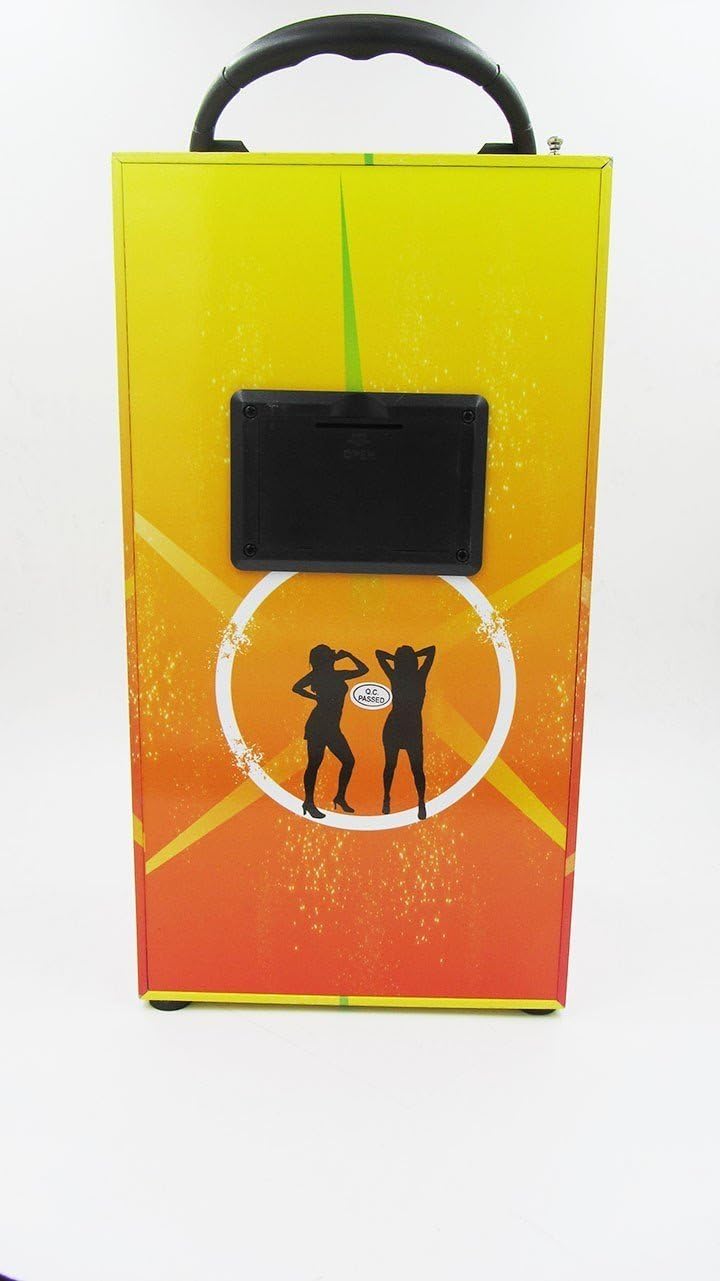
Figure 2: Back View. This image shows the rear side of the VAMAV VM 223BT Radio. A black panel is visible, which typically houses various ports and controls such as USB input, power input, and potentially an SD card slot.

Figure 3: Angled View. This image provides an angled perspective of the VAMAV VM 223BT Radio, showcasing both the front with its speakers and a side panel. The carrying handle is clearly visible at the top, emphasizing its portability.
Setup
Powering On
- Connect the power cable to the power input port on the back of the VM 223BT Radio.
- Plug the other end of the power cable into a standard electrical outlet.
- Locate the power button, typically on the back or top panel, and press it to turn on the device.
Initial Connection
Upon first power-on, the device may automatically enter Bluetooth pairing mode or a default mode (e.g., FM Radio). Refer to the operating instructions for specific mode selection.
Operating Instructions
Bluetooth Mode
- Ensure the VM 223BT Radio is powered on.
- Press the 'Mode' button (if available) until the display indicates 'Bluetooth' or a Bluetooth icon flashes.
- On your mobile device (smartphone, tablet, etc.), enable Bluetooth and search for available devices.
- Select 'VAMAV VM 223BT' from the list of found devices.
- Once paired, the device will confirm the connection, and you can now play audio wirelessly from your mobile device.
MP3 Playback (USB/SD)
- Insert a USB flash drive or an SD card (with MP3 files) into the corresponding port on the VM 223BT Radio.
- The device should automatically detect the storage and switch to MP3 playback mode. If not, press the 'Mode' button to select 'USB' or 'SD' mode.
- Use the 'Play/Pause', 'Next', and 'Previous' buttons to control playback.
Radio Mode (FM)
- Ensure the VM 223BT Radio is powered on.
- Press the 'Mode' button until 'FM' or 'Radio' is displayed.
- To auto-scan and save stations, press and hold the 'Play/Pause' button. The radio will scan and store available FM stations.
- Use the 'Next' and 'Previous' buttons to navigate through the saved stations.
Maintenance
- Cleaning: Use a soft, dry cloth to clean the exterior of the device. Do not use liquid cleaners or aerosol sprays.
- Storage: When not in use for extended periods, store the radio in a cool, dry place away from direct sunlight and extreme temperatures.
- Battery Care (if applicable): If your model has a rechargeable battery, avoid fully discharging it frequently to prolong its lifespan.
Troubleshooting
| Problem | Solution |
|---|---|
| Device does not power on. | Ensure the power cable is securely connected to both the device and a working power outlet. Check if the power outlet is active. |
| Cannot pair with Bluetooth device. | Make sure the VM 223BT is in Bluetooth pairing mode. Ensure your mobile device's Bluetooth is enabled and within range. Try restarting both devices. |
| No sound from speakers. | Check the volume level on both the radio and your connected device. Ensure the correct input mode (Bluetooth, USB, FM) is selected. |
| USB/SD card not recognized. | Ensure the USB drive or SD card is inserted correctly. Verify that the audio files are in a compatible format (e.g., MP3). Try a different USB drive or SD card. |
Specifications
| Feature | Detail |
|---|---|
| Brand | Vamav |
| Model | VM 223BT |
| Special Functions | MP3 Playback, Bluetooth Connectivity |
| Connectivity Technology | USB |
| Hardware Interface | USB |
| ASIN | B013QBU8UQ |
| Global Trade Identification Number | 08435388099629 |
Warranty and Support
For warranty information and technical support, please refer to the documentation provided with your purchase or contact VAMAV customer service directly. Keep your proof of purchase for any warranty claims.
Related documentsVM 223BT


Ask a question about this manual
Ask about setup, troubleshooting, compatibility, parts, safety, or missing instructions. Manuals+ will review the question and use this page’s manual context to help answer it.