Introduction
The Polk Audio T50 Floor Standing Tower Speaker is engineered to deliver powerful, high-performance sound for both home theater and stereo applications. Featuring Polk's Dynamic Balance technology, a 1-inch silk dome tweeter, a 6.25-inch composite driver, and two front-firing sub-bass radiators, the T50 provides crisp highs, detailed mids, and deep, impactful bass. It is designed to integrate seamlessly into most home theater receivers and stereos, supporting Dolby and DTS for an immersive audio experience.
What's in the Box
- 1 x Polk Audio T50 Tower Speaker
- 1 x Speaker Grille
- Warranty Registration Card
Setup
Setting up your Polk Audio T50 Tower Speaker is designed to be straightforward. Follow these steps for optimal performance:
- Placement: Position the tower speakers in your listening area, ensuring they are equidistant from your primary listening position for a balanced soundstage. For home theater setups, place them to the left and right of your television or projection screen.
- Connections: Connect the speaker wire from your AV receiver or stereo amplifier to the 5-way binding posts on the back of the T50 speaker. Ensure correct polarity (positive to positive, negative to negative) for optimal sound reproduction.
- Grille Attachment: The speaker grille can be attached magnetically to the front of the speaker for protection and aesthetic preference.
- System Integration: The T50 speakers are timbre-matched with other Polk T-Series speakers, allowing for seamless integration into a larger surround sound system (e.g., with T15 surrounds and a T30 center channel).
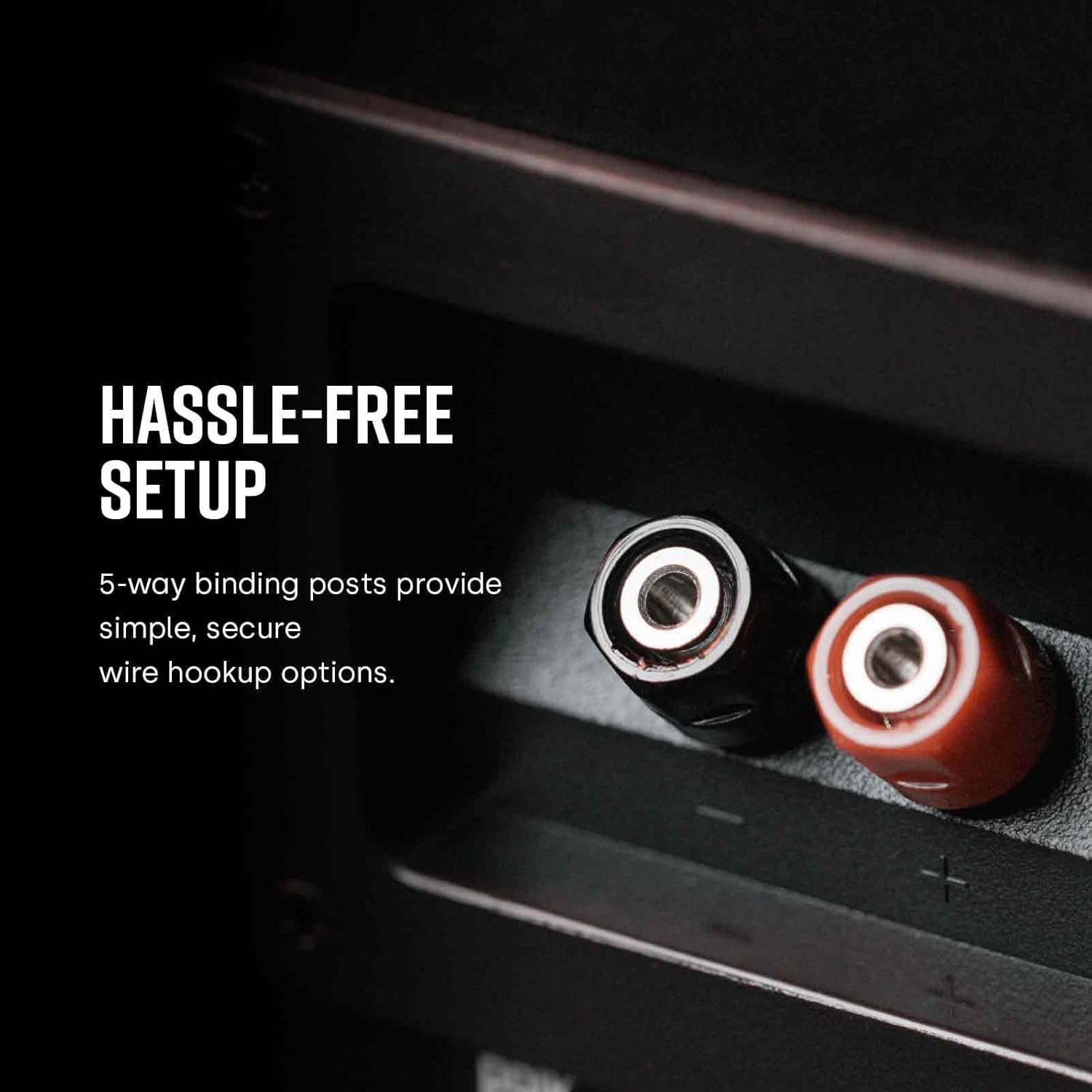
Figure 1: Rear view of the Polk Audio T50 speaker showing the 5-way binding posts for easy and secure wire hookup.

Figure 2: Example placement of two Polk Audio T50 tower speakers in a home theater setup, demonstrating seamless sound integration.
Video 1: An overview of the Polk T-Series speakers, highlighting their design and features for home audio setups.
Operating
Once properly connected, your Polk Audio T50 speakers will operate in conjunction with your audio receiver or amplifier. Ensure your receiver is powered on and set to the correct input source. Adjust volume levels on your receiver. The T50 speakers are designed to reproduce a wide range of frequencies, providing clear audio for movies, music, and games.

Figure 3: The Polk Audio T50 speaker integrated into a home audio environment, ready for use.
Maintenance
To ensure the longevity and optimal performance of your Polk Audio T50 speakers, follow these simple maintenance guidelines:
- Cleaning: Gently wipe the speaker cabinets with a soft, dry cloth. Avoid using harsh chemicals or abrasive cleaners, which can damage the finish.
- Grille Care: The speaker grilles can be carefully removed and dusted. If necessary, they can be gently vacuumed with a soft brush attachment.
- Environment: Place speakers in a stable location away from direct sunlight, excessive heat, moisture, or extreme temperature changes. Ensure adequate ventilation around the speakers.
- Connections: Periodically check speaker wire connections to ensure they are secure and free from corrosion.
Troubleshooting
If you encounter issues with your Polk Audio T50 speakers, consider the following common troubleshooting steps:
- No Sound:
- Verify that your AV receiver or amplifier is powered on and the correct input source is selected.
- Check all speaker wire connections at both the speaker and the receiver for proper polarity and secure contact.
- Ensure the volume on your receiver is not muted or set too low.
- Distorted Sound:
- Reduce the volume level on your receiver.
- Check speaker wire connections for any loose strands that might be touching each other or the wrong terminal.
- Ensure your receiver's impedance settings match the speaker's impedance (6 Ohms).
- Uneven Sound:
- Confirm that both speakers are connected with correct polarity.
- Check speaker placement to ensure they are symmetrically positioned relative to your listening area.
- Adjust the balance settings on your AV receiver.
Specifications
| Feature | Specification |
|---|---|
| Mounting Type | Floor Standing |
| Material | Wood |
| Model Name | T50 |
| Speaker Type | Tower |
| Special Feature | Hi-Res Audio, Multi-Room Audio |
| Recommended Uses | For Surround Sound Systems |
| Compatible Devices | Most Home Theater AV Receivers |
| Subwoofer Diameter | 6.5 Inches |
| Unit Count | 1.0 Count |
| Surround Sound Channel Configuration | 2.1, 5.1 |
| Color | Black |
| Product Dimensions | 7.75"D x 8.75"W x 36.25"H |
| Item Weight | 20.35 Pounds |
| Impedance | 6 Ohms |
| Maximum Range | 7 Meters |
| Control Method | Touch |
| Speaker Size | 6.5 Inches |
| Power Source | Corded Electric |
| Woofer Diameter | 6 Inches |
| Tweeter Diameter | 1 Inches |
| Audio Driver Type | Dynamic Driver |
| Audio Driver Size | 6.25 Inches |
| Speaker Maximum Output Power | 150 Watts |
| Frequency Response | 24000 Hz |
| Connectivity Technology | Wired |
| Audio Output Mode | Surround |

Figure 4: Detailed dimensions of the Polk Audio T50 Floor Standing Tower Speaker.
Warranty
The Polk Audio T50 Floor Standing Tower Speaker comes with a Full Warranty. Please refer to the included Warranty Registration Card for specific terms, conditions, and registration details. Retain your proof of purchase for any warranty claims.
Support
For further assistance, technical support, or service inquiries regarding your Polk Audio T50 speakers, please visit the official Polk Audio website or contact their customer service department. You can find contact information on the Warranty Registration Card or the brand's official website.


