
Crenova PT100A
Crenova PT100A 720P HD WIFI Surveillance IP Camera User Manual
Model: PT100A | Brand: Crenova
1. Introduction
The Crenova PT100A is a 720P HD WIFI Surveillance IP Camera designed for home security and monitoring. It features Pan-Tilt-Zoom (PTZ) capabilities, night vision, two-way audio, and support for wireless alarm sensors, providing comprehensive surveillance and communication functionalities.
This manual provides detailed instructions for setting up, operating, and maintaining your Crenova PT100A camera to ensure optimal performance and security.
2. Key Features
- One-Key Wi-Fi Configuration: Simple and quick setup via sound.
- HD Resolution: 720P resolution with a 1.0 MP CMOS sensor for clear images and video.
- Night Vision: Ceramic infrared light provides optimal visibility in low-light conditions.
- PTZ Control: Pan 355 degrees horizontally and tilt 120 degrees vertically for wide area coverage.
- Security Alerts: Supports up to 64 wireless alarm sensors, with siren, mobile phone calls, and email photo alerts.
- Two-Way Audio: Real-time communication with the monitored area.
- Local Storage: Supports up to a 128GB TF card for continuous recording.
3. Package Contents
Please verify that all items are present in your package:
- 1 x Crenova Smart IP Camera (PT100A)
- 1 x USB Cable
- 1 x Power Adapter
- 1 x Mounting Basket Panel
- 1 x User Manual
4. Product Overview

Image 4.1: Diagram of the Crenova PT100A IP Camera with its main components labeled. This includes the lens, ceramic lamp, speaker, antenna, network cable interface, TF card slot, reset button, and power interface.
Familiarize yourself with the camera's components:
- Lens: Captures video and images.
- Ceramic Lamp: Provides infrared illumination for night vision.
- Speaker: Outputs audio for two-way communication and alarm siren.
- Antenna: For Wi-Fi connectivity.
- PT (Pan/Tilt) Mechanism: Allows remote adjustment of camera angle.
- Network Cable Interface: For wired Ethernet connection (optional).
- TF Card Slot: Insert a MicroSD card for local video storage.
- Reset Button: Used to restore factory settings.
- Power Interface: Connects to the power adapter.
5. Setup Guide
Follow these steps to set up your Crenova PT100A IP Camera:

Image 5.1: Visual guide for the quick setup process, illustrating connecting power, downloading the app, performing one-key Wi-Fi setup, and adding the camera.
- Connect Power: Plug the power adapter into the camera's power interface and then into a wall outlet. The camera will power on and initiate its startup sequence.
- Download the App: Search for the official Crenova camera application on your smartphone's app store (e.g., Apple App Store for iOS or Google Play Store for Android). Download and install the application.
- Register an Account: Open the app and follow the on-screen instructions to register a new user account.
- One-Key Wi-Fi Setup: Within the app, select the option for 'One-Key Wi-Fi Configuration' or 'SmartLink'. Follow the prompts to connect the camera to your Wi-Fi network. Ensure your smartphone is connected to the same 2.4GHz Wi-Fi network you intend to use for the camera. The app will use sound waves to transmit network information to the camera.
- Add Camera: Once the Wi-Fi setup is complete, the app will guide you to add the camera to your account. You may need to scan a QR code on the camera or manually enter its ID.
- Placement: Position the camera in your desired monitoring area. The included mounting basket panel can be used for wall or ceiling installation.
6. Operating Instructions
6.1. Remote Viewing and PTZ Control
After successful setup, open the app on your smartphone to view the live feed from your camera. Use the on-screen controls to remotely pan (horizontal rotation) and tilt (vertical rotation) the camera lens.

Image 6.1: Illustration of the camera's Pan-Tilt-Zoom (PTZ) capabilities, demonstrating 355 degrees of horizontal rotation and 120 degrees of vertical rotation for comprehensive area coverage.
- Horizontal Rotation: The camera supports 355 degrees of horizontal movement.
- Vertical Rotation: The camera supports 120 degrees of vertical movement.
6.2. Motion Detection and Alarm Alerts
The camera can detect motion and trigger various alarm responses. Configure these settings within the camera app.

Image 6.2: A smartphone displaying a motion detection alarm notification from the camera, indicating an event has occurred.
- Alarm Sensor Support: The camera can integrate with up to 64 wireless alarm sensors.
- Alarm Methods: When an alarm is triggered, the camera can:
- Emit a loud siren.
- Call up to five pre-configured mobile phone numbers.
- Capture photos and send them via email.
6.3. Two-Way Audio
Utilize the built-in microphone and speaker for real-time two-way communication.

Image 6.3: The camera depicted alongside an icon representing two-way audio functionality, with sound waves indicating active communication.
- Tap the microphone icon in the app to speak through the camera's speaker.
- The camera's microphone will pick up audio from the monitored area.
6.4. Video Recording
The camera supports local video recording to a TF (MicroSD) card.
- Insert a TF card (up to 128GB) into the designated slot on the camera.
- Configure recording settings (e.g., continuous recording, motion-activated recording) within the camera app.
- Footage can be reviewed directly from the app.
7. Specifications
| Feature | Specification |
|---|---|
| Model | PT100A |
| Image Sensor | 1.0 MP HD CMOS Sensor |
| Resolution | 720P (1280 x 720) |
| Connectivity | Wi-Fi (Wireless), Wired Ethernet |
| PTZ Angles | Pan 355°, Tilt 120° |
| Night Vision | Ceramic Infrared Light |
| Storage | Supports up to 128GB TF Card |
| Alarm Sensor Support | Up to 64 wireless channels |
| Power Source | Cable eléctrico (Power Cable) |
| Dimensions (L x W x H) | 20.57 x 15.49 x 13.21 cm (approx. 8.1 x 6.1 x 5.2 inches) |
| Weight | 657.7 g (approx. 1.45 lbs) |
| Certifications | CE, FCC, ROHS |
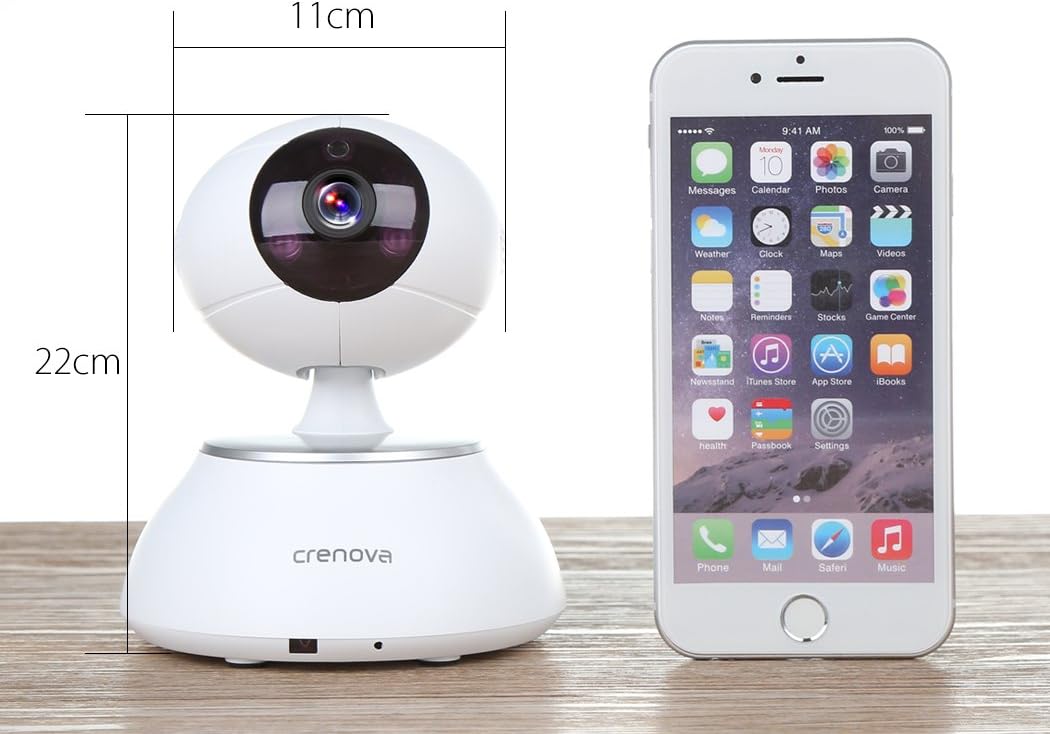
Image 7.1: The Crenova PT100A IP Camera shown next to a smartphone, with its approximate dimensions indicated as 11cm in width and 22cm in height.
8. Maintenance
- Cleaning: Use a soft, dry cloth to clean the camera's exterior. Do not use liquid cleaners or aerosols directly on the camera.
- Lens Care: Gently wipe the lens with a microfiber cloth designed for optics to avoid scratches.
- Placement: Ensure the camera is placed in a stable location, away from direct sunlight, extreme temperatures, and high humidity.
- Firmware Updates: Periodically check the camera app for available firmware updates to ensure optimal performance and security.
9. Troubleshooting
- Camera Not Connecting to Wi-Fi:
- Ensure your Wi-Fi network is 2.4GHz. The camera may not support 5GHz networks.
- Verify the Wi-Fi password is entered correctly in the app.
- Move the camera closer to your Wi-Fi router.
- Reset the camera using the reset button and attempt setup again.
- Poor Image Quality:
- Check your internet connection speed. A slow connection can affect streaming quality.
- Clean the camera lens for any smudges or dust.
- Ensure adequate lighting in the monitored area, especially for optimal night vision performance.
- No Alarm Alerts:
- Verify motion detection and alarm settings are enabled in the app.
- Check app notification settings on your smartphone to ensure alerts are not blocked.
- Ensure wireless alarm sensors (if used) are properly paired and functioning.
- Two-Way Audio Not Working:
- Check microphone and speaker permissions for the app on your smartphone.
- Ensure the volume on your smartphone and within the app is turned up.
- Verify there are no obstructions blocking the camera's microphone or speaker.
10. Warranty and Support
For warranty information and technical support, please refer to the documentation included with your purchase or contact Crenova customer service directly. Details for contacting support are typically available on the manufacturer's official website or within the product packaging.
Ask a question about this manual
Ask about setup, troubleshooting, compatibility, parts, safety, or missing instructions. Manuals+ will review the question and use this page’s manual context to help answer it.