
Introduction
This manual provides essential instructions for the safe and efficient operation, installation, and maintenance of your Sharp R-94A0(ST)V Microwave Oven. Please read this manual thoroughly before using the appliance and retain it for future reference.
The Sharp R-94A0(ST)V is a versatile microwave oven featuring microwave, grill, and convection cooking functions. It has a 42-liter capacity and offers 10 auto-cook menus, time and weight defrost, a child lock function, and an additional 30-second function for convenience.
Important Safety Instructions
When using electrical appliances, basic safety precautions should be followed, including the following:
- Read all instructions before using the appliance.
- Do not operate the oven if it has a damaged cord or plug, if it is not working properly, or if it has been damaged or dropped.
- Do not heat liquids or other foods in sealed containers as they are liable to explode.
- Only allow children to use the oven without supervision when adequate instructions have been given so that the child is able to use the oven in a safe way and understands the hazards of improper use.
- Do not use corrosive chemicals or vapors in this appliance.
- Do not use this oven for commercial purposes. It is intended for household use only.
- Always ensure the turntable and turntable support are correctly positioned before operation.
- Do not attempt to tamper with, or make adjustments or repairs to the door, control panel, safety interlock switches or any other part of the oven.
Setup and Installation
Unpacking
Carefully remove the microwave oven from its packaging. Remove all packing materials, including any protective film or tape from the oven surfaces. Check the oven for any damage, such as dents or a misaligned door. If any damage is observed, do not operate the oven and contact your dealer.
Placement
Place the oven on a flat, stable surface that can support its weight and the heaviest food item likely to be cooked in it. Ensure there is adequate ventilation around the oven. Maintain a minimum clearance of 20 cm (8 inches) above the oven, 10 cm (4 inches) at the rear, and 5 cm (2 inches) on the sides.
Do not place the oven near heat sources such as a conventional oven or radiator, or in a damp area like near a sink. Avoid placing it where it might be exposed to direct sunlight.
Electrical Connection
Ensure the voltage specified on the rating label matches your local power supply. The oven operates on 220 Volts. Plug the oven into a properly grounded wall outlet. Do not use extension cords or multiple outlet adapters.
Operating Instructions
The Sharp R-94A0(ST)V features a dial for human interface input and an LED display for settings and time.
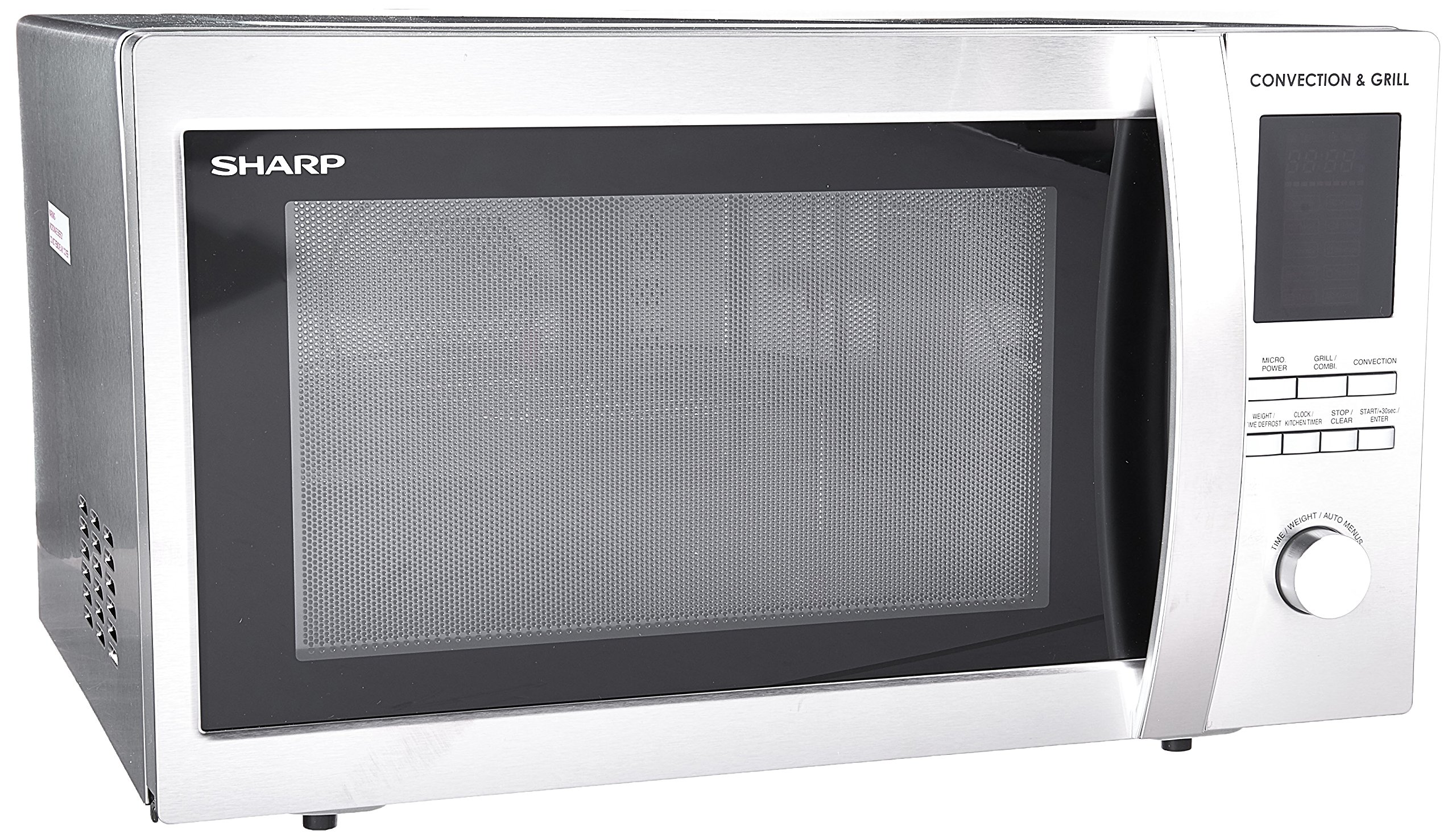
Image: Front view of the Sharp R-94A0(ST)V Microwave Oven, showing the control panel with LED display, buttons for various functions (Micro Power, Grill/Combi, Convection, Weight/Time Defrost, Clock/Kitchen Timer, Stop/Clear, Start/+30sec/Enter), and the main dial for time/weight/auto menus. The oven door is on the left.
Setting the Clock
- Press the CLOCK/KITCHEN TIMER button once.
- Turn the dial to set the hour.
- Press the CLOCK/KITCHEN TIMER button again.
- Turn the dial to set the minutes.
- Press the START/+30SEC/ENTER button to confirm.
Microwave Cooking (1000W)
- Place food in a microwave-safe container on the turntable. Close the door.
- Press the MICRO POWER button repeatedly to select the desired power level (e.g., 100% for 1000W).
- Turn the dial to set the cooking time.
- Press the START/+30SEC/ENTER button to begin cooking.
Grill Cooking (1400W)
- Place food on the grill rack (if provided) in the oven. Close the door.
- Press the GRILL/COMBI button once for grill mode.
- Turn the dial to set the grilling time.
- Press the START/+30SEC/ENTER button to begin grilling.
Convection Cooking (2800W)
- Place food in an oven-safe dish. Close the door.
- Press the CONVECTION button.
- Turn the dial to set the desired temperature.
- Press START/+30SEC/ENTER to preheat. The oven will beep when preheating is complete.
- Place food inside and turn the dial to set the cooking time.
- Press START/+30SEC/ENTER to start cooking.
Auto-Cook Menus (10 Menus)
The oven has 10 pre-programmed auto-cook menus for various food types. Refer to the internal oven sticker or a separate quick guide for specific menu numbers and corresponding food items.
- Press the AUTO MENU button (part of the dial function).
- Turn the dial to select the desired auto-cook menu number.
- Press START/+30SEC/ENTER.
- Turn the dial to select the food weight or quantity if prompted.
- Press START/+30SEC/ENTER to begin.
Time and Weight Defrost
- Place the frozen food in the oven. Close the door.
- Press the TIME/WEIGHT DEFROST button.
- Turn the dial to select either defrost by time or by weight.
- Adjust the time or weight using the dial.
- Press START/+30SEC/ENTER to start defrosting.
Additional 30-Second Function
Pressing the START/+30SEC/ENTER button during microwave cooking will add 30 seconds to the cooking time. This button can also be used to quickly start microwave cooking at full power for 30 seconds.
Child Lock Function
To activate the child lock, press and hold the STOP/CLEAR button for approximately 3 seconds until a lock indicator appears on the LED display. To deactivate, repeat the process.
Maintenance and Cleaning
Regular cleaning helps maintain the performance and longevity of your microwave oven.
- Exterior: Wipe the exterior with a damp cloth and mild detergent. Avoid abrasive cleaners.
- Interior: Clean the interior cavity after each use. For stubborn food splatters, place a bowl of water with lemon slices inside and microwave for 5-10 minutes. The steam will loosen food particles, making them easier to wipe away.
- Door and Door Seals: Keep the door and door seals clean to ensure proper closure. Wipe with a soft, damp cloth.
- Turntable and Support: The glass turntable and roller ring can be removed and washed in warm, soapy water or in a dishwasher. Ensure they are completely dry before placing them back in the oven.
- Grill Element: For grill and convection functions, ensure the interior is clean to prevent smoke or odors from burnt food residue.
Always unplug the oven before cleaning.
Troubleshooting
| Problem | Possible Cause | Solution |
|---|---|---|
| Oven does not start | Door not closed properly; Plug not inserted firmly; Fuse blown or circuit breaker tripped. | Ensure door is securely closed; Check plug connection; Check household fuse or reset circuit breaker. |
| Food not cooking evenly | Food not stirred or turned; Incorrect power level or cooking time. | Stir or turn food halfway through cooking; Adjust power level and cooking time as needed. |
| Sparking inside oven | Metal or foil in oven; Food residue on cavity walls. | Remove any metal objects; Clean oven interior thoroughly. |
| Oven light not working | Bulb needs replacement. | Contact qualified service personnel for bulb replacement. |
| Child lock activated | Oven controls are unresponsive. | Press and hold the STOP/CLEAR button for 3 seconds to deactivate. |
Specifications
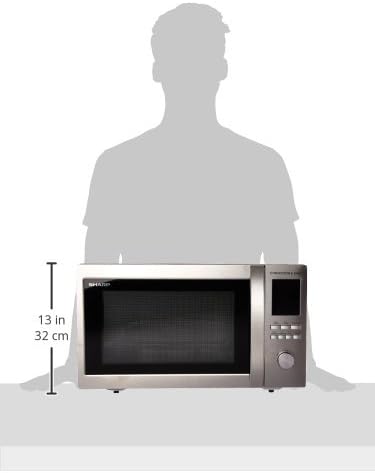
Image: Diagram showing the Sharp R-94A0(ST)V Microwave Oven with its approximate dimensions: 13 inches (32 cm) in height. The overall product dimensions are 58.42 cm (length) x 53.34 cm (width) x 35.56 cm (height).
| Brand | Sharp |
| Model Number | R-94A0(ST)V |
| Capacity | 42 Liters |
| Microwave Output Power | 1000 Watts |
| Grill Power | 1400 Watts |
| Convection Power | 2800 Watts |
| Voltage | 220 Volts |
| Frequency | 94 Hz |
| Material | Stainless Steel |
| Product Dimensions (L x W x H) | 58.42 x 53.34 x 35.56 cm |
| Item Weight | 19.05 kg |
| Special Features | Timer, Turntable, LED Display, Child Lock |
| Human Interface Input | Dial |
Warranty and Support
Specific warranty details and customer support contact information are not provided within this manual. Please refer to the warranty card included with your product packaging or visit the official Sharp website for detailed warranty terms and service contact information in your region.
