
Introduction
Thank you for purchasing the RCA JPS2015D Amplified Speaker. This powerful 15-inch speaker is designed to deliver high-quality audio for various applications, featuring Bluetooth connectivity, USB/SD card playback, FM radio, and an equalizer. This manual provides essential information for setting up, operating, maintaining, and troubleshooting your speaker to ensure optimal performance and longevity.
Setup
1. Unpacking
Carefully remove all components from the packaging. Ensure all items listed below are present:
- RCA JPS2015D Amplified Speaker
- Power Cable
- Tripod Stand
- Microphone
- Remote Control
- User Manual (this document)
2. Speaker Placement and Stand Assembly
Place the speaker on a stable, flat surface or assemble the included tripod stand for elevated placement. Ensure the stand is fully extended and locked into position before mounting the speaker.

Figure 1: Front view of the RCA JPS2015D Amplified Speaker mounted on its tripod stand. The speaker features a large 15-inch woofer and a horn tweeter, with the RCA logo visible on the grille.
3. Connecting Power
Connect the provided power cable to the AC IN port on the rear panel of the speaker and then to a standard electrical outlet. Ensure the power switch is in the OFF position before connecting.
4. Connecting Audio Sources and Accessories
The speaker offers multiple input options:
- USB/SD Card: Insert a USB flash drive or SD card into the respective slots on the control panel.
- Microphone: Connect the included microphone to the MIC IN port.
- External Audio Devices: Use the available RCA or XLR inputs to connect other audio sources like mixers, CD players, or instruments.
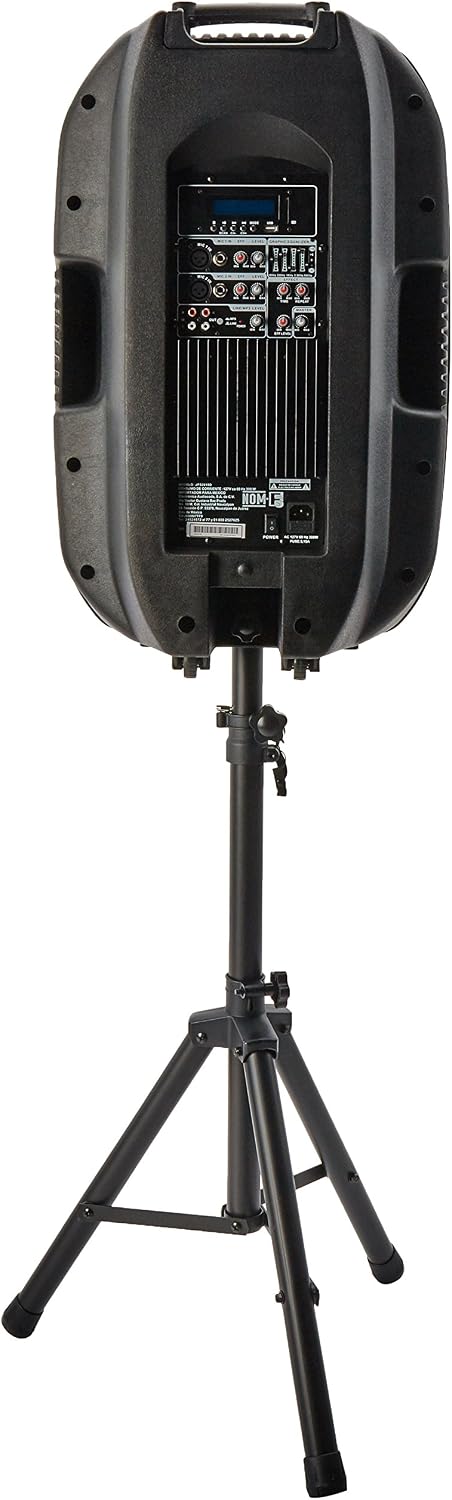
Figure 2: Rear view of the RCA JPS2015D Amplified Speaker, displaying the various input and output ports, including USB, SD, microphone inputs, RCA, and XLR connections, along with the power input.

Figure 3: The microphone included with the RCA JPS2015D speaker, featuring a standard XLR connector for audio input.
Operating Instructions
1. Powering On/Off
Locate the power switch on the rear panel of the speaker. Flip it to the "ON" position to power on the unit. The LCD display will illuminate. To power off, flip the switch back to "OFF".
2. Volume Control
Adjust the master volume using the main volume knob on the control panel. Individual input volumes (e.g., microphone volume) can also be adjusted if available.
3. Input Selection
Press the "MODE" button on the control panel or remote control to cycle through available input modes: Bluetooth, USB, SD, FM Radio, and Line In.
- Bluetooth Pairing: In Bluetooth mode, the speaker will automatically enter pairing mode. Search for "RCA JPS2015D" on your device's Bluetooth settings and connect.
- USB/SD Playback: When a USB drive or SD card is inserted, the speaker will automatically switch to the corresponding mode and begin playing supported audio files.
- FM Radio: In FM mode, use the scan function to find available radio stations.
4. Equalizer (EQ)
Use the EQ button on the control panel or remote control to cycle through preset equalizer settings (e.g., Pop, Rock, Jazz, Classic) to optimize sound for different music genres.
5. Remote Control Usage
The included remote control allows convenient operation from a distance. Functions include power, mode selection, volume control, track navigation, EQ settings, and mute.

Figure 4: The remote control for the RCA JPS2015D speaker, featuring buttons for volume, track control, EQ, repeat, USB/SD mode, and a numeric keypad for direct track selection.
Maintenance
1. Cleaning
Wipe the speaker's exterior with a soft, dry cloth. Do not use abrasive cleaners, waxes, or solvents as they may damage the finish. Ensure no liquids enter the speaker's openings.
2. Storage
When not in use for extended periods, store the speaker in a cool, dry place, away from direct sunlight and extreme temperatures. It is recommended to use the original packaging for storage if available.
3. General Care
- Avoid placing heavy objects on the speaker.
- Do not expose the speaker to water or excessive moisture.
- Protect the speaker from strong impacts or vibrations.
- Ensure proper ventilation around the speaker to prevent overheating.
Troubleshooting
| Problem | Possible Cause | Solution |
|---|---|---|
| No power | Power cable not connected; Power outlet not working; Power switch off. | Ensure power cable is securely connected. Test the outlet with another device. Flip the power switch to ON. |
| No sound | Volume too low; Incorrect input mode selected; Audio source issue; Cables not connected properly. | Increase master volume. Select the correct input mode. Check audio source (e.g., phone volume). Ensure all audio cables are securely connected. |
| Bluetooth not connecting | Speaker not in pairing mode; Device Bluetooth off; Device too far; Interference. | Ensure speaker is in Bluetooth mode and discoverable. Turn Bluetooth on your device. Move device closer to speaker. Avoid strong interference sources. |
| USB/SD playback issues | Unsupported file format; Corrupted files; USB/SD card not inserted correctly. | Ensure audio files are in a supported format (e.g., MP3). Try another USB/SD card. Reinsert the card/drive. |
Specifications
| Feature | Detail |
|---|---|
| Model | JPS2015D |
| Brand | RCA |
| Woofer Size | 15 inches |
| Power Output | 300 Watts RMS |
| Connectivity | Bluetooth, USB, SD, FM Radio, Microphone Input, RCA/XLR Inputs |
| Power Source | Electric Cable |
| Mounting Type | Floor Mount (Tripod Stand included) |
| Product Dimensions (L x W x H) | 51 x 39 x 72 cm (20.1 x 15.4 x 28.3 inches) |
| Product Weight | 2.2 Kilograms (4.85 lbs) |
| Special Features | Bluetooth, Equalizer, LCD Display |
Warranty and Support
For warranty information and technical support, please refer to the warranty card included with your product or visit the official RCA website. Keep your purchase receipt as proof of purchase for any warranty claims.
For further assistance, you may contact RCA customer service through their official channels. Contact details are typically available on the manufacturer's website or product packaging.


