
1. Introduction
Thank you for purchasing the Marvo G904 6D Optical Wired Gaming Mouse. This manual provides essential information for the proper setup, operation, and maintenance of your new gaming mouse. Please read this manual thoroughly before use to ensure optimal performance and longevity of the product.
2. Product Overview
The Marvo G904 is a high-performance 6D optical wired gaming mouse designed for precision and comfort. It features an AVago3050 sensor, adjustable DPI settings, and programmable buttons to enhance your gaming experience.

Figure 1: Marvo G904 Gaming Mouse with blue LED lighting, showcasing its ergonomic design and illuminated accents.

Figure 2: Marvo G904 Gaming Mouse displaying green LED lighting, indicating different lighting modes or DPI settings.
3. Setup
Follow these steps to set up your Marvo G904 gaming mouse:
- Unpack the Mouse: Carefully remove the mouse and any accessories from its packaging.
- Connect to Computer: Plug the USB connector of the mouse into an available USB port on your computer. The mouse is plug-and-play for basic functionality.
- Install Driver (Optional for Advanced Features): For full functionality, including macro programming and advanced DPI settings, insert the provided CD driver into your computer's optical drive and follow the on-screen instructions to install the software. If your computer does not have an optical drive, please visit the official Marvo website for driver downloads.

Figure 3: Marvo G904 Gaming Mouse packaging, which includes the driver CD.
4. Operating Instructions
The Marvo G904 mouse features 6 buttons and adjustable DPI settings for versatile control.
4.1 Button Functions
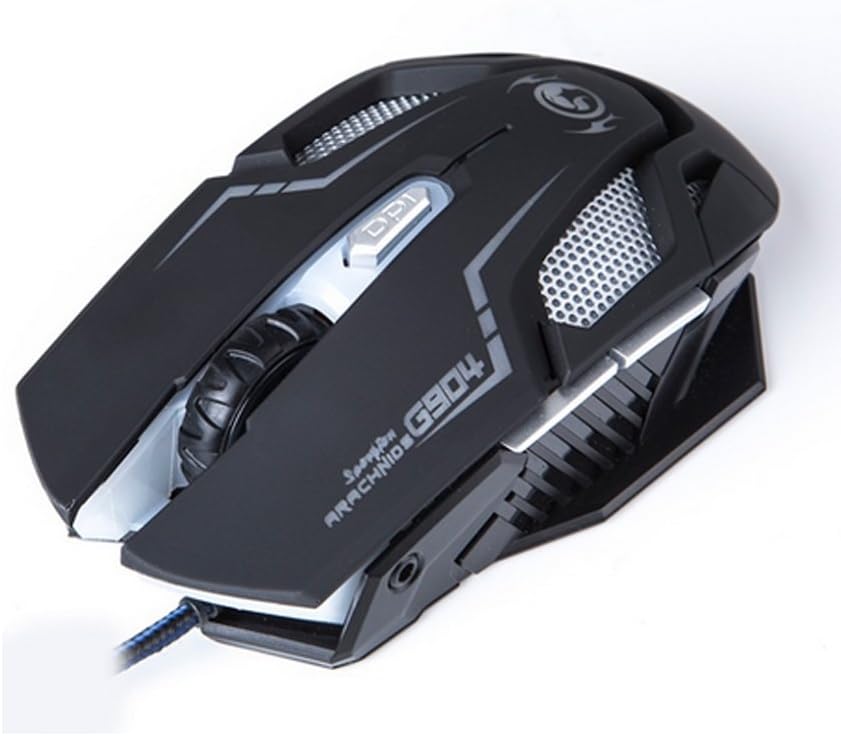
Figure 4: Top view of the Marvo G904 Gaming Mouse, highlighting the placement of its 6 buttons.
- Left Click Button: Standard primary click function.
- Right Click Button: Standard secondary click function.
- Scroll Wheel: Scrolls up/down. Can also be pressed for a middle click function.
- DPI Shift Button: Cycles through DPI settings (1000, 2000, 3000, 4000).
- Side Buttons (2): Typically function as 'Forward' and 'Back' in web browsers and file explorers. These can be programmed using the driver software.
4.2 DPI Adjustment
Press the DPI Shift Button (located behind the scroll wheel) to cycle through the available DPI settings: 1000, 2000, 3000, and 4000 DPI. Each DPI level may be indicated by a change in the mouse's LED lighting color or pattern, depending on the current light mode.
4.3 Macro Programming (with Light Mode)
Utilize the included CD driver software to customize button functions and create macros. The software also allows you to configure the mouse's LED lighting modes. Refer to the software's help section for detailed instructions on macro creation and light mode customization.
5. Maintenance
Proper maintenance ensures the longevity and optimal performance of your gaming mouse.
- Cleaning: Use a soft, dry cloth to wipe the surface of the mouse. For stubborn dirt, slightly dampen the cloth with water or a mild cleaning solution. Avoid using harsh chemicals or abrasive materials.
- Sensor Care: Keep the optical sensor on the bottom of the mouse clean and free from dust or debris. Use a cotton swab or compressed air if necessary.
- Cable Management: Avoid sharp bends or excessive pulling on the USB cable to prevent damage.
- Storage: When not in use, store the mouse in a clean, dry environment away from extreme temperatures.
6. Troubleshooting
If you encounter issues with your Marvo G904 mouse, refer to the following common problems and solutions:
| Problem | Solution |
|---|---|
| Mouse not responding. |
|
| DPI settings not changing. |
|
| Buttons not functioning correctly. |
|
| Mouse cursor movement is erratic or jumpy. |
|
7. Specifications
Detailed technical specifications for the Marvo G904 Gaming Mouse:

Figure 5: Bottom view of the Marvo G904 Gaming Mouse, displaying model number, DPI range, and certification marks.
| Feature | Detail |
|---|---|
| Model | G904 |
| Sensor Type | Optical (AVago3050) |
| DPI Settings | 1000 / 2000 / 3000 / 4000 DPI |
| Buttons | 6D (6 Buttons) |
| Report Rate | 1000 Hz |
| Key Durability | 10 million clicks |
| Cable Length | 1.5 meters |
| Dimensions (L*W*H) | 143 * 76 * 42 mm |
| Rated Voltage | 5V |
| Rated Current | 10 mA |
| Compatibility | PC |
| Color | Black |
8. Warranty and Support
For warranty information and technical support, please refer to the documentation provided with your purchase or contact your retailer. You may also visit the official MARVO website for further assistance and updated driver software.

