
Introduction
This manual provides detailed instructions for the safe and effective use of your ORACURA OC150 Dental PRO Smart Water Flosser. This portable and rechargeable device features a 150ml water tank and three operating modes to enhance your daily oral hygiene routine. Please read this manual thoroughly before first use and retain it for future reference.
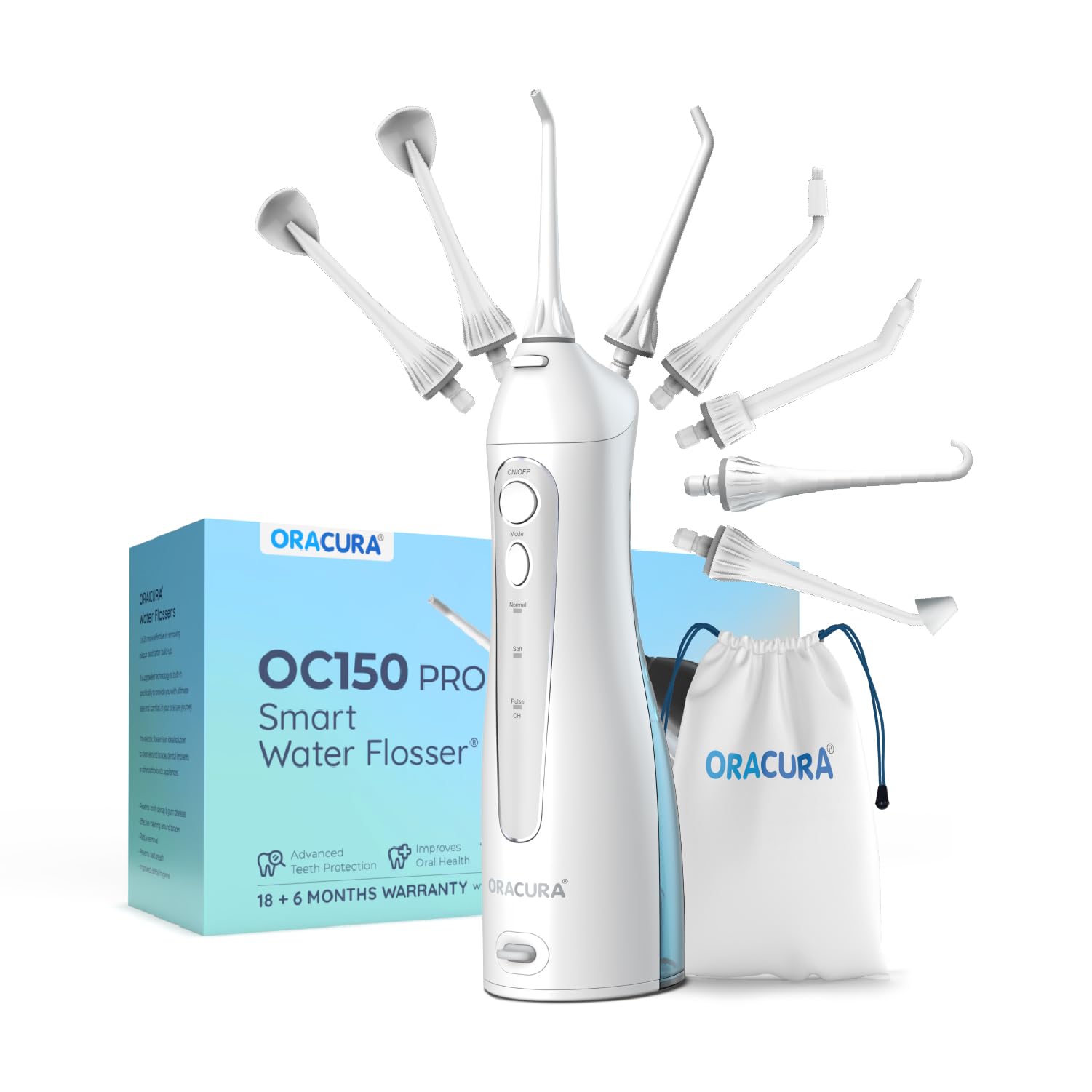
Image: The ORACURA OC150 Dental PRO Smart Water Flosser, a portable oral hygiene device.
Safety Information
Important Safety Precautions:
- Do not use with damaged or broken teeth, bridges, or dental restorations.
- Keep out of reach of children.
- Do not immerse the charging base in water.
- Always unplug the charger when not in use.
- Do not use while sleeping or unconscious.
- If you have any medical conditions, consult your dentist before use.
Package Contents
Your ORACURA OC150 Dental PRO Smart Water Flosser package includes the following items:

Image: The ORACURA OC150 Dental PRO package showing the flosser, manual, various tips, protective pouch, and USB charger cable.
- ORACURA OC150 Dental PRO Water Flosser Unit
- Operation Manual
- Orthodontic Tip
- Pocket Tip
- Standard Tip (x2)
- Nasal Tip
- Tongue Scraper (x2)
- Implant Tip
- Protective Pouch
- USB Charger Cable
Setup
1. Charging the Device
Before first use, fully charge the water flosser. Connect the USB charger cable to the charging port on the device and plug it into a suitable power source. A full charge typically takes approximately 4 hours and provides 2-3 weeks of use.

Image: The water flosser connected to its USB charging cable, illustrating the charging process.
2. Filling the Water Tank
Open the water tank cap and fill the 150ml tank with lukewarm water. You may also use mouthwash as recommended by your dentist. Close the cap securely to prevent leaks.

Image: Water being filled into the 150ml capacity tank of the water flosser.
3. Attaching a Nozzle Tip
Insert your desired nozzle tip into the opening at the top of the flosser handle until it clicks into place. Ensure it is firmly seated.
Operating Instructions
1. Selecting a Mode
The ORACURA OC150 features three operating modes:
- Normal Mode: For daily flossing and effective plaque removal.
- Soft Mode: A gentle mode suitable for sensitive gums or first-time users.
- Pulse Mode: Provides a soothing gum massage while flossing.
Press the "Mode" button to cycle through the available settings.

Image: The control panel of the water flosser, highlighting the three operational modes.
2. Flossing Technique
Lean over a sink and place the tip in your mouth. Turn on the device. Guide the water jet along your gumline and between your teeth. Pause briefly between teeth, allowing the water to clean the interdental spaces. Start with the soft mode and gradually increase pressure as you become accustomed to the device.
3. Using Different Nozzle Tips
The ORACURA OC150 Dental PRO comes with specialized tips for various dental needs:
- Standard Tip: For general daily cleaning.
- Orthodontic Tip: Designed for cleaning around braces and orthodontic appliances.
- Pocket Tip: For gently delivering water into periodontal pockets.
- Implant Tip: For cleaning around dental implants and bridges.
- Nasal Tip: For rinsing nasal cavities (use with saline solution, consult a doctor).
- Tongue Scraper: For cleaning the tongue to reduce bad breath.

Image: Close-up view of the Orthodontic Tip for braces and the Pocket Tip for periodontal pockets.

Image: An illustration of the ORACURA Dental Pro with its eight different nozzle tips for various dental treatment aftercare needs.
Maintenance
1. Cleaning the Device
After each use, empty any remaining water from the tank. Rinse the tank and the nozzle tip under running water. Wipe the exterior of the flosser with a soft, damp cloth. Do not use abrasive cleaners or immerse the main unit in water.
2. Storage
Store the water flosser in a cool, dry place, away from direct sunlight. Ensure the device is dry before storing. Use the provided protective pouch for travel or extended storage.
Troubleshooting
| Problem | Possible Cause | Solution |
|---|---|---|
| Device does not turn on. | Low battery or not charged. | Charge the device fully (approx. 4 hours). |
| Weak water pressure. | Water tank is low or empty; tip is clogged. | Refill the water tank; clean the nozzle tip. |
| Water leakage. | Water tank cap not securely closed; tip not properly seated. | Ensure tank cap is tight; re-insert nozzle tip until it clicks. |
| Device stops working or not charging. | Internal malfunction or water ingress. | Contact ORACURA customer support for assistance. |
Specifications
- Model: OC150PRO
- Product Dimensions: 2.91 x 2.24 x 10.63 inches
- Item Weight: 1.21 pounds (approx. 550 g)
- Water Tank Capacity: 150 ml
- Power Source: Battery Powered (1 Lithium Ion battery included)
- Charging Time: Approximately 4 hours
- Operating Modes: Normal, Soft, Pulse
- Material Type: Plastic
- UPC: 787099486822
Warranty Information
The ORACURA OC150 Dental PRO Smart Water Flosser comes with a 2-year warranty from the date of purchase. This warranty covers manufacturing defects and issues arising from normal use. Please retain your proof of purchase for warranty claims. For detailed warranty terms and conditions, refer to the official ORACURA website or contact customer support.
Support
For any questions, technical assistance, or warranty claims regarding your ORACURA OC150 Dental PRO Smart Water Flosser, please contact ORACURA customer support. You can find contact information on the official ORACURA website or through the retailer where you purchased the product.
Online Resources: Visit the official ORACURA website for FAQs, product registration, and additional support materials.


