
1. Introduction
This manual provides comprehensive instructions for the installation, operation, and maintenance of your Southwest Speed Telescoping Steering Column, Model 150-2856. This steering column is designed for various high-performance applications, including off-road vehicles, drag racing cars, circle track stock cars, and dune buggies. It features a collapsible shaft for safety, an adjustable rod end for mounting flexibility, and a quick-release steering wheel disconnect for easy entry and exit.
Please read this manual thoroughly before installation and use to ensure proper function and safety.
2. Safety Information
- Professional Installation Recommended: Installation of this steering column requires mechanical knowledge and specialized tools. If you are not confident in your abilities, seek professional assistance.
- Read All Instructions: Ensure you understand all steps before beginning installation or operation.
- Use Correct Tools: Always use appropriate tools for each step to prevent damage to the product or injury.
- Secure All Fasteners: Ensure all bolts, nuts, and other fasteners are tightened to the manufacturer's specifications. Regularly check for looseness.
- Check for Clearances: Verify that the steering column and attached components have adequate clearance from other vehicle parts, especially during full steering lock and suspension travel.
- No Modifications: Do not modify the steering column or its components. Unauthorized modifications can compromise safety and performance.
- Wear Safety Gear: Always wear appropriate personal protective equipment, such as safety glasses and gloves, during installation.
3. Package Contents
Verify that all components listed below are present and undamaged before proceeding with installation.
- Southwest Speed Telescoping Steering Column (Model 150-2856)
- Quick Release Steering Wheel Disconnect Hub
- Oversized Aluminum Rod End with Jam Nuts
- Weather-Resistant Dust Boot (pre-installed)
- Mounting Hardware for Quick Release and Rod End
Note: A 3/4 inch – 20 spline U-joint or coupler is required for connection to the steering box/rack, but is not included with this package.
4. Setup and Installation
Follow these steps carefully for proper installation of the telescoping steering column.
4.1. Prepare Vehicle
- Ensure the vehicle is safely supported on jack stands or a lift.
- Disconnect the battery to prevent accidental electrical activation.
- Remove any existing steering column components as required by your vehicle's setup.
4.2. Install Steering Column
- Position the telescoping steering column in the desired location within the vehicle.
- Mount the oversized aluminum rod end to your dash bar or other structural support. The rod end is adjustable forward and backward to accommodate specific mounting requirements. Use the provided jam nuts to secure its position once adjusted.
- Connect the 3/4 inch – 20 spline output shaft of the steering column to your steering box or rack using a compatible 3/4 inch – 20 spline U-joint or coupler (not included). Ensure this connection is secure and free of play.
- Securely fasten the steering column to the vehicle chassis or frame using appropriate mounting brackets and hardware (not included, as vehicle-specific mounting varies). Ensure the column is rigidly mounted and does not flex.
- Verify that the steering column can telescope freely within its 22.5 inch to 32.5 inch range without obstruction.
4.3. Install Quick Release Steering Wheel Disconnect
- Attach the quick-release hub to the upper end of the steering column shaft. Use the provided mounting hardware to secure it firmly.
- Mount your steering wheel to the quick-release hub. Ensure all fasteners are tightened according to the steering wheel manufacturer's specifications.
- Test the quick-release mechanism to ensure it engages and disengages smoothly and securely.
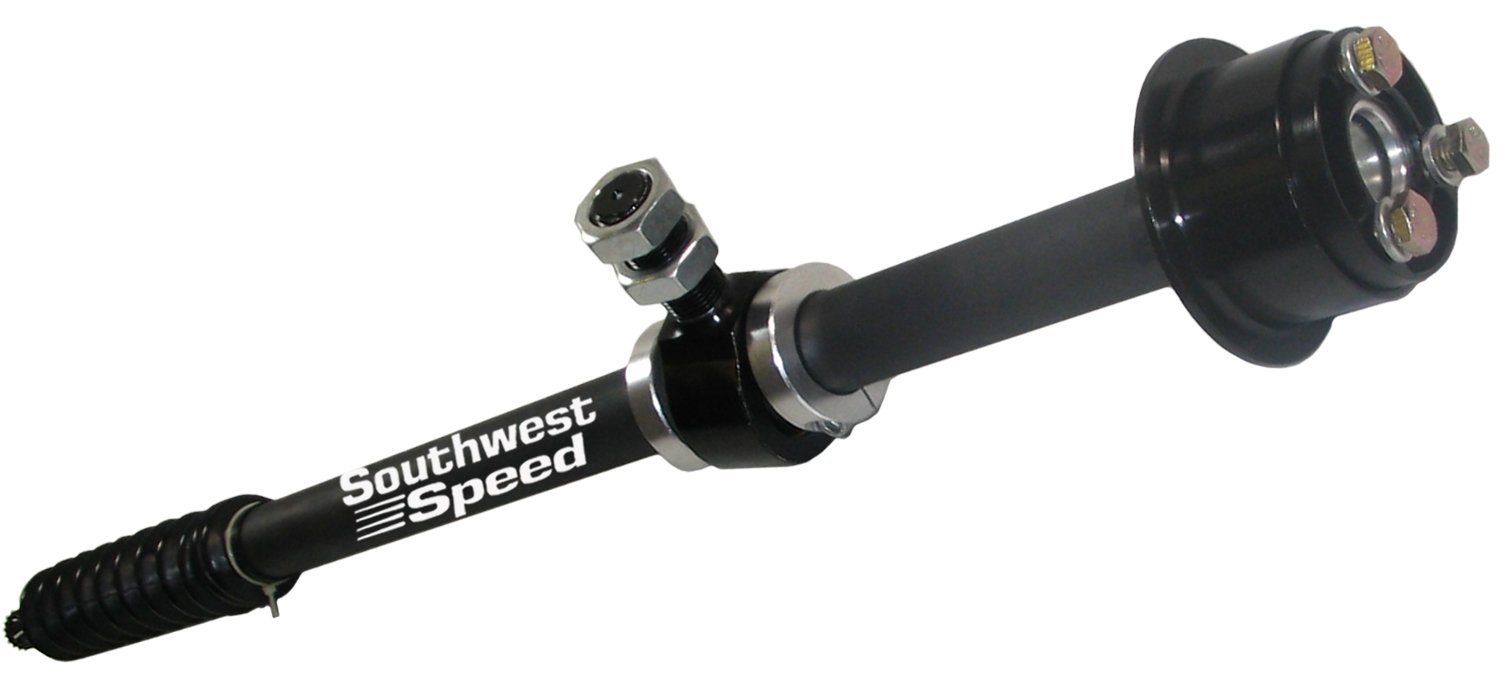
Figure 1: Southwest Speed Telescoping Steering Column (Model 150-2856) with quick-release hub and rod end. This image illustrates the main components of the steering column, including the collapsible shaft, the quick-release mechanism for the steering wheel, and the adjustable rod end for mounting.
5. Operation
5.1. Telescoping Function
The steering column is designed to telescope between 22.5 inches and 32.5 inches. This feature allows for adjustment to suit driver preference or to collapse in the event of an impact, enhancing safety. To adjust the length, loosen the locking mechanism (if present, depending on specific model variant) and slide the column to the desired length. Re-tighten the locking mechanism securely.
5.2. Quick Release Steering Wheel
The quick-release hub allows for rapid removal and attachment of the steering wheel. This is beneficial for driver entry/exit, security, and quick changes in racing environments.
- To Remove: Pull the quick-release collar towards the driver and simultaneously pull the steering wheel off the hub.
- To Attach: Align the splines of the steering wheel hub with the quick-release mechanism on the column. Push the steering wheel firmly onto the hub until the quick-release collar snaps into place, securing the wheel. Always ensure the steering wheel is fully engaged and locked before operating the vehicle.
6. Maintenance
Regular inspection and maintenance are crucial for the longevity and safe operation of your steering column.
- Periodic Inspection: Regularly inspect the entire steering column assembly for any signs of wear, damage, or corrosion. Pay close attention to welds, mounting points, and the telescoping mechanism.
- Fastener Checks: Check all bolts, nuts, and fasteners for tightness before each use, especially in racing or off-road applications. Re-tighten as necessary.
- Lubrication: Apply a light coat of appropriate grease or lubricant to the telescoping shaft and quick-release mechanism periodically to ensure smooth operation and prevent binding.
- Dust Boot: Inspect the weather-resistant dust boot for tears or damage. A damaged boot can allow dirt and moisture into the shaft, leading to premature wear. Replace if damaged.
- Cleanliness: Keep the steering column clean from dirt, mud, and debris, especially around moving parts.
7. Troubleshooting
| Problem | Possible Cause | Solution |
|---|---|---|
| Steering wheel feels loose after quick-release engagement. | Quick-release not fully engaged; worn quick-release mechanism. | Ensure the quick-release collar snaps fully into place. Inspect the quick-release for wear; replace if necessary. |
| Difficulty telescoping the column. | Lack of lubrication; dirt/debris in shaft; bent shaft. | Clean and lubricate the telescoping shaft. Inspect for damage; replace if bent. |
| Excessive play in steering. | Loose mounting bolts; worn U-joint/coupler; worn rod end. | Check and tighten all mounting bolts. Inspect U-joint/coupler and rod end for wear; replace if necessary. |
| Squeaking or grinding noises. | Lack of lubrication; rubbing against other components. | Lubricate moving parts. Check for proper clearances and adjust mounting if needed. |
8. Specifications
| Model Number | 150-2856 |
| Brand | Southwest Speed |
| Telescopic Range | 22.5 inches - 32.5 inches (57.15 cm - 82.55 cm) |
| Upper Column Outer Diameter | 1.125 inches (2.86 cm) |
| Lower Shaft Outer Diameter | 0.750 inches (1.91 cm) |
| Lower Shaft Spline | 3/4 inch - 20 Spline |
| Oversized Aluminum Rod End Outer Diameter | 2.220 inches (5.64 cm) |
| Rod End Center to Shaft | 3 inches (7.62 cm) |
| Quick Release Ring Outer Diameter | 3.180 inches (8.08 cm) |
| Quick Release Body Outer Diameter | 2.50 inches (6.35 cm) |
| Material | Man-made (Synthetic) |
| Applications | Off-road, Drag Racing, Circle Track, Dune Buggies |
9. Warranty and Support
For specific warranty information regarding your Southwest Speed Telescoping Steering Column, please refer to the documentation provided at the time of purchase or visit the official Southwest Speed website. Warranty terms and conditions may vary.
If you encounter any issues not covered in the troubleshooting section or require technical assistance, please contact Southwest Speed customer support directly. Have your model number (150-2856) and purchase details ready when contacting support.
Southwest Speed Official Website: www.southwestspeed.com (This is a placeholder URL, please verify the actual official website for Southwest Speed.)