
Nitecore MT10A
NiteCore MT10A LED Flashlight User Manual
Model: MT10A
Brand: Nitecore
1. Introduction
The Nitecore MT10A is a compact and powerful LED flashlight designed for versatile use. Utilizing a CREE XM-L2 U2 LED, it offers a maximum output of up to 920 lumens, making it suitable for various outdoor activities, tactical applications, and everyday carry. Its dual-fuel capability allows it to operate on both 14500 Li-ion batteries for maximum output and readily available AA batteries for convenience. The MT10A also features a secondary red LED for preserving night vision and various special modes for signaling and emergencies.

Figure 1: Nitecore MT10A LED Flashlight. This image shows the overall design of the flashlight, highlighting its compact size and textured grip.
2. Key Features
- Utilizes a CREE XM-L2 U2 LED for high performance.
- Maximum output up to 920 lumens.
- Integrated secondary red LED provides constant or flashing illumination for night vision preservation and signaling.
- Waterproof in accordance with IPX-8 (two meter submersible) for reliable use in wet conditions.
- Compatible with both 14500 Li-ion batteries and AA batteries.
- Direct access to Turbo mode and Red Light mode.
- Advanced Temperature Regulation (ATR) technology.
- Reverse polarity protection.
- Aerospace-grade aluminum alloy construction with HAIII military grade hard-anodized finish.
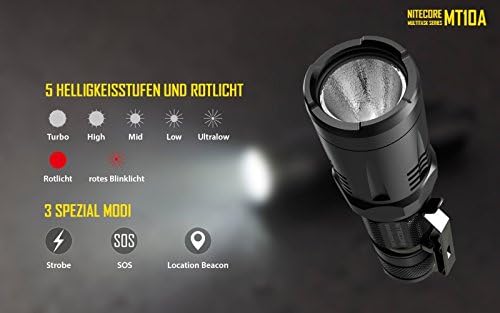
Figure 2: Brightness Levels and Special Modes. This image illustrates the five white light brightness levels (Turbo, High, Mid, Low, Ultralow) and the red light modes (constant red, red blinking), along with three special modes (Strobe, SOS, Location Beacon).
3. Package Contents
Please check the package contents upon opening to ensure all items are present and in good condition.
- Nitecore MT10A Flashlight
- Pocket Clip
- Lanyard
- Spare O-ring
- Spare Tail Cap Boot
- AA Battery (included for initial use)
4. Setup
4.1 Battery Installation
- Unscrew the tail cap of the flashlight.
- Insert one 14500 Li-ion battery or one AA battery with the positive (+) terminal facing towards the head of the flashlight.
- Screw the tail cap back on tightly to ensure proper contact and water resistance.
Note: The MT10A features reverse polarity protection. If the battery is inserted incorrectly, the flashlight will not operate, but no damage will occur.

Figure 3: Battery Compatibility. This image demonstrates the MT10A's compatibility with various AA-sized batteries, including primary AA, rechargeable AA, primary LiFePO4, Lithium-ion, and IMR Li-ion batteries. It also shows compatible Nitecore chargers.
5. Operating Instructions
5.1 Turning On/Off
- To Turn On: Fully press the tail cap switch until a click sound is heard.
- To Turn Off: Fully press the tail cap switch again until a click sound is heard.
- Momentary On: With the light off, half-press and hold the tail cap switch. Release to turn off.
5.2 Brightness Level Selection (White Light)
- With the light on, press the mode switch (side switch) repeatedly to cycle through brightness levels: Ultralow → Low → Mid → High → Turbo. The flashlight will memorize the last used brightness level for white light.
5.3 Direct Access to Turbo/Red Light
- Direct Access to Turbo: With the light off, press and hold the mode switch. The flashlight will turn on in Turbo mode. Release the switch to turn off.
- Direct Access to Red Light: With the light off, press and hold the tail cap switch while simultaneously pressing and holding the mode switch. The flashlight will turn on in Red Light mode. Release both switches to turn off.
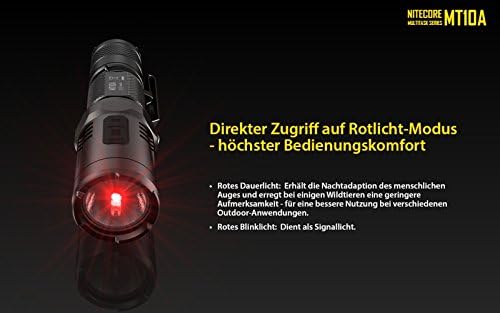
Figure 4: Direct Access to Red Light Mode. This image highlights the red LED, emphasizing its utility for maintaining night adaptation and minimizing disturbance to wildlife.
5.4 Special Modes (Strobe, SOS, Location Beacon)
- With the light on, press and hold the mode switch for more than 1 second to activate Strobe mode.
- Once in Strobe mode, press the mode switch repeatedly to cycle through SOS → Location Beacon → Strobe.
- To exit special modes, short press the mode switch or turn off the flashlight.
5.5 Power Indicator
- When the flashlight is off, press the mode switch. The red indicator light will flash to indicate battery voltage (accurate to 0.1V). For example, three flashes followed by a one-second pause and then two more flashes indicates 3.2V.
6. Maintenance
- Cleaning: Clean the threads and O-rings regularly with a clean cloth. Lubricate threads with silicone grease to prevent wear and maintain water resistance.
- Battery Care: Remove batteries from the flashlight if it will not be used for an extended period to prevent battery leakage and damage to the flashlight.
- Waterproofing: Ensure the O-rings are intact and properly seated before exposing the flashlight to water.
7. Troubleshooting
| Problem | Possible Cause | Solution |
|---|---|---|
| Flashlight does not turn on or flickers. |
|
|
| Reduced brightness or short runtime. |
|
|
| Water ingress. |
|
|
8. Specifications
| Attribute | Detail |
|---|---|
| LED | CREE XM-L2 U2 |
| Max Output | 920 Lumens |
| Beam Distance | 170 meters (max) |
| Peak Beam Intensity | 7300cd (max) |
| Power Source | 1 x 14500 Li-ion or 1 x AA battery |
| Water Resistance | IPX-8 (2 meters submersible) |
| Impact Resistance | 1.5 meters |
| Dimensions | Length: 108mm (4.25"), Head Diameter: 25.4mm (1"), Body Diameter: 21.1mm (0.83") |
| Weight | 60.7g (2.14oz) without battery |
| Color | Black |
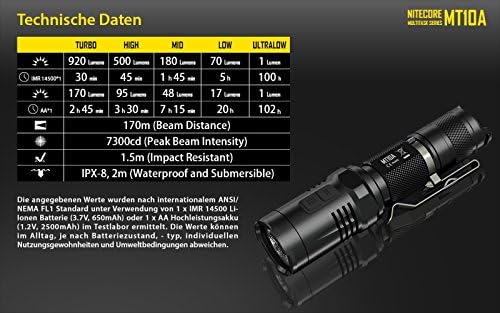
Figure 5: Technical Data. This table provides detailed performance data for the MT10A, including brightness levels, runtime, beam distance, and peak beam intensity for both 14500 and AA battery types, along with impact and water resistance ratings.
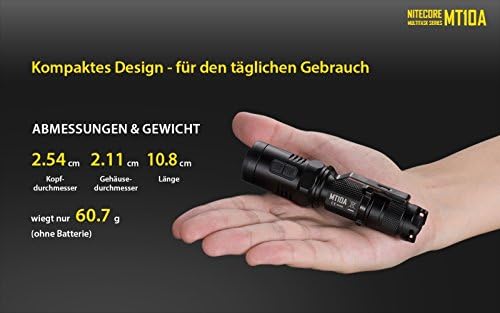
Figure 6: Compact Design. This image illustrates the compact size of the MT10A flashlight in hand, along with its key dimensions: Head diameter (2.54 cm), Body diameter (2.11 cm), and Length (10.8 cm). It also notes the weight without battery (60.7g).
9. Warranty & Support
Nitecore products are covered by a warranty period. Please refer to the official Nitecore website or your local distributor for detailed warranty information and terms and conditions.
For technical support, service, or warranty claims, please contact your original point of purchase or visit the official Nitecore website for contact information.
You can also find additional resources and support at the Nitecore Store on Amazon.
A PDF version of the user manual may also be available: User Manual (PDF).
Related documentsMT10A


Ask a question about this manual
Ask about setup, troubleshooting, compatibility, parts, safety, or missing instructions. Manuals+ will review the question and use this page’s manual context to help answer it.