
1. Overview
The iBasso D14 Bushmaster is a high-performance portable headphone amplifier and Digital-to-Analog Converter (DAC) designed to significantly improve the audio quality from various digital and analog sources. It integrates advanced audio components to deliver a clear, powerful, and detailed sound experience for your headphones.

Image 1: The iBasso D14 Bushmaster unit, showcasing its sleek black brushed aluminum casing and front panel controls.
2. What's in the Box
Please verify that all the following items are included in your package:
- iBasso D14 Bushmaster Headphone Amplifier/DAC Unit
- Carrying Pouch
- USB Charge Cable
- 3.5mm to 3.5mm Interconnect Cable
- OTG Cable (for Android devices)
- Silicone Strap
- 3.5mm Stereo to RCA Connection Cable
- SPDIF-TOSlink Cable
- Extreme Audio Travel Charger
- Warranty Card
3. Key Features
- High-Performance DAC Chip: Integrates the Sabre32 ES9018K2M DAC chip for superior audio conversion.
- Advanced USB Audio: Features an XMOS USB audio controller, supporting up to 32bit/384kHz PCM and 256x native DSD signals from Windows PCs and Mac computers.
- Asynchronous USB Transfer: Ensures precise timing and reduced jitter for optimal sound quality.
- Powerful Amplifier Design: Utilizes an OPAMP+BUF design, providing high current and high power output for demanding headphones.
- Versatile Inputs: Supports USB digital signal from Windows PCs and Mac computers, OTG audio from Android 4.1+ devices, digital signal from iPhone/iPad (with camera kit cable), coaxial input, and optical input.
- Multiple Operating Modes: Functions as a DAC+AMP Combo, a standalone amplifier, or a standalone DAC (via Line Out).
- Gain Switch: A 2-setting gain switch allows for impedance matching with various headphones.
- Rechargeable Battery: Equipped with a built-in Li-polymer battery for portable use.
4. Setup Guide
4.1 Charging the Device
Before initial use, fully charge the D14 Bushmaster. Connect the provided USB charge cable to the D14's charging port and plug the other end into a USB power adapter or a computer's USB port. The charging indicator light will show the charging status. A full charge typically takes approximately 5 hours.
4.2 Connecting to Audio Sources
The D14 offers multiple input options:
- USB (PC/Mac): Connect the D14 to your computer using a USB cable. The device will be recognized as an external sound card.
- OTG (Android Devices): Use the supplied OTG cable to connect to Android devices running version 4.1 or higher.
- iPhone/iPad: A separate camera kit cable (not included) is required to connect to Apple iOS devices.
- Coaxial Input: Connect a coaxial digital audio cable from your source device to the D14's coaxial input.
- Optical Input: Use the SPDIF-TOSlink cable to connect an optical digital audio source to the D14's optical input.
- Analog Input (AUX IN): For using the D14 as a standalone amplifier, connect an analog audio source (e.g., a portable music player) to the AUX IN port using a 3.5mm audio cable.
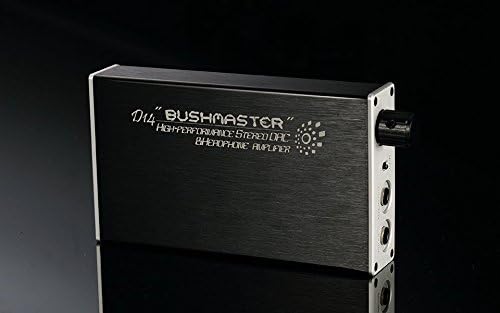
Image 2: Front panel of the iBasso D14, showing the headphone output, AUX input, and gain switch.
4.3 Connecting Headphones
Plug your headphones into the 3.5mm headphone output jack on the D14. Ensure the connection is secure.
4.4 Gain Setting
The D14 features a 2-setting gain switch (+3dB and +9dB). For sensitive headphones or in-ear monitors (IEMs), use the lower gain setting. For less sensitive, higher impedance headphones, the higher gain setting may be necessary to achieve adequate volume and dynamics.
5. Operating Instructions
5.1 Power On/Off and Volume Control
The main knob on the D14 serves as both the power switch and volume control. Rotate the knob clockwise to power on the device and increase the volume. Rotate counter-clockwise to decrease volume and power off.
5.2 Input Selection
The D14 automatically detects the active digital input (USB, Coaxial, Optical). If using the analog AUX IN, ensure no digital input is active or select the analog input if a switch is present (refer to device markings).
5.3 Operating Modes
- DAC+AMP Combo: When connected to a digital source (USB, Coaxial, Optical) and headphones, the D14 functions as both a DAC and an amplifier.
- Standalone Amplifier: Connect an analog source to the AUX IN port and headphones to the output. The D14 will amplify the analog signal.
- Standalone DAC: The D14 features a Line Out function. Connect the Line Out to an external amplifier or active speakers to use the D14 solely as a digital-to-analog converter.

Image 3: The iBasso D14 Bushmaster connected to a smartphone via an OTG cable, demonstrating portable usage.
6. Maintenance
6.1 Cleaning
Wipe the exterior of the D14 with a soft, dry cloth. Avoid using liquid cleaners, solvents, or abrasive materials, as these can damage the finish or internal components.
6.2 Battery Care
To prolong battery life, avoid fully discharging the battery frequently. Charge the device regularly, even if not in constant use. Store the device in a cool, dry place, away from extreme temperatures.
6.3 Storage
When not in use, store the D14 in its provided carrying pouch to protect it from dust and scratches.
7. Troubleshooting
- No Sound Output:
- Ensure the D14 is powered on and the volume is turned up.
- Verify that your headphones are securely plugged into the headphone jack.
- Check all cable connections from the source device to the D14.
- Confirm the correct input source is selected on your playback device.
- Distorted Sound:
- Reduce the volume on both the D14 and your source device.
- Check the gain setting; if it's too high for your headphones, switch to the lower gain.
- Ensure the audio cables are not damaged and are properly connected.
- Test with a different audio source or headphones to isolate the issue.
- Battery Drains Quickly:
- Ensure the battery is fully charged (5 hours charge time).
- Note that using the USB DAC function consumes more power than SPDIF or analog input.
- Battery life is approximately 13 hours for AMP+DAC mode and 25 hours for AMP only mode.
- Popping Sound When Connecting/Disconnecting Headphones:
- To avoid popping sounds, ensure music is playing before plugging in headphones.
- Unplug headphones before powering off the device.
8. Specifications
| Feature | Specification |
|---|---|
| Power Source | Built-in 4.2V Li-polymer Battery or external 5V DC |
| Frequency Response (DAC) | 17Hz~20 KHz +/-1dB |
| Frequency Response (AMP) | 17Hz~100 KHz +/-0.2dB |
| Signal to Noise Ratio (DAC) | 115dB |
| Signal to Noise Ratio (AMP) | 116dB |
| Crosstalk (DAC) | 106dB |
| Total Harmonic Distortion (DAC) | 0.0018%@1kHz/-10dBF |
| Total Harmonic Distortion (AMP) | 0.0012%@1kHz/max volume |
| Output Power | Up to 400mW+400mW into 32ohm |
| Gain | +3dB and +9dB (AMP) |
| Battery Life (AMP+DAC) | 13 hours |
| Battery Life (AMP only) | 25 hours |
| Battery Charge Time | 5 hours |
| Recommended Headphone Impedance | 8~300 Ohm |
| Output Impedance | 0.1ohm |
| Case Dimensions (W x L x H) | 2.4 x 4.1 x 0.8 inches (60 x 104 x 20 mm) |
| Weight | 149g (5.26oz) |
9. Warranty and Support
The iBasso D14 Bushmaster typically comes with a One Year USA Warranty from an Authorized iBasso Dealer. Please refer to the warranty card included in your package for specific terms and conditions.
For technical support, service, or warranty claims, please contact your authorized iBasso dealer or visit the official iBasso website for contact information.


