
FOSCAM R2W
Foscam R2 Home Security Camera User Manual
Model: R2W | Brand: FOSCAM
Introduction
The Foscam R2 Home Security Camera is designed to provide comprehensive surveillance for your home, children, pets, or business. This Full HD 1080P WiFi IP camera offers real-time video at 25 frames per second, pan and tilt capabilities with 8X digital zoom, and intelligent motion detection with alerts. It supports various recording methods including local storage via MicroSD card, Network Video Recorder (NVR), and optional cloud service, giving you full control over your security footage.

Figure 1: Front view of the Foscam R2 Home Security Camera.
Package Contents
Verify that all items are present in your package:
- Foscam R2 Security Camera
- Wireless Antenna
- Mounting Bracket
- Power Supply / Security Camera Adapter
- Quick Install Guide
- User Manual

Figure 2: Contents included in the Foscam R2 product package.
Key Features
- Full HD 1080P Resolution: Captures video at 1920x1080 pixels at 25 frames per second, powered by an Ambarella chipset for real-time video streaming.
- Strong WiFi Signal: Equipped with a 2.4G antenna for extended range and optional higher gain antenna (5db) support.
- Cloud Storage: Offers 8 hours of free cloud storage with 12 months' validity for Foscam Cloud subscribers, with no data space limitation during the last 8 hours. Utilizes US-based AWS servers for high-level encrypted security.
- Wide Field of View & Pan/Tilt: Features a 2.0 MP optical lens (f=2.8mm) with a 110° view angle, 350° horizontal pan, and 100° vertical tilt for 360° coverage.
- Night Vision: Provides clear night vision up to 26 feet using 13 IR LEDs.
- Easy Setup & Compatibility: Quick setup via the Foscam App for iOS and Android devices. Compatible with Foscam VMS (Video Management Software), third-party VMS like Blue Iris, ONVIF recording devices, and web browsers (IE, Chrome).
- Two-Way Talk: High-quality two-way audio with noise reduction.

Figure 3: Visual representation of Foscam R2's key features.
Setup
Initial Setup with Foscam App
- Download the Foscam App: Search for "Foscam" in your device's app store (iOS/Android) and install it.
- Power On the Camera: Connect the camera to the power supply using the provided adapter. The camera will initiate its startup sequence.
- Connect to Network:
- WPS Setup (Recommended for quick setup): Ensure your router has a WPS button. Press the WPS button on your router, then press the WPS button on the side of the camera's base. The camera will connect to your WiFi network automatically.
- QR Code Setup: Open the Foscam App, select "Add New Device," and scan the QR code located on the camera. Follow the on-screen prompts, which may include connecting your phone to the camera's temporary WiFi hotspot and then selecting your home WiFi network.
- Wired Setup: For initial setup or if wireless connection is difficult, connect the camera directly to your router using an Ethernet cable.
- Create User Account: Follow the Voice Setup Wizard and app prompts to create a secure username and password for your camera. This is crucial for security.

Figure 4: Using the Foscam app for pan and tilt control.
MicroSD Card Installation (for Local Recording)
The Foscam R2 supports local recording to a MicroSD card (not included). This allows the camera to record footage directly without requiring a constant internet connection or cloud subscription. The camera records to the SD card when motion is detected.
- Locate the MicroSD card slot on the camera (refer to the physical camera for exact location, typically on the side or bottom).
- Gently insert the MicroSD card into the slot until it clicks into place.
- Within the Foscam App or web interface, navigate to the storage settings to format the MicroSD card and enable local recording.
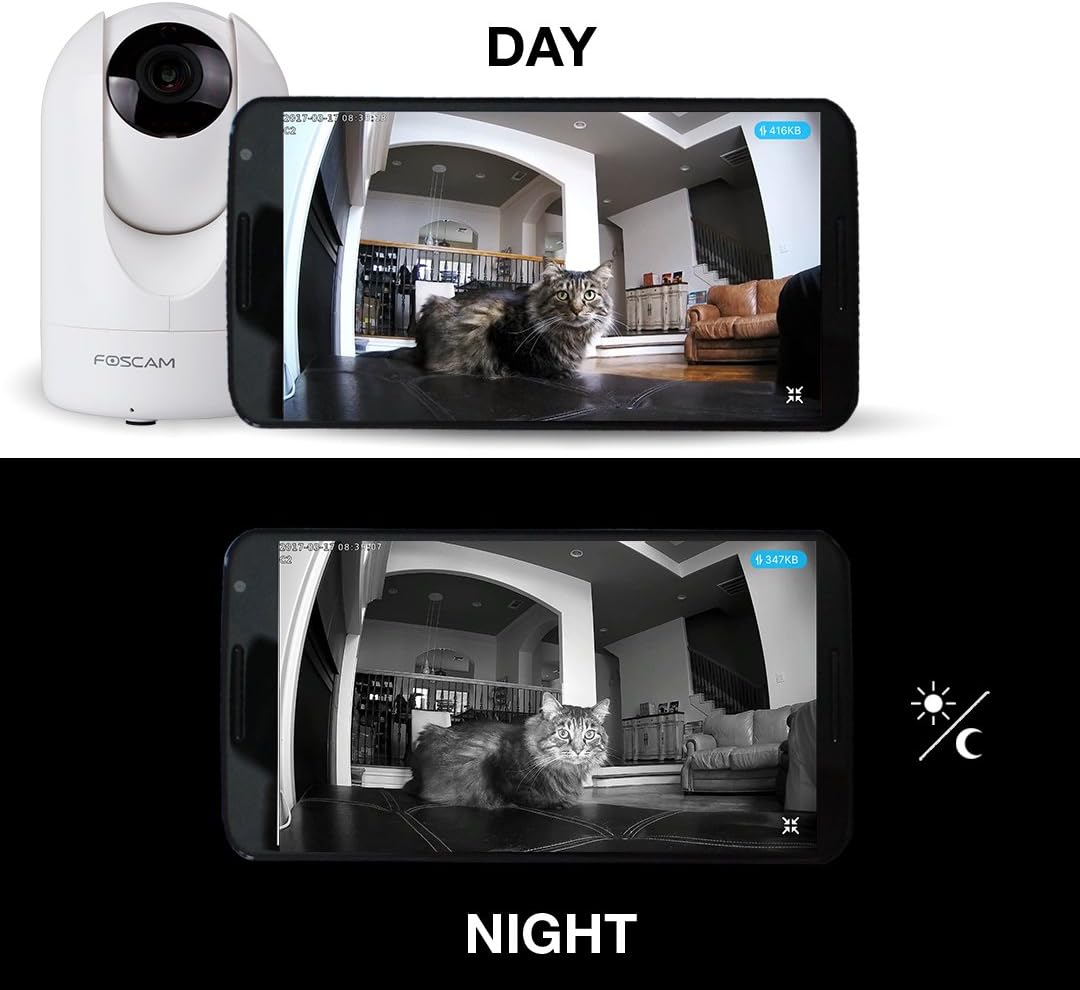
Figure 5: Day and Night vision capabilities of the Foscam R2.
Operating Instructions
Live View and Control
Access live video streams and control your camera through the Foscam App or the web interface. The app provides intuitive controls for pan, tilt, and digital zoom.

Figure 6: Viewing 1080P HD live feed on mobile and desktop.
Motion Detection and Alerts
The camera features intelligent motion detection. When motion is detected, the camera can:
- Send push notifications to your mobile device.
- Record video clips to the MicroSD card or cloud storage.
- Send email alerts.
You can configure motion detection zones and sensitivity settings within the Foscam App or web interface to minimize false alarms.

Figure 7: Motion detection alert displayed on a smartphone.
Two-Way Audio
Utilize the built-in microphone and speaker for two-way communication. This feature allows you to listen in on the camera's environment and speak through the camera from your mobile device.
Night Vision
The Foscam R2 automatically switches to infrared night vision mode in low-light conditions, providing clear black-and-white video up to 26 feet.
Cloud Recording
Foscam offers an optional cloud service for storing recorded video. This provides off-site backup and access to your footage from anywhere. Review recorded events via the cloud recording timeline in the Foscam App or web interface.
Video 1: Official Foscam video demonstrating various features of the Foscam Home Security Camera, including remote viewing, motion detection, and two-way audio. This video highlights the camera's capabilities for home monitoring.
Maintenance
To ensure optimal performance and longevity of your Foscam R2 camera:
- Cleaning: Gently wipe the camera lens and body with a soft, dry cloth. Avoid using harsh chemicals or abrasive cleaners.
- Placement: Ensure the camera is placed in a stable location, away from direct sunlight, heat sources, and excessive moisture.
- Firmware Updates: Regularly check for and install firmware updates through the Foscam App or web interface to ensure the camera has the latest features and security enhancements.
Troubleshooting
If you encounter issues with your Foscam R2 camera, consider the following:
- Connectivity Issues (Offline/Lagging Video):
- Ensure the camera is within range of your WiFi router.
- Check your internet connection.
- Restart the camera and your router.
- If using the Foscam app and experiencing lag, consider using a third-party app or accessing the camera via a web browser (e.g., Firefox) on a desktop, as some users report smoother performance.
- Motion Detection Not Triggering/Too Sensitive:
- Adjust the motion detection sensitivity settings in the app.
- Define specific motion detection zones to exclude areas with frequent irrelevant movement (e.g., trees swaying).
- Poor Video Quality:
- Ensure the lens is clean.
- Check your network bandwidth, especially if streaming over a limited internet connection, as the MJPEG format can consume significant data.
- Power Cord Length: The provided power cord may be short for ceiling mounting. An extension or alternative power supply (5V, 2000mA rated) may be required.
Specifications
| Feature | Specification |
|---|---|
| Model Name | Foscam Security camera (R2W) |
| Video Capture Resolution | 1080p (1920x1080) at 25FPS |
| Connectivity Technology | Wireless (Wi-Fi, 2.4G band), Ethernet |
| Pan/Tilt Range | 350° Horizontal Pan, 100° Vertical Tilt |
| Field Of View | 110 Degrees |
| Digital Zoom | 8x |
| Night Vision Range | Up to 26 Feet (13 IR LEDs) |
| Audio | Two-Way Talk (Built-in mic & speaker) |
| Storage Options | MicroSD Card (up to 128GB), NVR, Cloud Service |
| Power Source | AC/DC (5V, 2000mA) |
| Dimensions (L x W x H) | 2.91 x 4.6 x 2.91 inches |
| Item Weight | 8 ounces (227 Grams) |
| Indoor/Outdoor Usage | Indoor |
Warranty and Support
The Foscam R2 Home Security Camera comes with a full 1-year USA Warranty, ensuring peace of mind regarding your purchase.
For detailed instructions, advanced configurations, or further assistance, please refer to the official User Manual (PDF) and User Guide (PDF) available through the following links:
Related documentsR2W


Ask a question about this manual
Ask about setup, troubleshooting, compatibility, parts, safety, or missing instructions. Manuals+ will review the question and use this page’s manual context to help answer it.