
Introduction
The GoWISE Power PS1001 inverter is an advanced power conversion tool designed to convert 12V DC power from a source like a car battery into 115V AC power. This device is suitable for various applications including use in vehicles, vessels, during camping, and in power failure emergencies. It provides a stable pure sine wave output with low harmonic distortion, ensuring maximum efficiency and safe operation for sensitive electronic equipment such as computers. The compact and portable design allows for versatile use in diverse environments, from worksites to recreational activities.
What's in the Box
- GoWISE Power PS1001 Pure Sine Wave Inverter
- Battery Clamp Cables (Red for Positive, Black for Negative)
- Instruction Manual
Product Overview

Figure 1: Front panel of the GoWISE Power PS1001 inverter, featuring two standard 115V AC outlets, a 5V USB port, a remote on/off port, and the main power switch with LED indicators.
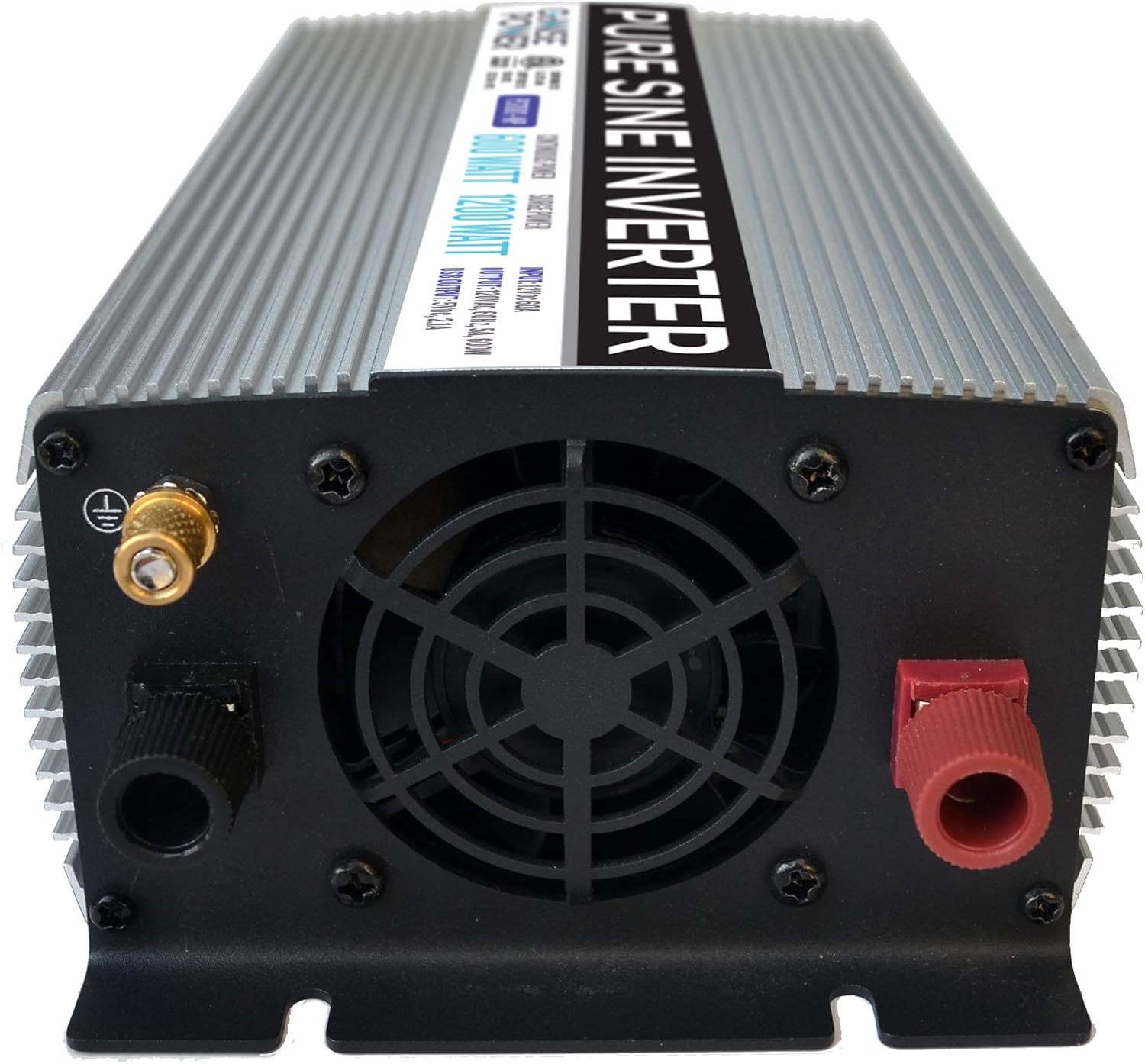
Figure 2: Rear panel of the GoWISE Power PS1001 inverter, displaying the positive (red) and negative (black) DC input terminals, a grounding screw, and the integrated cooling fan.

Figure 3: Accessories included with the inverter, showing the remote control unit and the red and black battery clamp cables for direct battery connection.
Safety Information
The PS1001 inverter incorporates multiple protection systems to ensure safe operation and protect both the device and connected electronics:
- Thermal Protection: Automatically shuts down the inverter if internal temperature exceeds safe limits.
- Overload Protection: Prevents damage by shutting down if the connected load exceeds the inverter's capacity.
- Over Voltage Protection: Protects against damage from excessively high input voltage.
- Under Voltage Protection: Shuts down the inverter to prevent deep discharge of the battery.
- Low Voltage Protection Alarm: Alerts the user when the battery voltage drops to a critical level before shutdown.
Always ensure proper ventilation around the inverter to prevent overheating. Do not expose the inverter to water or extreme temperatures. Before connecting, verify the maximum amperage of your battery and its compatibility with the inverter.
Setup and Installation
Connecting to a 12V Power Source
The GoWISE Power PS1001 inverter can be connected to a 12V DC power source using the provided battery clamp cables.
- Ensure the inverter's power switch is in the 'OFF' position.
- Connect the ring terminal of the red cable to the positive (+) terminal on the inverter. Tighten securely.
- Connect the ring terminal of the black cable to the negative (-) terminal on the inverter. Tighten securely.
- Attach the red battery clamp to the positive (+) terminal of your 12V battery.
- Attach the black battery clamp to the negative (-) terminal of your 12V battery.
- Once connected, switch the inverter's power button to 'ON'. The green LED indicator will illuminate, and the cooling fan may activate.
For loads exceeding 150W, direct connection to a 12V battery using the provided clamp cables is recommended to ensure full power delivery. For lower loads, a 12V accessory outlet (cigarette lighter socket) may be used with an appropriate adapter (not included for full 600W operation).
Using the Remote Control (Optional)
The inverter includes a remote control for convenient power management. Connect the remote control cable to the dedicated remote port on the inverter's front panel. The remote allows you to turn the inverter on or off from a distance, which is useful if the inverter is installed in an inaccessible location.
Video 1: Demonstration of the LANDERPOW Inverter powering various appliances like coffee machines, hair dryers, and circular saws. This video illustrates the inverter's capability to handle different loads, showcasing its versatility for users needing power for various tools and devices.
Operating Instructions
- After connecting the inverter to a 12V DC power source and turning it on, the green 'POWER' LED will light up.
- Plug your AC devices into the 115V AC outlets on the front panel.
- For USB charging, connect your device to the 5V USB port.
- Ensure the total wattage of all connected devices does not exceed the inverter's continuous power rating (600W) or surge rating (1200W).
- When finished, turn off the inverter using the power switch or remote control, and then disconnect it from the 12V power source.
Protection Systems
The PS1001 inverter is equipped with advanced protection features:
- Thermal Protection: Prevents overheating.
- Overload Protection: Safeguards against excessive power draw.
- Over Voltage Protection: Protects from high input voltage.
- Under Voltage Protection: Prevents battery damage from low voltage.
- Low Voltage Protection Alarm: Audible alert for low battery voltage.
An LED light on the inverter indicates the status of these protection systems, helping to diagnose potential issues.
Specifications

Figure 4: GoWISE Power PS1001 Inverter with key specifications highlighted.
| Feature | Specification |
|---|---|
| Brand | GoWISE |
| Model Name | PS1001 |
| Continuous Power | 600W |
| Surge Power | 1200W |
| Input Voltage | 12V DC |
| Output Voltage | 115V AC |
| Output Frequency | 60Hz |
| AC Outlets | 2 |
| USB Port | 1 (5V) |
| Total Harmonic Distortion (THD) | <3% |
| Product Dimensions | 8.4 x 3 x 5.5 inches |
| Item Weight | 4 pounds |
Maintenance
- Keep the inverter clean and free from dust and debris to ensure proper ventilation and cooling.
- Regularly check all cable connections to ensure they are secure and free from corrosion.
- Store the inverter in a cool, dry place when not in use.
- Avoid exposing the inverter to direct sunlight or heat sources.
Troubleshooting
If the inverter is not functioning as expected, check the following:
- No Power Output: Ensure the inverter is switched 'ON' and the green LED is illuminated. Verify that the 12V DC power source (battery) is adequately charged and properly connected. Check for blown fuses (extra fuses are typically included).
- Alarm Sounds: A low voltage alarm indicates the battery voltage is too low. Disconnect loads and recharge the battery. An overload alarm indicates too many devices are connected or a device is drawing too much power. Reduce the load.
- Overheating: If the inverter feels excessively hot, ensure it has proper ventilation and is not obstructed. Reduce the load if necessary.
Refer to the detailed instruction manual included with your purchase for specific LED indicator meanings and further troubleshooting steps.
Warranty and Support
For warranty information and customer support, please refer to the documentation provided in the product packaging or contact GoWISE customer service directly. Keep your purchase receipt for warranty claims.


