
1. Introduction
The JHS Pedals Prestige Boost is a versatile guitar effects pedal designed to enhance your guitar's tone. It functions as a buffer, a clean boost, and can even drive your amplifier into natural overdrive. This manual provides detailed instructions for setting up, operating, and maintaining your Prestige Boost pedal to ensure optimal performance.
2. Product Overview
The Prestige Boost pedal is a compact and powerful tool for guitarists. It features a single control knob that allows for a range of effects, from subtle signal enhancement to significant volume boost and amplifier saturation. Its true-bypass switching ensures your signal remains unaffected when the pedal is disengaged.
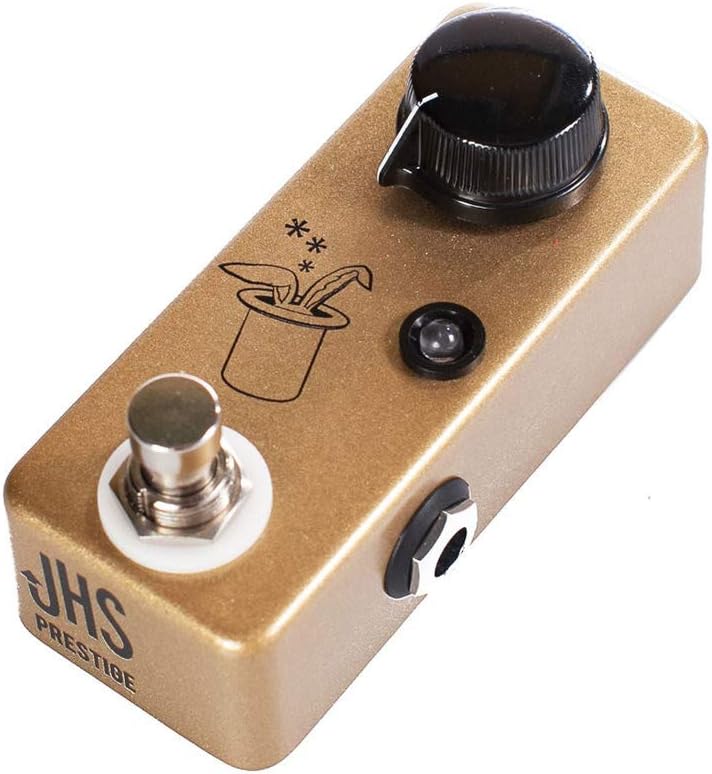
Figure 1: Front view of the JHS Pedals Prestige Boost pedal.
3. Features
- Single Control Knob: Provides intuitive control over the effect's intensity.
- Buffer/Enhancer: Ideal for long cable runs or to add brightness to your signal, especially at lower settings (0-25%).
- Volume Booster: Delivers a clean volume boost for solos or to push other overdrive pedals (25-75% range).
- Natural Overdrive: Capable of driving your amplifier's preamp section into rich, natural tube breakup at higher settings (above 75%).
- True-Bypass Switching: Ensures no tonal degradation when the pedal is off.
- Compact Design: Small enclosure for easy integration into any pedalboard.
- Standard Power Requirement: Operates on standard 9V DC negative power.
4. Setup
4.1 Power Connection
The JHS Pedals Prestige Boost requires a standard 9V DC power supply with a negative center pin. Ensure your power supply meets these specifications to prevent damage to the pedal.
4.2 Signal Chain Connection
- Connect your guitar to the input jack (right side) of the Prestige Boost pedal using a standard 1/4-inch instrument cable.
- Connect the output jack (left side) of the Prestige Boost pedal to the input of your amplifier or the next pedal in your signal chain using another 1/4-inch instrument cable.
For optimal buffering, consider placing the Prestige Boost early in your signal chain, especially if you use long cable runs or many true-bypass pedals.
5. Operating Instructions
The Prestige Boost pedal features a single knob for controlling its effect. The footswitch engages or disengages the pedal (true-bypass).
5.1 Knob Functionality
- 0-25% (Buffer/Enhancer): At lower settings, the pedal acts as a transparent buffer, preserving your signal integrity over long cable runs and adding a subtle chime or brightness.
- 25-75% (Volume Boost): As you increase the knob, the pedal provides a clean volume boost, perfect for making solos stand out or pushing other overdrive pedals for increased saturation.
- Above 75% (Natural Overdrive): At higher settings, the Prestige Boost will significantly increase the signal level, driving your amplifier's preamp tubes into a rich, natural overdrive. This can be used as a primary overdrive or to further enhance existing amp breakup.
5.2 Engaging the Pedal
Press the footswitch to toggle the effect on or off. The LED indicator will illuminate when the pedal is active.
5.3 Demonstration Video
Video 1: Official demonstration of the JHS Pedals Prestige Boost, showcasing its buffer, boost, and overdrive capabilities with various guitar and amplifier settings.
6. Maintenance
- Cleaning: Use a soft, dry cloth to clean the pedal's exterior. Avoid abrasive cleaners or solvents.
- Storage: Store the pedal in a cool, dry place away from direct sunlight and extreme temperatures when not in use.
- Cable Connections: Periodically check all cable connections for wear and tear. Replace damaged cables to ensure optimal signal integrity.
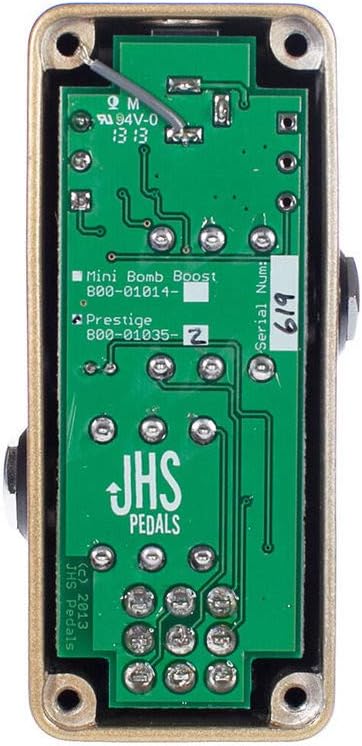
Figure 2: Internal view of the JHS Pedals Prestige Boost circuit board. No user-serviceable parts inside.
7. Troubleshooting
- No Sound:
- Ensure the power supply is correctly connected and functioning.
- Check all instrument cables for proper connection and integrity.
- Verify your guitar and amplifier are working correctly independently of the pedal.
- Weak or Distorted Signal (unexpectedly):
- Confirm the power supply is providing stable 9V DC.
- Check for faulty cables.
- Adjust the pedal's knob to a lower setting if unintended overdrive is occurring.
If issues persist, please refer to the Warranty and Support section for further assistance.
8. Specifications
| Feature | Detail |
|---|---|
| Brand | JHS Pedals |
| Model Name | Prestige Boost |
| Color | Gold |
| Product Dimensions | 6"L x 3"W x 3"H |
| Item Weight | 0.5 Pounds |
| Voltage | 9V |
| Amperage | 100 Milliamps |
| Audio Output Effects | Volume |
| Controls Type | Knob |
| Power Source | Corded Electric |
| Hardware Interface | 1/4-inch Audio |
| Signal Format | Analog |
| Connector Type | 1/4 inch (6.35mm) audio jack |
| Included Components | JHS Pedals JHS Prestige Boost Guitar Effects Pedal |
9. Warranty and Support
9.1 Warranty Information
The JHS Pedals Prestige Boost comes with a limited lifetime warranty (within the USA). Please retain your proof of purchase for warranty claims.
9.2 Customer Support
For technical assistance, troubleshooting beyond this manual, or warranty service, please contact JHS Pedals customer support. Visit the official JHS Pedals website for contact information and additional resources.


