
1. Introduction
This user manual provides detailed instructions for the operation and maintenance of your Venstar S404 Wireless Bluetooth Sport Portable Speaker. Designed for outdoor sports and bicycle use, this speaker allows you to enjoy music during activities like riding or climbing. Its robust TPU material ensures shockproof capability, and the included remote controller offers convenient volume control. Please read this manual carefully to ensure proper use and to maximize the lifespan of your device.
2. Safety Information
- Always read this manual thoroughly before initial use.
- The speaker is designed to be waterproof (IPX5 rated) against water splashes. However, it is not intended for submersion in water. If water splashes on the device, wipe it dry immediately.
- Keep the speaker away from strong magnetic fields to prevent damage.
- Do not attempt to disassemble, repair, or modify the speaker yourself. This may void the warranty and cause damage.
- Use only the provided charging cable and a DC5V, 1A power adapter for charging.
- Avoid exposing the speaker to extreme temperatures (hot or cold) or direct sunlight for prolonged periods.
- Keep out of reach of children.
3. Package Contents
Please check the box for the following items:
- 1 x Venstar S404 Bluetooth Speaker
- 1 x USB Charging Cable
- 1 x 3.5mm Audio Cable
- 1 x Metal Hook Loop (Carabiner)
- 1 x Bike Mount
- 1 x Fixed Trestle
- 1 x Allen Wrench
- 1 x Remote Controller
- 4 x Fastener Strings
- 1 x User Manual
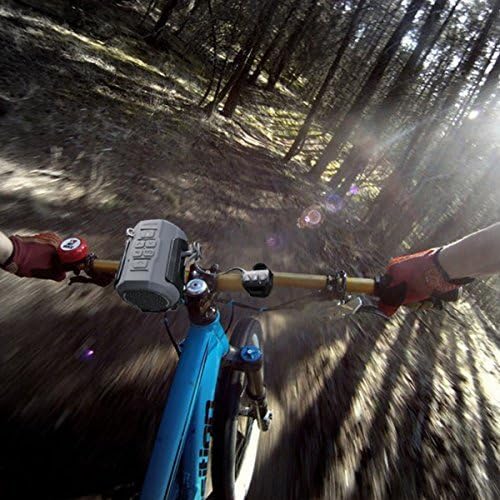
Figure 3.1: All components included in the Venstar S404 package.
4. Product Overview
Familiarize yourself with the various parts and controls of your Venstar S404 speaker.
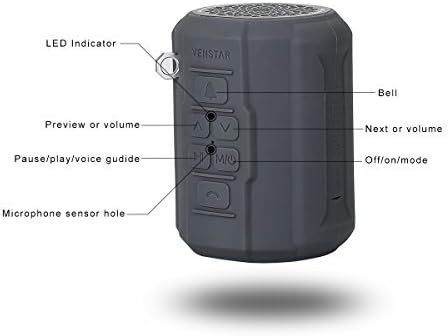
Figure 4.1: Side view of the speaker with labeled controls.
- LED Indicator: Shows power and connection status.
- Bell Button: Activates the bike bell sound.
- Previous/Volume Down Button: Short press for previous track, long press for volume down.
- Next/Volume Up Button: Short press for next track, long press for volume up.
- Pause/Play/Voice Guide Button (M/Mic): Controls playback, answers/ends calls, and toggles voice guide.
- Off/On/Mode Button: Powers the speaker on/off and switches between modes (Bluetooth, FM, TF Card, AUX).
- Microphone Sensor Hole: For hands-free calling.
5. Setup
5.1 Charging the Speaker
Before first use, fully charge the speaker. Connect the micro USB end of the provided USB cable to the speaker's charging port and the standard USB end to a DC5V, 1A USB power adapter or a computer's USB port. The LED indicator will show charging status.
5.2 Mounting on a Bicycle
The Venstar S404 comes with a bicycle mount for easy attachment to your bike's handlebars or frame. This mount also doubles as a bottle holder.
- Attach the fixed trestle to your bicycle's handlebar using the provided screws and Allen wrench. Ensure it is securely fastened.
- Slide the speaker into the bike mount until it clicks into place.
- Use the fastener strings if additional securing is needed.
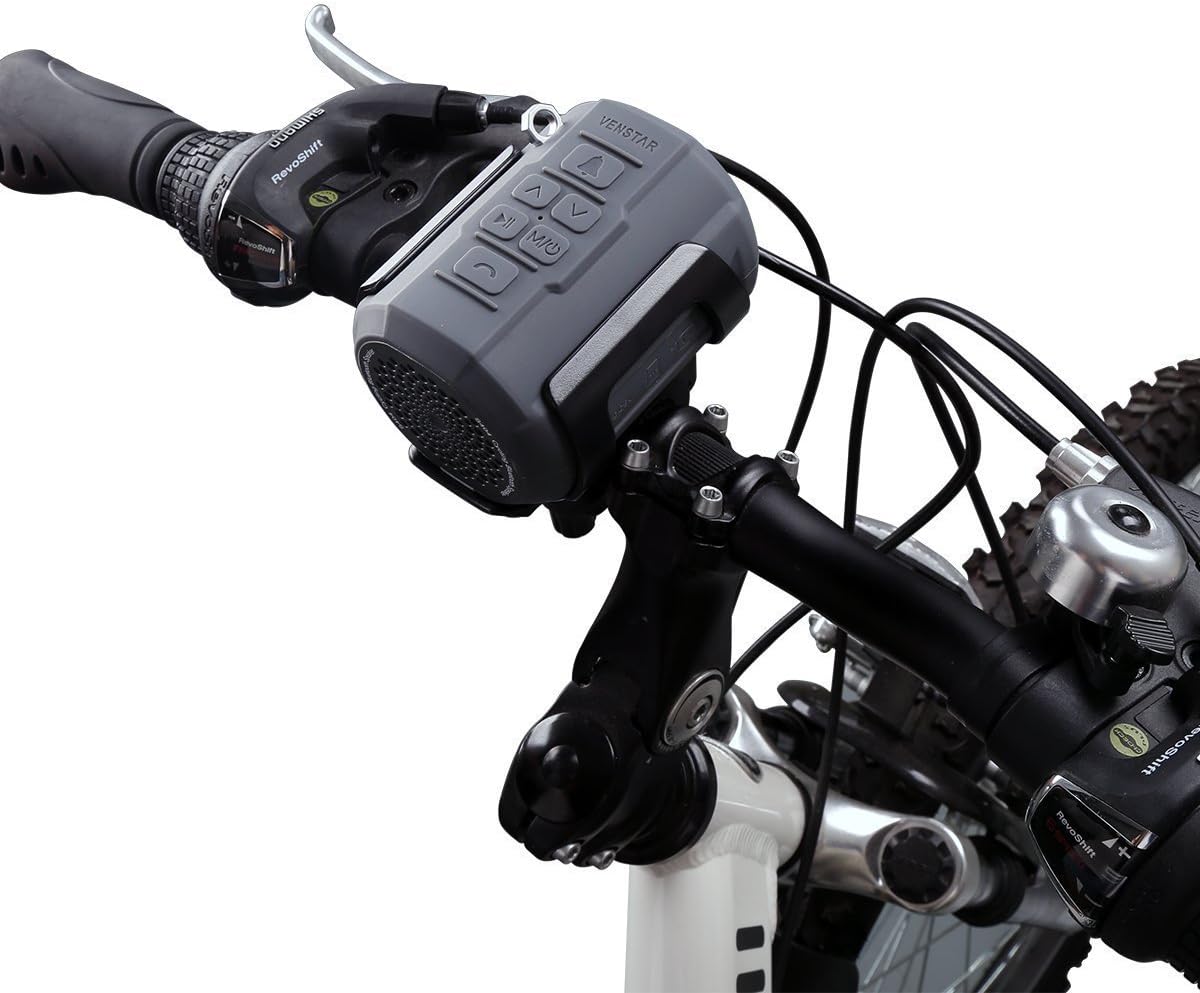
Figure 5.1: Speaker mounted on a bicycle handlebar.
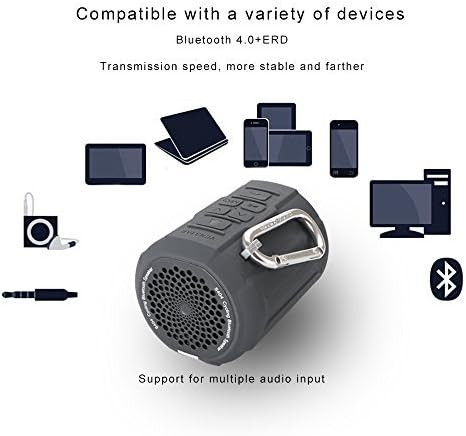
Figure 5.2: Rider's view of the speaker mounted on a bicycle.
6. Operating Instructions
6.1 Power On/Off
Press and hold the Off/On/Mode button to power the speaker on or off.
6.2 Bluetooth Pairing
The speaker will automatically enter Bluetooth pairing mode upon power-on if no other mode is selected. The LED indicator will flash. On your device (smartphone, tablet, etc.), enable Bluetooth and search for "Venstar S404". Select it to pair. The speaker will confirm successful connection, and the LED will become solid blue. The speaker will automatically connect to the last paired device when powered on.

Figure 6.1: Hands-free calling feature in use with the speaker.

Figure 6.2: Compatibility with various Bluetooth devices.
6.3 FM Radio Operation
Press the Off/On/Mode button to switch to FM radio mode. The speaker will automatically scan and save available FM stations. Use the Previous/Volume Down and Next/Volume Up buttons to navigate between saved stations. The speaker has breakpoint memory for FM stations.
6.4 TF Card Playback
Insert a TF (Micro SD) card (up to 32GB) loaded with music files (APE, FLAC, MP3, WMA, WAV formats supported) into the TF card slot. The speaker will automatically switch to TF card mode and begin playback. The speaker has breakpoint memory for TF card playback.
6.5 AUX Input
Connect an external audio device using the provided 3.5mm audio cable to the AUX input port on the speaker. The speaker will automatically switch to AUX mode.
6.6 Hands-free Calling
When connected via Bluetooth to a smartphone, you can use the speaker for hands-free calls. Press the Pause/Play/Voice Guide button to answer or end a call. The built-in noise reduction microphone ensures clear communication.
6.7 Remote Control Usage
The included remote controller allows for convenient operation while on the go. It can control volume, track skipping, and call functions without needing to reach the speaker directly.
6.8 Using as a Bike Bell
Press the Bell button on the speaker to activate the bike bell sound, providing an audible warning to pedestrians or other riders.
7. Maintenance
- Cleaning: Wipe the speaker with a soft, damp cloth. Do not use harsh chemicals or abrasive cleaners. Ensure the charging port cover is securely closed before cleaning.
- Storage: Store the speaker in a cool, dry place away from direct sunlight and extreme temperatures when not in use for extended periods.
- Battery Care: To prolong battery life, avoid fully discharging the battery frequently. Charge the speaker regularly, even if not in use.
8. Troubleshooting
| Problem | Possible Cause | Solution |
|---|---|---|
| Speaker does not power on. | Low battery. | Charge the speaker fully. |
| Cannot pair via Bluetooth. | Speaker is not in pairing mode; device Bluetooth is off; too far from speaker. | Ensure speaker is in Bluetooth mode (flashing LED). Turn on Bluetooth on your device. Move device closer to speaker (within 10 meters). |
| No sound. | Volume too low; incorrect mode selected; audio cable not fully inserted. | Increase volume on speaker and connected device. Ensure correct mode (Bluetooth, FM, TF, AUX) is selected. Re-insert audio cable firmly. |
| FM radio reception is poor. | Weak signal; interference. | Move to an area with better signal. Try re-scanning stations. |
| Speaker is unresponsive. | System error. | Use the reset function (if available, typically a small pinhole button) or power cycle the device. |
9. Specifications
| Feature | Detail |
|---|---|
| Model Number | S404 (385968) |
| Speaker Unit | 1.5 inches |
| Speaker Maximum Output Power | 6 Watts |
| Bluetooth Version | 4.0 EDR |
| Play Modes | Bluetooth, FM Radio, TF Card, AUX |
| Memory Type (TF Card) | Up to 32GB |
| Music Formats Supported | APE, FLAC, MP3, WMA, WAV |
| Battery | Built-in 2100mAh Li-ion battery |
| Input | DC5V, 1A (Micro USB Port) |
| Product Dimensions | 8.89 x 6.1 x 6.1 cm |
| Item Weight | 0.26 Kilograms (260 g) |
| Material | Plastic (TPU) |
| Special Features | Portable, Waterproof (IPX5), FM Radio, Shockproof, Dustproof, Hands-free Calling, Bike Bell Function |
10. Warranty and Support
The Venstar S404 Wireless Bluetooth Sport Portable Speaker comes with a 1-Year Manufacturer's Warranty. This warranty covers defects in materials and workmanship under normal use from the date of purchase.
Additionally, a 30-Day Money Back Guarantee is offered. Please refer to your purchase receipt or retailer's policy for specific terms and conditions.
For technical assistance, product inquiries, or warranty claims, please contact Venstar customer service. Contact information can typically be found on the product packaging or the official Venstar website. When contacting support, please have your product model number (S404) and proof of purchase ready.