
Graco R2 E-XP2
Graco Reactor 2 E-XP2 Instruction Manual
Model: R2 E-XP2
Important Safety Information
WARNING: This equipment handles high-pressure materials and chemicals. Always wear appropriate personal protective equipment (PPE), including gloves, safety glasses, and protective clothing. Avoid contact with skin and eyes. In case of contact, rinse immediately with plenty of water and seek medical advice. Do not use under high temperatures or in confined spaces. Always follow manufacturer's instructions for safe operation and maintenance. Store in a cool, dry place away from heat sources and incompatible materials. Dispose of according to local regulations. Keep out of reach of children and pets. This product is intended for professional use only. Do not use for any other purpose. Reactor Connect: Your data is stored and transmitted securely, but it is your responsibility to protect your data and comply with all relevant privacy and security regulations.
Product Overview
The Graco Reactor 2 E-XP2 is a state-of-the-art spray foam and polyurea equipment designed for professional applications. This system incorporates next-generation technology to enhance spray performance and operational efficiency. Key features include a compact footprint, ergonomic design for easier servicing, advanced circuit boards, and integrated troubleshooting via QR codes.
The Reactor 2 E-XP2 also features advanced control technology for tracking, monitoring, and saving project data, with the ability to download data onto a USB drive. It supports up to 24 chemical recipes and includes drum level indicators. Elite models come standard with Graco InSite Remote Reporting Technology, allowing real-time job activity monitoring via smart devices.
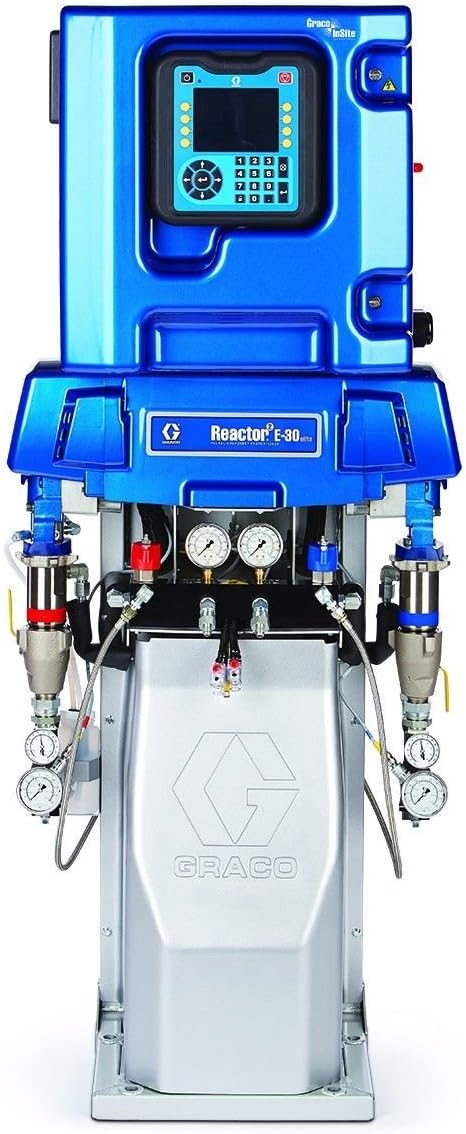
Figure 1: Front view of the Graco Reactor 2 E-XP2 system, showcasing its compact design and integrated control panel.
Technical Specifications
| Attribute | Value |
|---|---|
| Brand | Graco |
| Model Name | Reactor 2 E-XP2 |
| Item Model Number | R2 E-XP2 |
| Power Source | Electric |
| Maximum Pressure | 3500 PSI (Pound per Square Inch) |
| Material | Aluminum, Stainless Steel, Zinc-Plated Carbon Steel, Brass, Carbide, Chrome, Chemically Resistant O-Rings, PTFE, UHMWPE |
| Color | Blue |
| Recommended Uses | Painting, Spray Foam Insulation, Polyurea Application |
| Included Components | 1 x Pump, 1 x Hose |
| UPC | 633955638204 |
Setup and Installation
Proper setup of the Graco Reactor 2 E-XP2 is crucial for optimal performance and safety. Follow these general guidelines:
- Site Preparation: Ensure the work area is well-ventilated, free from obstructions, and has adequate power supply for the electric system.
- Unpacking: Carefully unpack all components, verifying against the packing list. Inspect for any shipping damage.
- Placement: Position the Reactor 2 E-XP2 on a stable, level surface. Its compact footprint allows for more room in spray rigs.
- Hose and Gun Connection: Connect the supplied hoses and spray gun according to the detailed diagrams in the full product manual. Ensure all connections are secure and leak-free.
- Material Supply: Connect the material supply lines from the chemical drums to the Reactor system. Utilize the drum level indicators to monitor material levels.
- Electrical Connection: Connect the system to the appropriate electrical power source. The advanced circuit boards are designed to handle power fluctuations, but a sacrificial surge protector is included to protect against excessive power spikes.
- Initial Power-Up: Power on the system and follow the on-screen prompts on the user display module for initial configuration.
Note: For detailed, step-by-step installation instructions, refer to the comprehensive installation guide provided with your equipment.
Operating Instructions
Operating the Graco Reactor 2 E-XP2 involves several key steps to ensure efficient and consistent spray performance:
- System Warm-up: Allow the system to reach the desired operating temperature for the specific chemicals being used. The 15.3 kW heaters ensure rapid and consistent heating.
- Recipe Selection: Use the advanced control technology to select from up to 24 stored chemical recipes. This ensures accurate proportioning and temperature control for different materials.
- Pressure Adjustment: Adjust the system pressure to the recommended settings for your application. The system provides smooth, consistent spray performance, similar to hydraulic systems.
- Spraying Technique: Maintain consistent spray patterns and overlap for uniform coverage. Refer to best practices for spray foam or polyurea application.
- Monitoring: Continuously monitor system parameters on the user display module, including temperature, pressure, and material levels.
- Data Logging: The system automatically tracks, monitors, and saves project data. This data can be downloaded onto a USB drive for record-keeping and analysis.
- Graco InSite (Elite Models): If you have an Elite model, utilize Graco InSite Remote Reporting Technology to transmit real-time job activity to your smart phone, tablet, or computer for remote monitoring.
Always consult the specific chemical manufacturer's data sheets for material handling and application guidelines.
Maintenance
Regular maintenance is essential to prolong the life of your Graco Reactor 2 E-XP2 and ensure its continued optimal performance. The ergonomic design makes the system easier to service.
Daily Maintenance:
- Clean the spray gun and mixing chamber thoroughly after each use to prevent material buildup.
- Inspect hoses for kinks, abrasions, or leaks.
- Check and clean material filters.
- Verify proper function of pressure gauges and temperature sensors.
Weekly/Monthly Maintenance:
- Inspect and lubricate pump packings as recommended.
- Check electrical connections for tightness and signs of wear.
- Clean the exterior of the unit.
- Perform a system pressure test to ensure integrity.
Preventative Maintenance:
- Follow the preventative maintenance schedule outlined in the official Graco manual.
- Replace wear parts (e.g., seals, O-rings) at recommended intervals.
- Consider professional servicing for annual inspections and major component checks.
Always disconnect power before performing any maintenance or cleaning procedures.
Troubleshooting
The Graco Reactor 2 E-XP2 is designed for reliability, but should issues arise, the system offers features to aid in quick diagnosis. Troubleshooting is made quick and easy with QR codes, leading to less downtime.
| Problem | Possible Cause | Solution |
|---|---|---|
| No Power to Unit | Power cord disconnected, circuit breaker tripped, internal fuse blown. | Check power connections, reset breaker, inspect fuses (consult manual for fuse location). |
| Inconsistent Spray Pattern | Clogged spray tip, incorrect pressure settings, material temperature issues. | Clean or replace spray tip, adjust pressure, verify material temperatures are within specifications. |
| Material Not Heating | Heater element failure, temperature sensor malfunction, electrical issue. | Check heater connections, verify sensor readings, consult a qualified technician. |
| Pressure Fluctuations | Air in system, worn pump packings, clogged filters. | Bleed air from system, inspect and replace pump packings, clean or replace filters. |
| Error Code Displayed | System detected an anomaly. | Scan the QR code displayed on the screen for specific troubleshooting steps or refer to the error code section in the full manual. |
For complex issues or issues not listed, contact Graco customer support or a certified service technician.
Warranty Information
The Graco Reactor 2 E-XP2 comes with a comprehensive warranty to ensure peace of mind for professional users.
- Three-Year Warranty: This warranty covers the user display module, control boards, and electric motor. This is one of the best warranties in the industry.
- General Warranty: Other components may be covered under a standard Graco warranty. Refer to the official Graco warranty statement provided with your product for full terms and conditions, including coverage details and exclusions.
To make a warranty claim, retain your proof of purchase and contact Graco customer support.
Customer Support and Resources
For further assistance, technical support, or to order replacement parts, please utilize the following resources:
- Graco Official Website: Visit the Graco website for product documentation, FAQs, and service center locations.
- Technical Support: Contact Graco technical support for expert assistance with operation, maintenance, and troubleshooting.
- Authorized Service Centers: Locate an authorized Graco service center near you for professional repairs and maintenance.
- Graco InSite: For Elite models, leverage the Graco InSite Remote Reporting Technology for advanced diagnostics and remote monitoring.
Always provide your product model number (R2 E-XP2) and serial number when contacting support.
Ask a question about this manual
Ask about setup, troubleshooting, compatibility, parts, safety, or missing instructions. Manuals+ will review the question and use this page’s manual context to help answer it.