1. Introduction
This manual provides comprehensive instructions for the operation, maintenance, and care of your TW Steel Men's TW938 Analog Display Quartz Black Watch. Please read this manual thoroughly before using your watch to ensure proper function and longevity.
2. Product Overview
The TW Steel TW938 is a robust analog display quartz watch designed for men, featuring a chronograph and tachymeter. Key features include:
- Chronograph watch featuring a tachymeter and date display within stainless steel case.
- Hardened mineral crystal protects watch from scratches.
- Quartz Movement ensures accurate timekeeping.
- Case Diameter: 45mm, providing a prominent presence on the wrist.
- Water Resistant To 165 Feet (5 ATM), suitable for short periods of recreational swimming, but not diving or snorkeling.

Figure 2.1: Front view of the TW Steel TW938 watch. This image displays the watch face, including the chronograph sub-dials, date window, and tachymeter scale around the bezel. The black dial has a carbon fiber texture, and the hands are silver with blue accents on the chronograph second hand.
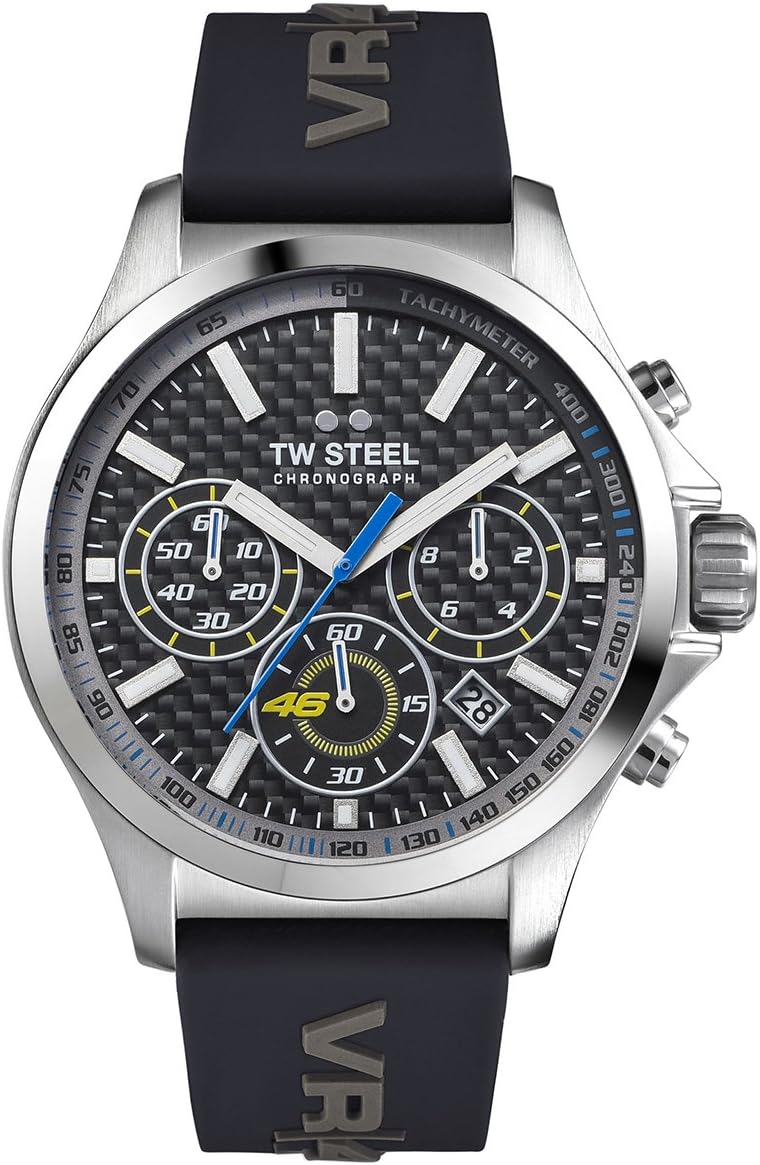
Figure 2.2: Angled view of the TW Steel TW938 watch. This perspective shows the watch from a slight angle, emphasizing the thickness of the case and the texture of the black silicone strap, which features the "VR46" logo.

Figure 2.3: The TW Steel TW938 watch on a male wrist. This image provides a real-world perspective of the watch's size and how it appears when worn.
3. Setup
3.1 Setting the Time
- Pull the crown (middle knob on the right side) out to position 2 (the furthest position). The second hand will stop.
- Turn the crown clockwise or counter-clockwise to set the hour and minute hands to the desired time.
- Push the crown back into position 0 (normal operating position). The second hand will resume movement.
3.2 Setting the Date
- Pull the crown out to position 1 (the first click).
- Turn the crown clockwise to adjust the date. If the date changes during the day, it means the watch is set for PM. Advance the time by 12 hours.
- Push the crown back into position 0.
Note: Avoid setting the date between 9 PM and 3 AM, as this may interfere with the date change mechanism.
4. Operating Instructions
4.1 Using the Chronograph
The chronograph function allows you to measure elapsed time. The watch features three sub-dials for chronograph measurements: a 60-second counter, a 60-minute counter, and a 24-hour indicator (or small seconds, depending on the specific movement). The large blue second hand is the chronograph second hand.
- Start: Press the upper pusher (button A) to start the chronograph. The large second hand will begin to move.
- Stop: Press the upper pusher (button A) again to stop the chronograph. The elapsed time will be indicated by the chronograph hands.
- Reset: After stopping, press the lower pusher (button B) to reset all chronograph hands to their zero positions.
4.2 Using the Tachymeter
The tachymeter scale on the bezel can be used to measure speed over a known distance (e.g., 1 kilometer or 1 mile) or to measure production units per hour.
- Start the chronograph at the beginning of the measured event (e.g., when a car passes the starting line).
- Stop the chronograph when the event is completed (e.g., after the car has traveled 1 unit of distance).
- Read the number on the tachymeter scale indicated by the chronograph second hand. This number represents the speed in units per hour (e.g., km/h or mph).
5. Maintenance
5.1 Cleaning Your Watch
- Wipe the watch case and crystal regularly with a soft, dry cloth to remove dust and fingerprints.
- For the silicone strap, you can use a damp cloth with mild soap and water, then rinse thoroughly and dry completely.
- Avoid using harsh chemicals, solvents, or abrasive cleaners, as these can damage the watch's finish or seals.
5.2 Water Resistance
Your TW Steel TW938 watch is water resistant to 165 feet (5 ATM). This means it is suitable for everyday use and can withstand splashes, rain, and short periods of recreational swimming. It is not suitable for diving, snorkeling, or high-impact water sports.
- Ensure the crown is fully pushed in before any contact with water.
- Do not operate the crown or pushers when the watch is wet or submerged.
- Avoid exposing the watch to extreme temperature changes (e.g., hot showers followed by cold water), as this can compromise the water resistance seals.
5.3 Battery Replacement
The watch is powered by a quartz movement, which requires a battery. When the second hand begins to jump in 2-second intervals, it indicates that the battery is low and needs replacement. Battery replacement should be performed by a qualified watchmaker or authorized service center to ensure proper sealing and water resistance.
6. Troubleshooting
| Problem | Possible Cause | Solution |
|---|---|---|
| Watch stops or runs intermittently. | Low battery. | Replace battery at an authorized service center. |
| Date does not change at midnight. | Time is set for AM instead of PM. | Advance the time by 12 hours. |
| Condensation inside the crystal. | Exposure to extreme temperature changes or compromised water resistance. | Immediately take the watch to an authorized service center for inspection and repair. |
| Chronograph hands do not reset to zero. | Requires calibration. | Consult the watch movement's specific instructions for chronograph hand calibration, or take to a service center. |
7. Specifications
| Feature | Detail |
|---|---|
| Model Number | TW938 |
| Movement | Quartz |
| Case Material | Stainless Steel |
| Case Diameter | 45mm |
| Crystal | Hardened Mineral Crystal |
| Water Resistance | 165 Feet (5 ATM) |
| Strap Material | Silicone |
| Functions | Chronograph, Tachymeter, Date Display |
| Weight | 111 g |
| Batteries | 1 Product Specific battery required |
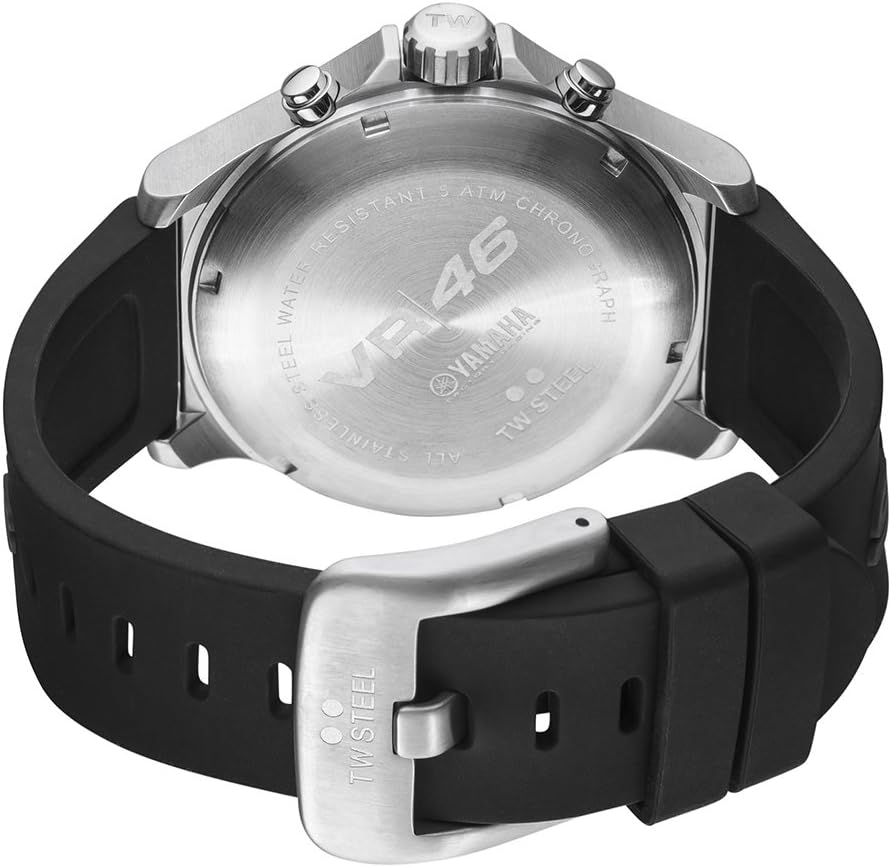
Figure 7.1: Side view of the TW Steel TW938 watch. This image focuses on the right side of the watch case, clearly showing the textured crown with the 'TW' logo and the two chronograph pushers above and below it.

Figure 7.2: Back view of the TW Steel TW938 watch. This image displays the stainless steel case back, which is engraved with details such as "VR46", "YAMAHA", "TW STEEL", "WATER RESISTANT 5 ATM", and "ALL STAINLESS STEEL CHRONOGRAPH". The black silicone strap is also visible.
8. Warranty and Support
For warranty information, service, or support, please refer to the official TW Steel website or contact their customer service. Keep your proof of purchase for any warranty claims.
Manufacturer: TW Steel Watches MFG
Date First Available: 28 November 2015
ASIN: B012N2M7Z8


