
1. Introduction
Welcome to the user manual for your Yale Digital Mortise Lock YDM 3212. This document provides essential information for the proper installation, operation, and maintenance of your new digital lock. Please read these instructions carefully before using the product to ensure optimal performance and security.

Image 1.1: Front view of the Yale Digital Mortise Lock YDM 3212, showcasing the sleek design and keypad.
2. Product Overview and Key Features
The Yale YDM 3212 is an advanced digital mortise lock designed to provide enhanced security and convenience for your home. It offers multiple access methods and smart features to ensure reliable protection.

Image 2.1: Diagram detailing the key features of the Yale YDM 3212 digital lock.
Key Features:
- Various Access Solutions: Open your door using a secure PIN code or RF (Radio Frequency) cards.
- Alarm System: Features an 80dB alarm that activates upon break-in attempts, damage, or detection of high heat (e.g., fire).
- Invisible Keypad: The keypad numbers are only visible when touched, enhancing security and aesthetics.
- Automatic Locking: The lock automatically secures the door after it is properly closed, providing peace of mind.
- Low Battery & Emergency Power Supply: Provides warnings for low battery levels and includes an external 9V battery terminal for emergency power.
- Clutch Mechanism Mortise: Incorporates a robust clutch mechanism for faster and more secure locking.
- Easy Installation: Designed for minimal drilling, requiring only two holes for installation.
- Remote Control (Optional): Supports wireless floating ID technology for optional remote access.
3. Components
Familiarize yourself with the main components of your Yale YDM 3212 digital lock:
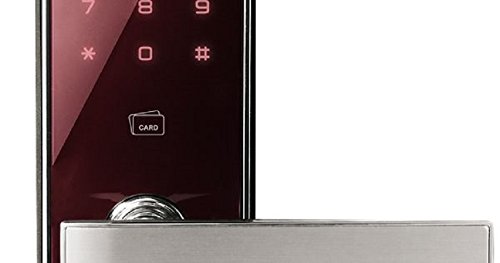
Image 3.1: Exploded view of the Yale YDM 3212 components, including the front body, main body, and mortise.
- Front Body: Contains the touch keypad and RF card key reader.
- Main Body: Houses the battery cover and status indicator.
- Mortise: The internal locking mechanism, featuring an auto-locking sensor and clutch mechanism.
4. Setup and Installation
Proper installation is crucial for the optimal performance and security of your Yale YDM 3212 lock. It is recommended that installation be performed by a qualified professional.
4.1. Pre-Installation Checklist
- Ensure your door thickness is compatible with the lock specifications (typically 38-55mm).
- Verify all components are present in the package.
- Have the necessary tools ready (e.g., drill, screwdriver, measuring tape).
4.2. Basic Installation Steps (Summary)
- Prepare the door by drilling the necessary holes according to the provided template.
- Install the mortise into the door edge.
- Mount the front body and main body, ensuring proper alignment.
- Connect the internal cables between the front and main bodies.
- Install the batteries and close the battery cover.
- Test the lock's functionality before closing the door.
5. Operating Instructions
Your Yale YDM 3212 offers convenient and secure access methods.
5.1. Access Methods
- PIN Code: To unlock, touch the keypad to activate, enter your registered PIN code, and press the '*' or '#' key (refer to specific model instructions for exact key).
- RF Card: To unlock, place your registered RF card on the card reader area of the front body.
5.2. Changing PIN Code
Refer to the detailed programming guide for specific steps to change your master or user PIN codes. This typically involves entering a master code, selecting the PIN change option, and then entering the new PIN.
5.3. Registering/Deleting RF Cards
RF cards must be registered with the lock before use. Consult the programming guide for instructions on how to add or remove RF cards from the system memory.
5.4. Automatic Locking Function
The lock is designed to automatically secure the door a few seconds after it closes. Ensure the door is fully shut for this feature to engage. This function can usually be enabled or disabled through the lock's settings.
5.5. Emergency Power Supply
If the batteries are completely drained, you can use a standard 9V battery to temporarily power the lock. Connect the 9V battery to the emergency power terminal located on the front body, then use your PIN code or RF card to unlock the door.
6. Maintenance
Regular maintenance ensures the longevity and reliable operation of your digital lock.
- Battery Replacement: Replace all batteries with new, high-quality alkaline batteries when the low battery alarm sounds. Do not mix old and new batteries or different battery types.
- Cleaning: Wipe the lock's surface with a soft, dry cloth. Avoid using abrasive cleaners, solvents, or harsh chemicals, as these can damage the finish and electronic components.
- Door Alignment: Periodically check that your door and frame are properly aligned. Misalignment can cause undue stress on the lock mechanism.
7. Troubleshooting
If you encounter issues with your Yale YDM 3212, refer to the table below for common problems and solutions.
| Problem | Possible Cause | Solution |
|---|---|---|
| Lock not responding to PIN/RF card. | Drained batteries; incorrect PIN/unregistered card; system error. | Replace batteries; use emergency 9V power; re-enter PIN carefully; re-register card; perform a factory reset (consult manual). |
| Low battery alarm sounds. | Batteries are low. | Replace all batteries immediately with new alkaline batteries. |
| Door does not lock automatically. | Door not fully closed; automatic locking feature disabled. | Ensure door is completely shut; check lock settings to enable automatic locking. |
| Keypad not lighting up. | Batteries drained; keypad malfunction. | Replace batteries; use emergency 9V power; if issue persists, contact customer support. |
8. Specifications
Technical details for the Yale Digital Mortise Lock YDM 3212:
| Feature | Detail |
|---|---|
| Brand | Yale |
| Model | YDM 3212 |
| Lock Type | Electronic Mortise Lock |
| Access Methods | PIN Code, RF Card |
| Special Feature | Biometric Lock (general category), Invisible Keypad, Alarm |
| Recommended Use | Home |
| Style | Modern |
| Color | Metallic |
| Finish Type | Polished |
| Control Method | Touch, Key Control |
| Connectivity Protocol | Wi-Fi (for optional smart home integration) |
| Item Weight | 1 kg |
9. Warranty and Support
Yale products are manufactured to high standards and undergo rigorous quality control. For specific warranty terms and conditions, please refer to the warranty card included with your product or visit the official Yale website. In case of any issues or for technical assistance, please contact Yale customer support through their official channels.
For further assistance, please visit the Yale Store on Amazon.


