
1. Introduction
Thank you for purchasing the RCA DEDE-240M4 24-inch HD LED Television. This manual provides essential information for the safe and efficient operation of your new television. Please read this manual thoroughly before using the product and retain it for future reference.
2. Safety Information
- Electrical Safety: Do not expose the television to rain or moisture to prevent fire or electric shock. Ensure the power cord is not damaged or pinched.
- Ventilation: Ensure adequate ventilation around the television. Do not block ventilation openings. Avoid placing the TV on soft surfaces like carpets or blankets.
- Placement: Place the television on a stable, level surface. Avoid direct sunlight, heat sources, and excessive dust.
- Cleaning: Unplug the television before cleaning. Use a soft, dry cloth. Do not use liquid cleaners or aerosol cleaners.
- Batteries: Dispose of used batteries responsibly. Do not mix old and new batteries or different types of batteries.
3. Package Contents
Please check that all items are present in the package:
- RCA DEDE-240M4 24-inch HD LED Television
- Remote Control
- Power Cord
- TV Stand (Base and Screws)
- AAA Batteries (2) for Remote Control
- User Manual (this document)
4. Product Overview
4.1 Rear Panel Connections
The rear panel of your television provides various ports for connecting external devices. Refer to the image below for a visual guide.

Image 1: Rear panel connections of the RCA DEDE-240M4 television. From left to right, ports include USB, L/R Audio Input, Video/Y/Pb/Pr Component Input, HDMI/MHL, VGA, PC/Audio Input, Earphone, ANT (Antenna), and Coaxial Digital Audio Out.
- USB: For connecting USB storage devices to play media files (JPEG, MP3, Movie).
- INPUT (L/R, VIDEO/Y/Pb/Pr): Analog audio and video inputs for older devices.
- HDMI/MHL: High-Definition Multimedia Interface inputs for digital audio and video. MHL (Mobile High-Definition Link) support allows connecting compatible mobile devices. There are 3 HDMI inputs.
- VGA (PC INPUT): For connecting a computer.
- PC/AUDIO INPUT: Audio input for PC connection.
- EARPHONE: For connecting headphones.
- ANT (Antenna): For connecting an external antenna or cable TV signal.
- COAXIAL (DIGITAL AUDIO OUT): For connecting to a digital audio receiver or sound system.
4.2 Remote Control
The remote control allows you to operate your television from a distance. Insert the two AAA batteries provided, ensuring correct polarity.
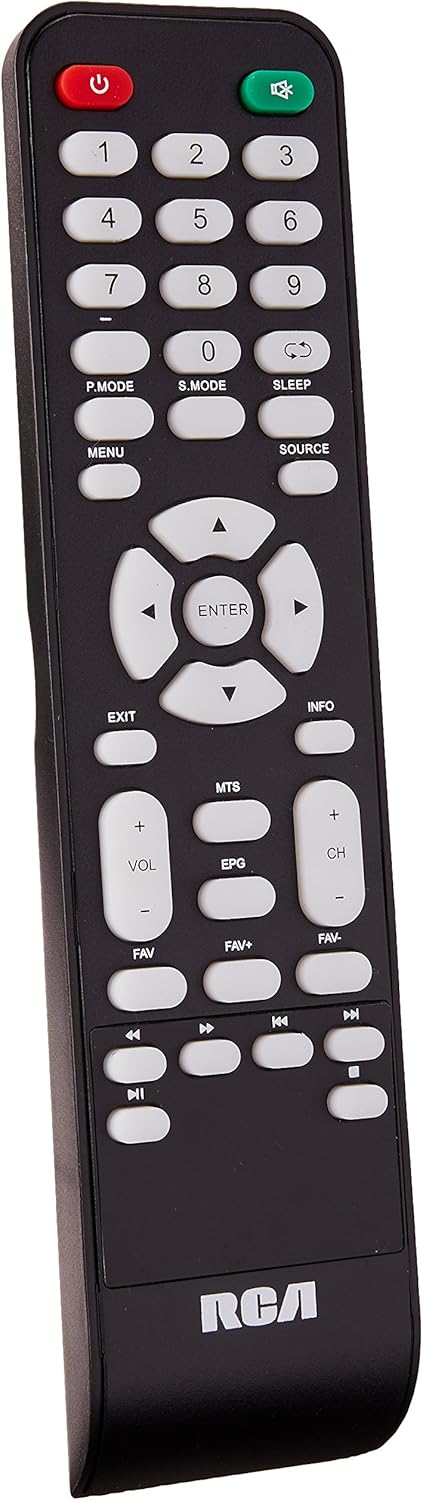
Image 2: Remote control for the RCA DEDE-240M4 television. Key buttons include Power, Number Pad, P.MODE, S.MODE, SLEEP, MENU, SOURCE, EXIT, INFO, directional arrows with ENTER, VOL+/-, CH+/-, MTS, EPG, FAV, FAV+, FAV-, and media playback controls.
- POWER (Red): Turns the TV on or off.
- Number Buttons (0-9): For direct channel selection.
- P.MODE: Picture Mode selection.
- S.MODE: Sound Mode selection.
- SLEEP: Sets the sleep timer.
- MENU: Accesses the main menu.
- SOURCE: Selects the input source (HDMI, AV, USB, TV).
- EXIT: Exits the current menu or function.
- INFO: Displays program information.
- Directional Arrows (Up/Down/Left/Right) & ENTER: Navigates menus and confirms selections.
- VOL +/-: Adjusts the volume level.
- CH +/-: Changes channels.
- MTS: Multi-channel Television Sound (SAP/Stereo).
- EPG: Electronic Program Guide (for digital channels).
- FAV / FAV+ / FAV-: Accesses and navigates favorite channels.
- Media Playback Controls: Play, Pause, Stop, Fast Forward, Rewind, Next/Previous Track (for USB media).
5. Setup
5.1 Attaching the Stand
- Carefully place the TV face down on a soft, clean surface to prevent screen damage.
- Align the stand base with the mounting holes on the bottom of the TV.
- Secure the stand using the provided screws. Do not overtighten.
- Place the TV upright on a stable surface.
5.2 Connecting External Devices
Ensure the TV and all devices are powered off before making any connections.
- Antenna/Cable: Connect an RF coaxial cable from your antenna or cable wall outlet to the ANT input on the TV.
- HDMI Devices (e.g., Blu-ray player, game console): Connect an HDMI cable from the device's HDMI output to any of the HDMI inputs on the TV.
- USB Devices: Insert a USB flash drive into the USB port for media playback.
- PC Connection: Connect a VGA cable from your computer's VGA output to the TV's VGA input. Connect an audio cable from your computer's audio output to the TV's PC/AUDIO INPUT.
- Audio System: For digital audio, connect a coaxial digital audio cable from the TV's COAXIAL output to your audio receiver. For headphones, use the EARPHONE jack.
5.3 Powering On
- Connect the power cord to the TV's power input, then plug the other end into a wall outlet.
- Press the POWER button on the remote control or on the TV itself.
- Follow the on-screen instructions for initial setup, including language selection and channel scanning.
6. Operating
6.1 Basic Functions
- Power On/Off: Press the POWER button on the remote or TV.
- Volume Adjustment: Use VOL +/- buttons on the remote.
- Channel Selection: Use CH +/- buttons or the number pad on the remote.
- Input Source Selection: Press the SOURCE button on the remote to cycle through available inputs (TV, HDMI1, HDMI2, HDMI3, AV, PC, USB). Press ENTER to confirm.
6.2 Menu Navigation
Press the MENU button to access the main menu. Use the directional arrows to navigate through options and ENTER to select. Use EXIT to close the menu.
6.3 USB Media Playback
Insert a USB flash drive into the USB port. The TV should automatically detect the device and prompt you to open the media browser. If not, select the USB source using the SOURCE button. You can play JPEG images, MP3 audio, and various video formats.
7. Maintenance
- Screen Cleaning: Gently wipe the screen with a soft, lint-free cloth. For stubborn marks, slightly dampen the cloth with water or a specialized screen cleaner (apply to cloth, not directly to screen).
- Cabinet Cleaning: Wipe the TV cabinet with a soft, dry cloth.
- Storage: If storing the TV for an extended period, unplug it, remove batteries from the remote, and cover it to protect from dust.
8. Troubleshooting
| Problem | Possible Solution |
|---|---|
| No power | Ensure the power cord is securely plugged into the TV and the wall outlet. Check if the outlet is working. |
| No picture, but sound is present | Check the input source selection. Ensure external devices are powered on and connected correctly. |
| No sound, but picture is present | Check the volume level and ensure the TV is not muted. Check audio cable connections for external devices. |
| Remote control not working | Replace the batteries with new AAA batteries, ensuring correct polarity. Ensure there are no obstructions between the remote and the TV's IR sensor. |
| "No Signal" message | Verify the correct input source is selected. Check antenna/cable connection or external device connections. Perform a channel scan if using an antenna. |
9. Specifications
| Feature | Specification |
|---|---|
| Model | DEDE-240M4 |
| Screen Size | 24 Inches |
| Display Technology | LED (LCD Type) |
| Resolution | 720p (Maximum) |
| Aspect Ratio | 16:9 |
| Connectivity | 3x HDMI, 1x USB, 1x RF Antenna, 1x PC (VGA), 1x PC Audio In, 1x Component (Video/Y/Pb/Pr), 1x L/R Audio In, 1x Coaxial Digital Audio Out, 1x Earphone Out |
| Mounting Type | Table Mount |
| Dimensions (with stand) | 62.5 x 9.4 x 40 cm (approx.) |
| Weight | 4.6 kg (approx.) |
| Batteries Required | 2 AAA (included) |
10. Warranty and Support
For warranty information and technical support, please refer to the warranty card included with your product or visit the official RCA website. Keep your purchase receipt as proof of purchase for any warranty claims.


