
1. Introduction
This manual provides essential information for the safe and efficient operation of your Generac iQ2000 Inverter Generator. The iQ2000 is designed to provide clean, stable power for various outdoor activities and sensitive electronics. Its advanced inverter technology ensures quiet operation and fuel efficiency.

Figure 1: Generac iQ2000 Inverter Generator, front view. This image shows the compact, orange and black design of the generator with its control panel visible.
Key features include a PowerDial for simplified start/run/stop functions, a PowerBar to monitor wattage output, and multiple operating modes (Turbo, Standard, Economy) to optimize performance and fuel consumption. The unit is also parallel capable for increased power output with an optional kit.
2. Important Safety Information
WARNING: Read and understand all safety precautions before operating this generator. Failure to follow instructions can result in serious injury or death.
- Carbon Monoxide Hazard: Generators produce carbon monoxide, an odorless, colorless gas that can kill you. Operate the generator outdoors only and far away from windows, doors, and vents.
- Fire Hazard: Gasoline is highly flammable. Refuel in a well-ventilated area with the engine off and cool. Do not smoke while refueling.
- Electrical Shock Hazard: Do not operate the generator in wet conditions. Ensure all connections are secure and dry.
- Low Oil Shutoff: The generator is equipped with a low oil safety shutoff to prevent engine damage. Always check oil levels before starting.
- Proposition 65 Warning: This product can expose you to chemicals including carbon monoxide and benzene, which are known to the State of California to cause cancer and birth defects or other reproductive harm. For more information go to www.P65Warnings.ca.gov.
3. Component Overview
Familiarize yourself with the key components of your Generac iQ2000 generator:
- PowerDial: Integrates Start, Run, and Stop functions into a single, easy-to-use dial.
- PowerBar: Monitors and displays the wattage being produced by the generator.
- LED Displays: Provides real-time information including electronic fuel gauge, run-time remaining, low fuel, low oil, overload, and overheating alerts.
- Mode Switch: Allows selection between Turbo, Standard, and Economy modes for optimized performance.
- AC Outlets: 120V outlets for connecting electrical devices.
- Fuel Cap: For adding gasoline to the fuel tank.
- Choke Lever: Used for starting the engine, especially in cold conditions.
- Recoil Starter: Manual pull-cord for starting the engine.
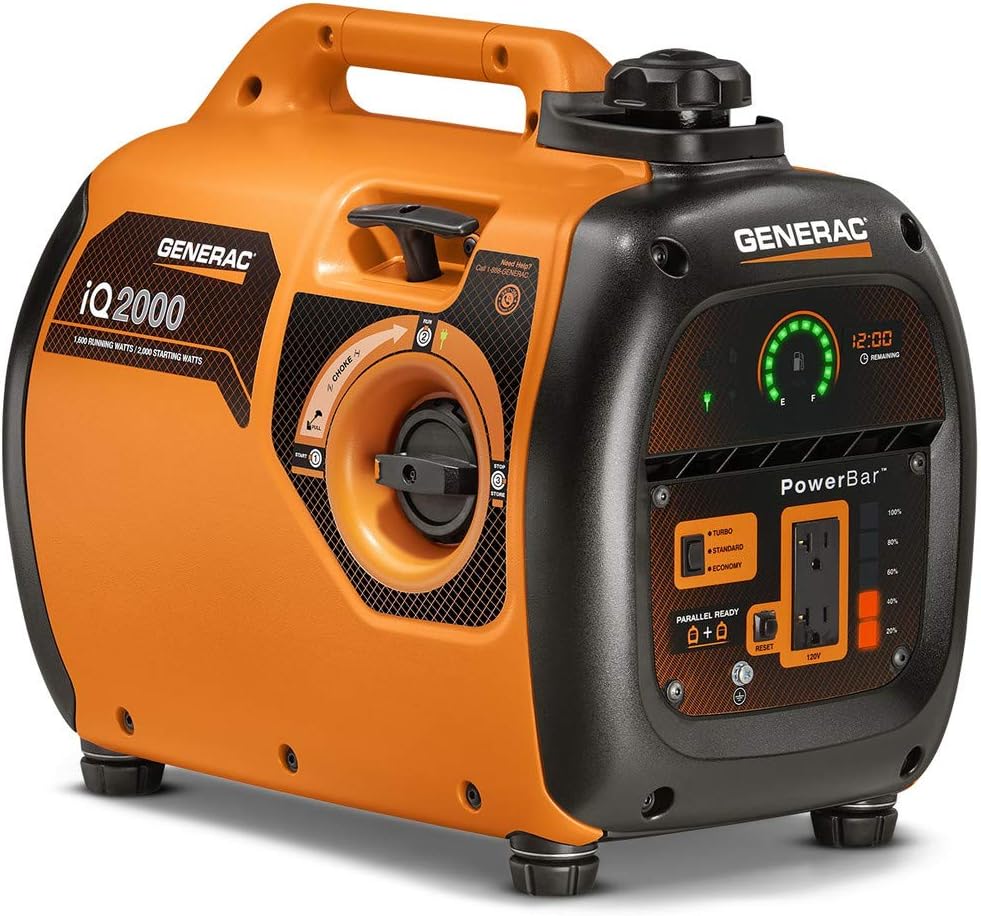
Figure 2: Close-up of the Generac iQ2000 control panel, showing the PowerDial, PowerBar, mode switch, and outlets.

Figure 3: Close-up of the mode selection switch on the Generac iQ2000, indicating Turbo, Standard, and Economy settings.
4. Setup
4.1 Initial Preparation
- Placement: Position the generator on a flat, level surface outdoors, away from any combustible materials, and ensure adequate ventilation.
- Add Engine Oil: Remove the oil fill cap/dipstick. Add the recommended amount and type of engine oil (SAE 10W-30) until it reaches the upper mark on the dipstick. Do not overfill.
- Add Fuel: Ensure the generator is off and cool. Unscrew the fuel cap and carefully fill the tank with fresh, unleaded gasoline. The fuel capacity is 1.06 gallons. Do not overfill.
4.2 Starting Procedure
- Turn the PowerDial to the "START" position.
- If the engine is cold, move the choke lever to the "CHOKE" position.
- Firmly pull the recoil starter handle until the engine starts.
- Once the engine starts, slowly move the choke lever back to the "RUN" position.
- Turn the PowerDial to the "RUN" position.
5. Operating Instructions
5.1 Connecting Appliances
Once the generator is running, you can connect your 120V AC appliances to the outlets. Ensure the total wattage of connected devices does not exceed the generator's running wattage (1600 Watts) or starting wattage (2000 Watts).
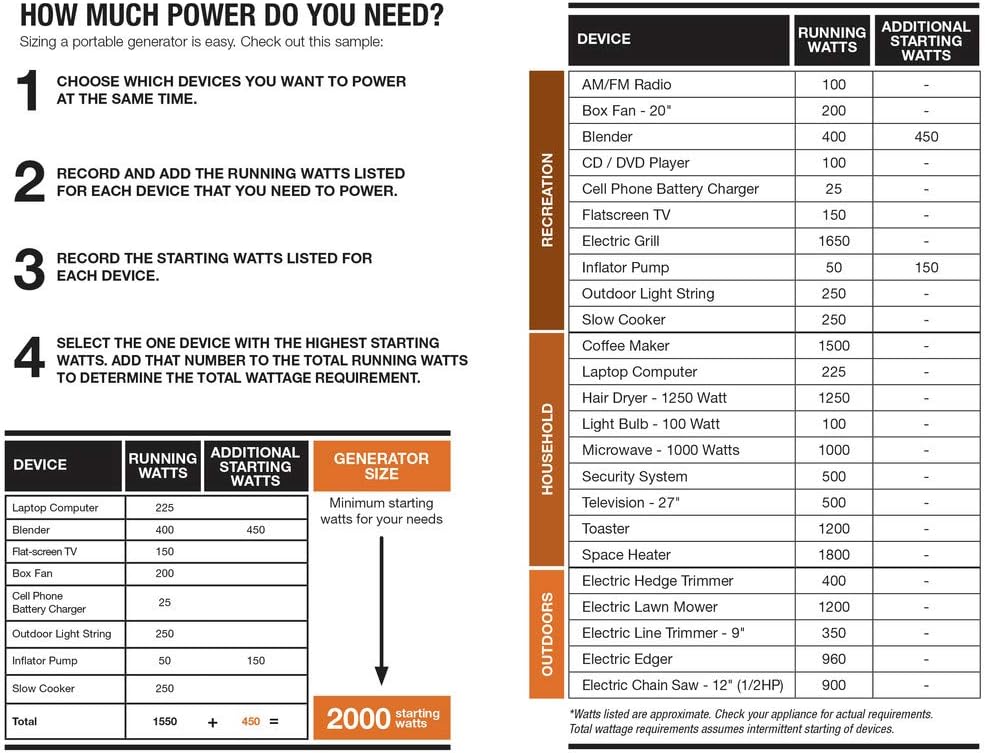
Figure 4: The Generac iQ2000 showing the PowerDial and AC outlets for connecting devices.
5.2 Operating Modes
The iQ2000 offers three operating modes to optimize performance and fuel efficiency:
- Turbo Mode: Use for items requiring higher power outputs.
- Standard Mode: Suitable for intermediate load requirements.
- Economy Mode: Recommended for loads requiring minimal power output to reduce noise and fuel consumption.
5.3 Monitoring Operating Status
The generator's dashboard provides several indicators:
- PowerBar: Continuously displays the wattage produced by the generator.
- Electronic Fuel Gauge: Shows the remaining fuel level.
- Run-time Remaining Display: Indicates how much time is left before refueling is required.
- Status Indicators: Alerts for low fuel, low oil, overload, and overheating.

Figure 5: Close-up of the Generac iQ2000's PowerBar and digital display, showing fuel level and remaining run-time.
5.4 Parallel Operation
For larger power requirements, two iQ2000 units can be connected in parallel using an optional Parallel Kit (Model 6877, sold separately). This nearly doubles the available power output.
5.5 Shutting Down the Generator
To turn off the generator, turn the PowerDial to the "STOP" position.
6. Maintenance
Regular maintenance ensures the longevity and optimal performance of your generator.
- Oil Changes: Refer to the full owner's manual for the recommended oil change schedule. Always use SAE 10W-30 oil.
- Fuel: Use fresh, unleaded gasoline. Consider using a fuel stabilizer, especially for storage, to prevent fuel degradation and carburetor issues.
- Air Filter: Regularly inspect and clean or replace the air filter as needed.
- Spark Plug: Check and clean or replace the spark plug periodically.
- Storage: For extended storage, ensure the fuel system is properly drained or treated with stabilizer, and the engine oil is changed.
7. Troubleshooting
This section addresses common issues you might encounter with your Generac iQ2000 generator.
- Engine Does Not Start:
- Check fuel level.
- Ensure the PowerDial is in the "START" position.
- Verify the choke is correctly set for cold starting.
- Check engine oil level; the low oil shutoff may be activated.
- Inspect the spark plug for fouling or damage.
- Engine Runs but No Power Output:
- Check for an overload alarm. Reduce the load and reset if necessary.
- Ensure the PowerDial is in the "RUN" position.
- Engine Hunts or Surges at Idle:
- This can often be caused by a clogged carburetor jet. Consult the full owner's manual or a qualified technician for cleaning procedures.
- Overload Alarm:
- The generator is being asked to produce more power than its capacity. Disconnect some appliances and restart the generator.
8. Specifications
| Feature | Specification |
|---|---|
| Brand | Generac |
| Model Name | 6866 |
| Running Wattage | 1600 Watts |
| Starting Wattage | 2000 Watts |
| AC Rated Voltage | 120V |
| Fuel Type | Gasoline |
| Fuel Capacity | 1.06 Gallons |
| Runtime (50% - 25% Load) | 5.7 - 7.7 hrs |
| Engine Displacement | 80 cc |
| Oil Type | SAE 10W-30 |
| Item Weight | 46.2 Pounds |
| Product Dimensions | 20 x 12.6 x 16.9 inches |
| Special Feature | Super Quiet |
9. Determining Power Requirements
To ensure optimal performance and avoid overloading your generator, it's crucial to understand the power requirements of your devices. The table below provides a general guide for common devices.
Figure 6: A chart illustrating the running and starting wattage for various devices to help determine your power needs.
Steps to Calculate Total Wattage:
- Choose the devices you plan to power simultaneously.
- Record and add the running watts for each device.
- Identify the device with the highest starting watts and add that to your total running watts to determine your minimum starting wattage requirement.
10. Official Product Overview
Video 1: An official overview of the Generac iQ2000 Inverter Generator, highlighting its features, quiet operation, and ease of use for various outdoor activities.
11. Warranty and Support
For detailed warranty information, please refer to the warranty document included with your product or visit the official Generac website. For customer support, please contact Generac directly.
You can also visit the Generac Store on Amazon for additional resources and product information.


