
Introduction
The Brondi Office Plus is a reliable corded desk phone designed for both office and home environments. It features a large, easy-to-read backlit display, a convenient hands-free function, and two direct memory keys (M1 and M2) for quick dialing. This manual provides essential information for the proper setup, operation, and maintenance of your Brondi Office Plus phone, ensuring optimal performance and longevity.
Package Contents
Please check the package carefully to ensure all items are present:
- 1 x Brondi Office Plus Corded Desk Phone
- 1 x Handset
- 1 x Coiled Handset Cord
- 1 x Line Cord (RJ11)
- 1 x User Manual
Product Overview
Familiarize yourself with the components and controls of your Brondi Office Plus phone.

Figure 1: Front view of the Brondi Office Plus phone, highlighting the display, keypad, and various function buttons.
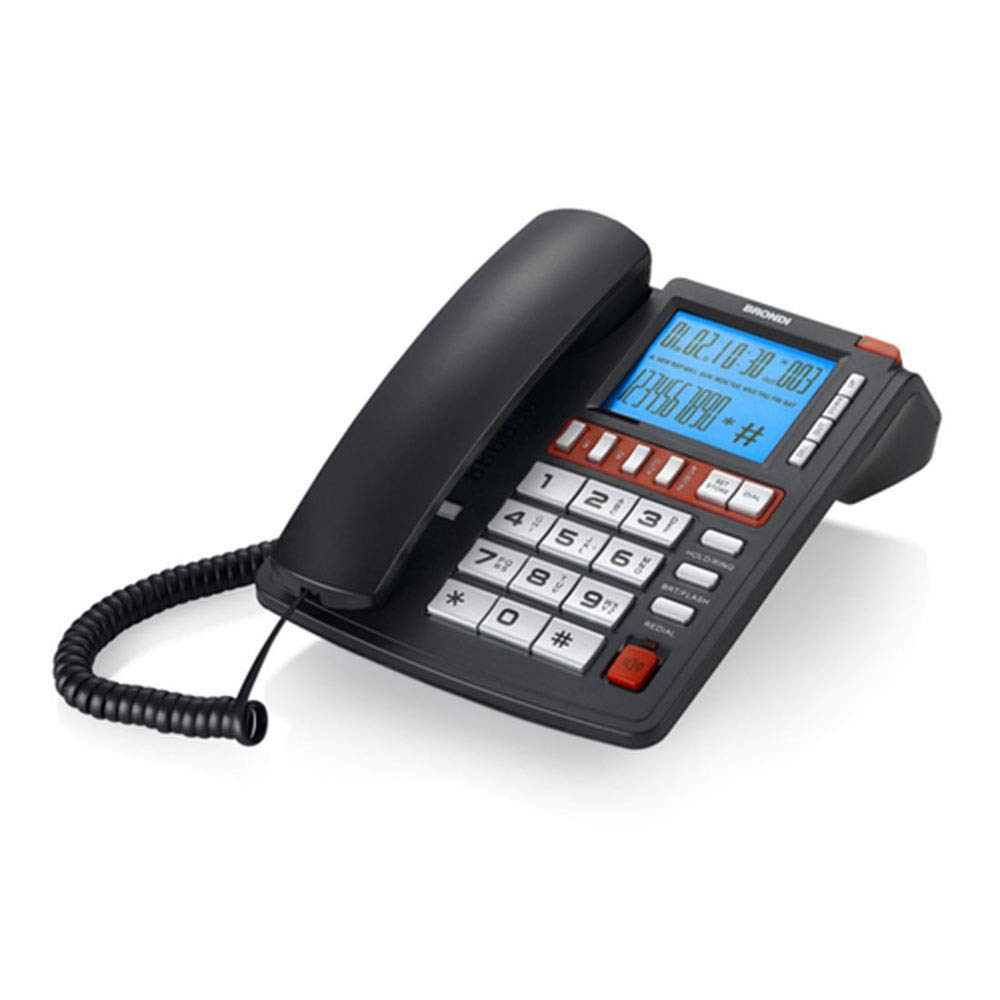
Figure 2: Rear view of the Brondi Office Plus phone, illustrating the connection ports for the telephone line.
Key Components:
- Display: Large backlit screen for caller ID, time, and menu information.
- Keypad: Standard numeric keys (0-9, *, #) for dialing.
- M1 / M2 Keys: Direct memory keys for frequently called numbers.
- Vivavoce (Hands-free) Button: Activates the speakerphone function.
- Volume Up/Down Buttons: Adjusts handset, speakerphone, or ring volume.
- Redial Button: Dials the last number called.
- Hold/Ring Button: Puts a call on hold or adjusts ring settings.
- LED Indicator: Flashes for incoming calls.
Setup
Follow these steps to set up your Brondi Office Plus phone:
- Connect the Handset: Plug one end of the coiled handset cord into the handset and the other end into the designated handset port on the side of the phone base.
- Connect the Line Cord: Plug one end of the RJ11 line cord into the LINE port on the rear of the phone (refer to Figure 2) and the other end into your telephone wall jack.
- Initial Power-Up: The phone will power on automatically once connected to the telephone line. The display should illuminate.
- Set Date and Time (Optional): If the display does not show the correct date and time, refer to the 'Operating Instructions' section for setting these parameters.
Operating Instructions
Making a Call:
- Using the Handset: Lift the handset, wait for a dial tone, then dial the desired number.
- Using Hands-free (Speakerphone): Press the Vivavoce button, wait for a dial tone, then dial the desired number.
- Using Direct Memory Keys (M1/M2): Press the M1 or M2 button to dial a pre-programmed number.
Receiving a Call:
- Using the Handset: Lift the handset when the phone rings.
- Using Hands-free (Speakerphone): Press the Vivavoce button when the phone rings.
- The LED indicator will flash for incoming calls.
Caller ID:
When an incoming call is received, the caller's number (and name, if available and subscribed to the service) will be displayed on the screen.
Adjusting Volume:
During a call, use the Volume Up/Down buttons to adjust the handset or speakerphone volume. The ring volume can typically be adjusted via the phone's menu settings (refer to the on-screen prompts).
Programming M1/M2 Direct Memory Keys:
To program a number into M1 or M2:
- Ensure the phone is idle (not on a call).
- Press the STORE button (or similar, refer to display prompts).
- Enter the phone number you wish to save.
- Press either M1 or M2 to save the number to that key.
- A confirmation message should appear on the display.
Maintenance
Proper care ensures the longevity of your Brondi Office Plus phone:
- Cleaning: Use a soft, damp cloth to clean the phone's surface. Avoid abrasive cleaners or solvents.
- Environment: Keep the phone away from excessive heat, direct sunlight, and moisture.
- Cords: Periodically check the handset and line cords for any signs of wear or damage. Replace if necessary.
Troubleshooting
If you encounter issues with your Brondi Office Plus phone, try these solutions:
- No Dial Tone:
- Ensure the line cord is securely connected to both the phone and the wall jack.
- Test the wall jack with another working phone, if available.
- Cannot Hear or Be Heard:
- Check the handset cord connection.
- Adjust the volume using the Volume Up/Down buttons.
- If using hands-free, ensure the microphone is not obstructed.
- Display Not Working:
- Ensure the phone is properly connected to the telephone line.
- If the issue persists, disconnect and reconnect the line cord.
- Keys Not Responding:
- Clean the keypad area to remove any dust or debris.
- Try disconnecting the phone from the line for a few minutes, then reconnecting it.
If these steps do not resolve the issue, please contact Brondi customer support.
Specifications
| Brand | Brondi |
| Model | Office Plus |
| Color | Black |
| Phone Type | Corded Phone |
| Material | Acrylonitrile Butadiene Styrene (ABS) |
| Dimensions (LxWxH) | 55 x 40 x 21 cm |
| Caller ID | Yes |
| Hands-free Function | Yes |
| Direct Memory Keys | 2 (M1, M2) |
| Display | Backlit |
Warranty and Support
For warranty information and technical support, please refer to the warranty card included in your product packaging or visit the official Brondi website. Keep your purchase receipt as proof of purchase for any warranty claims.