
1. Introduction and Overview
This manual provides detailed instructions for the setup, operation, and maintenance of your Little Giant Digital Circulated Air Incubator, Model 10300. Designed for poultry enthusiasts, this incubator facilitates the hatching process by providing a controlled environment for various types of eggs. For a visual overview of the Little Giant incubator series, including this model, please refer to the video below.
Video Description: An informational video detailing the features and operation of Little Giant Digital Incubators, including the 9300, 10300, 11300, and 12300 models. This video provides a general guide to using these incubators for hatching various poultry eggs.
2. Product Features
- Quality Construction: Made of durable, warmth-retaining styrofoam, featuring an LCD display with LED light for instant, accurate readings.
- Digital Control Board: Offers easy, one-touch temperature setting with self-regulating control, maintaining temperature within one degree.
- Built-in Fan: Circulates warm air for proper temperature distribution. Includes a digital hygrometer for humidity measurement and water channels to reduce humidity loss, improving hatch rates.
- Enhanced Safety: Redesigned plastic heater is cooler to the touch than traditional metal elements. The mesh plastic screen has no sharp edges, ensuring safety for both users and chicks.
- Capacity: Holds 41 large chicken eggs or up to 120 bantam or quail eggs (when used with the Little Giant Automatic Egg Turner, sold separately).

Image Description: The Little Giant Digital Circulated Air Incubator, Model 10300, shown with its white styrofoam body, clear viewing windows, and black digital control panel. The fan is visible inside the lid.
3. Setup
- Unpack and Inspect: Carefully remove all components from the packaging. Inspect the incubator for any damage.
- Connect Power: Connect the power supply cord to the temperature controller on the incubator lid. Support the back of the foam top when inserting the power cord to prevent damage. It is recommended to use a Ground Fault Circuit Interrupter (GFCI) protected outlet. Do not use an extension cord.
- Place Mesh Screen: Position the plastic mesh screen on the bottom of the incubator base. This screen provides a safe and sanitary surface for eggs and newly hatched chicks.
- Fill Water Channels: Lift the top of the incubator and slide it back an inch or two to access the water channels on the base. Use a turkey baster or similar tool to add room temperature water to the channels. The amount of water needed will vary based on your specific egg type and humidity requirements.
- Pre-run Incubator: Run the incubator for a minimum of 8 hours prior to inserting eggs. This allows the internal temperature and humidity to stabilize. During this period, the heater icon on the display will cycle on and off as the unit reaches and maintains the set temperature.
- Place Eggs: Once the incubator has stabilized and the hatching chick icon appears on the digital screen, carefully place your fertile eggs directly on the plastic mesh screen.
- Sensor Placement: Ensure the temperature sensor hanging from the lid is freely suspended and not caught in any cables. For best results, place a secondary, calibrated thermometer (such as the Little Giant Incubation Thermometer #6303) at egg height in the center of one of the viewing windows to verify accuracy.
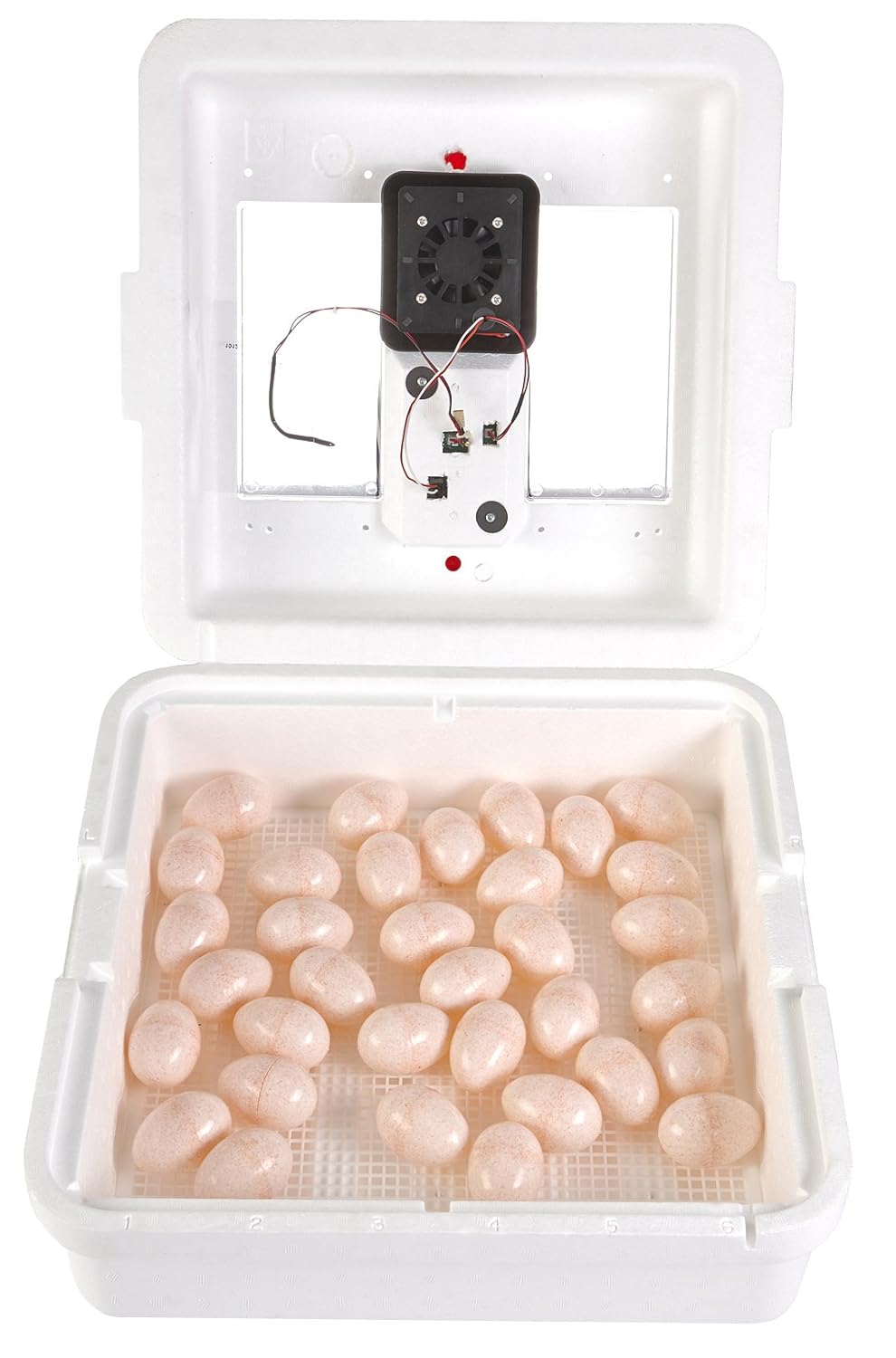
Image Description: The Little Giant Digital Circulated Air Incubator with its lid open, revealing the mesh screen at the bottom and several eggs placed on it. The fan and heating element are visible in the lid.
4. Operating Instructions
- Setting Temperature: The incubator is pre-set to 99.5°F (37.5°C). To adjust, press and hold the 'SET' button for 1-3 seconds until the current set temperature flashes. Use the 'UP' and 'DOWN' buttons to adjust to your desired temperature. Press and hold 'SET' again to confirm.
- Monitoring Humidity: The internal hygrometer displays humidity levels. The reading is most accurate between 60% and 80% humidity. If the humidity is below this range, the reading may not be accurate.
- Ventilation: The two red vent plugs on the top of the incubator can be left in or removed to assist in controlling humidity and ventilation. In most cases, they should remain in place unless there is excessive moisture or humidity (indicated by fogging windows or water droplets). If removing plugs, you may need to slightly increase the set temperature to compensate for heat loss.
- Egg Turning: If not using an automatic egg turner (sold separately), manually rotate eggs 2-3 times daily. This ensures even heat distribution and prevents the embryo from sticking to the shell.
- Daily Water Checks: After the initial 24-hour stabilization period, check water levels in the channels daily. It is best to use a flashlight to view water levels through a window. Add water as needed by pushing the lid back slightly and using a turkey baster. Minimize opening the incubator to maintain stable conditions.
- Hatching Process: Once eggs begin to hatch, allow an additional 48-72 hours for the hatch to complete before opening the incubator to remove chicks. This allows all chicks to hatch and dry properly.

Image Description: A top-down view of the Little Giant Digital Circulated Air Incubator, showing the digital control panel, clear viewing windows, and red vent plugs.
5. Maintenance
After all birds have hatched and been removed, the incubator can be cleaned. Use soap and water to clean the incubator. Do not scrub or use bleach, as these can damage the unit. The plastic mesh screen is dishwasher safe for easy cleaning and sanitization.
6. Troubleshooting
- No Display/Heat Failure: Ensure the power cord is securely connected to both the incubator and a working GFCI-protected outlet. If the issue persists, contact customer support.
- Inaccurate Humidity Reading: The hygrometer is most accurate between 60% and 80%. If humidity is outside this range, the reading may not be precise. Adjust water levels in the channels as needed.
- Temperature Fluctuations: Ensure the incubator is placed in a stable environment away from drafts or direct sunlight. Verify the vent plugs are correctly positioned. If using a secondary thermometer, ensure it is calibrated and placed at egg height.
- Excessive Moisture/Fogging: This indicates high humidity. Consider removing one or both red vent plugs to increase ventilation.
7. Specifications
- Product Dimensions: 17.75 x 17.75 x 8 inches
- Item Weight: 4 pounds
- Manufacturer: Miller Manufacturing
- Item Model Number: 10300
- Egg Capacity: 41 large chicken eggs (up to 120 bantam/quail eggs with optional egg turner)
- Power: Nonstandard Battery batteries required (for digital display, likely included or pre-installed).
8. Warranty and Support
For warranty information, technical support, or to purchase accessories, please refer to the documentation included with your product or visit the official Miller Manufacturing Company website. You can also find additional resources and contact information there.
Manufacturer: Miller Manufacturing Company
Website: Miller-MFG.com
