
Delta Electronics DPS-350AB-5 B
Delta Electronics 350W Switching Power Supply
Model: DPS-350AB-5 B
Introduction
This manual provides essential information for the safe and efficient use of your Delta Electronics 350W Switching Power Supply, Model DPS-350AB-5 B. It covers product overview, safety guidelines, installation procedures, operational instructions, maintenance tips, and troubleshooting common issues. Please read this manual thoroughly before installation and operation to ensure proper functionality and safety.
Safety Information
WARNING: To reduce the risk of electric shock, fire, or damage to the equipment, always follow these safety precautions.
- Grounding: Connect the power supply only to a properly earth grounded outlet. Ensure the electrical outlet is correctly wired and grounded.
- Ventilation: Ensure adequate ventilation around the power supply. Do not block any ventilation openings. Overheating can lead to malfunction or fire.
- Hot Surface: The power supply may become hot during operation. Avoid direct contact with the surface, especially after prolonged use.
- Moisture: Do not expose the power supply to water or excessive moisture. Operate in a dry environment.
- Servicing: Do not attempt to open or service the power supply yourself. There are no user-serviceable parts inside. Refer all servicing to qualified service personnel.
- Power Disconnection: Always disconnect the power cord from the wall outlet before performing any installation, maintenance, or troubleshooting.
- Class A Product: This is a Class A product. In a domestic environment, this product may cause radio interference, in which case the user may be required to take adequate measures.
Product Overview
The Delta Electronics DPS-350AB-5 B is a 350W switching power supply designed for personal computer systems. It provides stable and reliable power to various components.
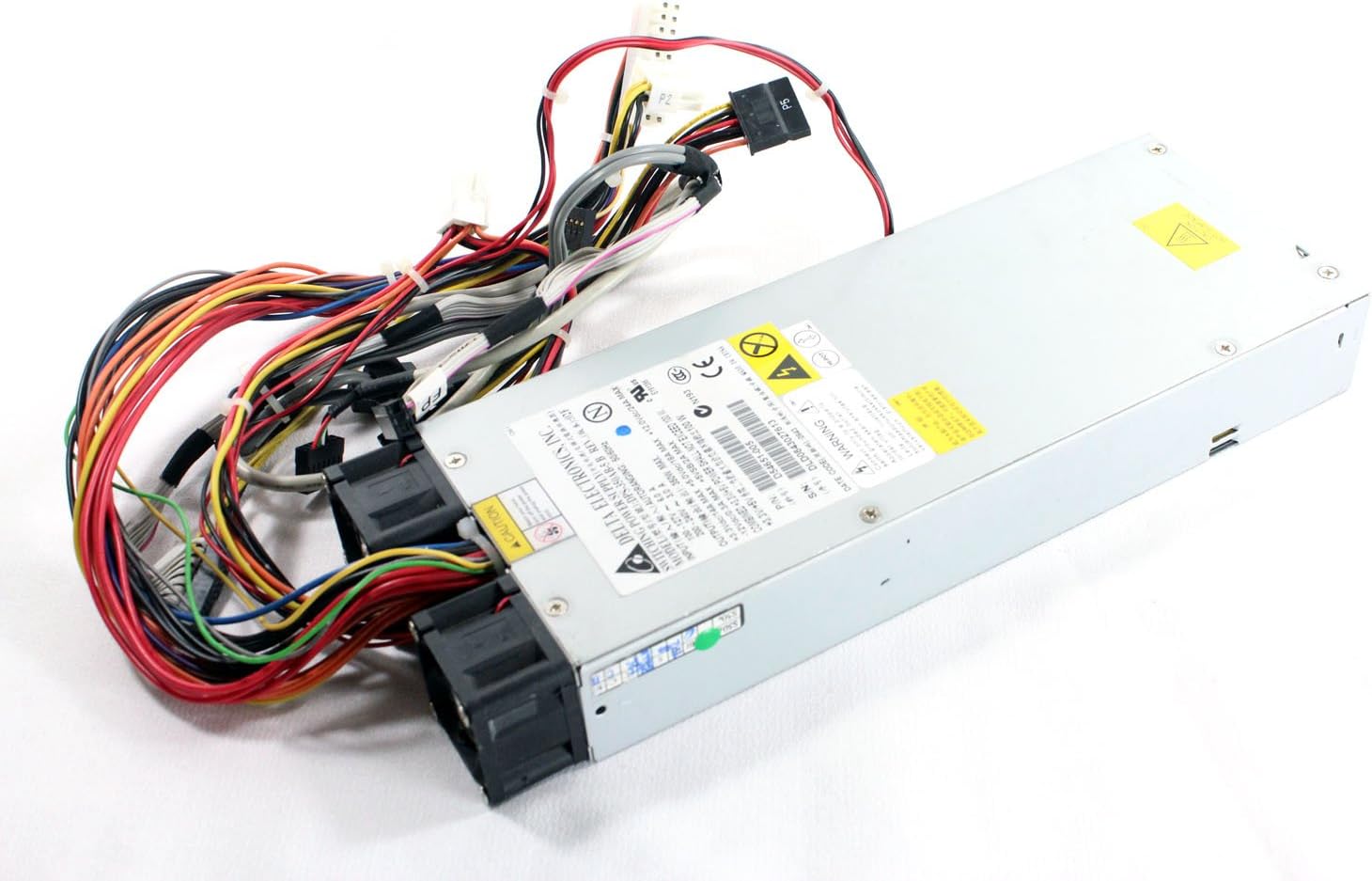
Overall view of the Delta Electronics 350W Switching Power Supply, showcasing its compact form factor and the array of connected cables.

Rear view of the power supply, highlighting the dual cooling fans and the bundled output cables.

Side view of the power supply, showing the AC input receptacle and ventilation grilles. A 'CAUTION HOT SURFACE' warning is visible.

Another perspective of the power supply, illustrating the various cable bundles extending from the unit.

Close-up view of the power supply's output connectors, including SATA power, 4-pin peripheral (Molex), and the main 24-pin ATX connector.

Detailed view of the product label, displaying model number DPS-350AB-5 B, part number D54651-005, serial number DLD0843027613, input/output specifications, and various certifications.

Close-up of warning labels on the power supply, including a grounding instruction: 'Connect only to a properly earth grounded outlet,' and a Chinese statement regarding Class A product radio interference.
Setup
Follow these steps to properly install the power supply in your computer system:
- Preparation: Ensure your computer is completely powered off and unplugged from the wall outlet. Open the computer case.
- Mounting: Carefully slide the power supply into the designated bay in your computer case. Secure it with screws provided with your computer case or power supply.
- Connect Main Power: Connect the 24-pin ATX main power connector from the power supply to the corresponding port on your motherboard. Ensure it clicks into place.
- Connect CPU Power: Connect the 4-pin or 8-pin CPU power connector (P4/P8) to the CPU power port on your motherboard.
- Connect Peripherals: Connect SATA power connectors to your hard drives, SSDs, and optical drives. Connect 4-pin peripheral (Molex) connectors to any other components requiring them (e.g., older fans, certain expansion cards).
- Cable Management: Route cables neatly to improve airflow and aesthetics within the case.
- Close Case: Once all connections are secure, close your computer case.
- Connect AC Power: Plug the AC power cord into the power supply's receptacle and then into a properly grounded wall outlet.
Operating Instructions
Once the power supply is correctly installed and connected, you can power on your system:
- Power On: Press the power button on your computer case. The power supply will begin to deliver power to your system components.
- Normal Operation: The power supply operates automatically, providing stable voltage to your system. The internal fans will activate to maintain optimal operating temperature.
- Power Off: To shut down your system, use the operating system's shutdown procedure. Once the system is off, the power supply will cease operation. For complete power disconnection, unplug the AC power cord from the wall outlet.
Maintenance
Regular maintenance helps ensure the longevity and optimal performance of your power supply:
- Dust Removal: Periodically clean dust from the power supply's fan grilles and internal components (if accessible without opening the unit) using compressed air. Ensure the system is powered off and unplugged before cleaning.
- Fan Check: Occasionally check that the cooling fans are spinning freely and are not obstructed.
- Cable Inspection: Inspect all power cables for any signs of wear, fraying, or damage. Replace damaged cables immediately.
- Environment: Operate the power supply in a clean, dry, and well-ventilated environment to prevent dust buildup and overheating.
Troubleshooting
If you encounter issues with your power supply, consider the following common solutions:
- No Power:
- Ensure the AC power cord is securely plugged into both the power supply and a working wall outlet.
- Check the power switch on the back of the power supply (if present) is in the 'On' position.
- Verify all internal power connectors (24-pin ATX, CPU, peripheral) are firmly seated.
- Test the wall outlet with another device to confirm it has power.
- System Instability/Random Shutdowns:
- Ensure adequate ventilation. Overheating can cause instability.
- Check for loose power connections to components.
- If the issue persists, the power supply may be faulty or insufficient for your system's power demands.
- Loud Fan Noise:
- Clean dust from the fan grilles.
- Ensure no cables are obstructing the fan blades.
- Excessive noise could indicate a failing fan or an overloaded power supply.
If troubleshooting steps do not resolve the issue, contact qualified service personnel or the manufacturer for assistance.
Specifications
| Feature | Specification |
|---|---|
| Manufacturer | Delta Electronics |
| Model Number | DPS-350AB-5 B |
| Part Number | D54651-005 |
| Serial Number | DLD0843027613 |
| Output Wattage | 350 Watts |
| Form Factor | ATX |
| Connector Type | ATX |
| Cooling Method | Air |
| Maximum Input Voltage | 240 Volts (AC) |
| Compatible Devices | Personal Computer |
Warranty and Support
For warranty information and technical support, please refer to the documentation provided with your purchase or contact Delta Electronics directly through their official website or customer service channels. Keep your proof of purchase for warranty claims.
Related documentsDPS-350AB-5 B


Ask a question about this manual
Ask about setup, troubleshooting, compatibility, parts, safety, or missing instructions. Manuals+ will review the question and use this page’s manual context to help answer it.