
Bose 738599-0110
Bose Sound Touch Series II Wireless Adapter User Manual
Model: 738599-0110
Brand: Bose
Introduction
The Bose Sound Touch Series II Wireless Adapter transforms your compatible Bose home theater system into a versatile music streaming device. This adapter allows you to enjoy wireless music through your existing home Wi-Fi network or via Bluetooth-enabled devices. It provides access to music services like Spotify and Pandora, internet radio, and your personal music library, all controllable through a dedicated app.
This adapter is compatible with Lifestyle Series II & III home entertainment systems, Lifestyle Sound Touch entertainment systems, Sound Touch home theater systems, and CineMate 520, 220, 130, and 120 home theater systems.
This manual provides detailed instructions for setting up, operating, and maintaining your Sound Touch Series II Wireless Adapter.
Package Contents
Please ensure all items are present in the package:
- Sound Touch Wireless Adapter
- USB-A to Micro USB-B Cable (6 feet)
- USB Flash Drive (for updates)
- Setup Guide (this manual)
Setup Guide
1. Physical Connection
Connect the Sound Touch Series II Wireless Adapter to your compatible Bose home theater system. Use the provided USB-A to Micro USB-B cable to connect the adapter to the designated port on your Bose system. Ensure the adapter is placed in a location with good Wi-Fi signal reception.

Figure 1: Rear view of the Sound Touch Series II Wireless Adapter, highlighting the various connection ports including USB and service ports. This view is essential for proper physical setup.
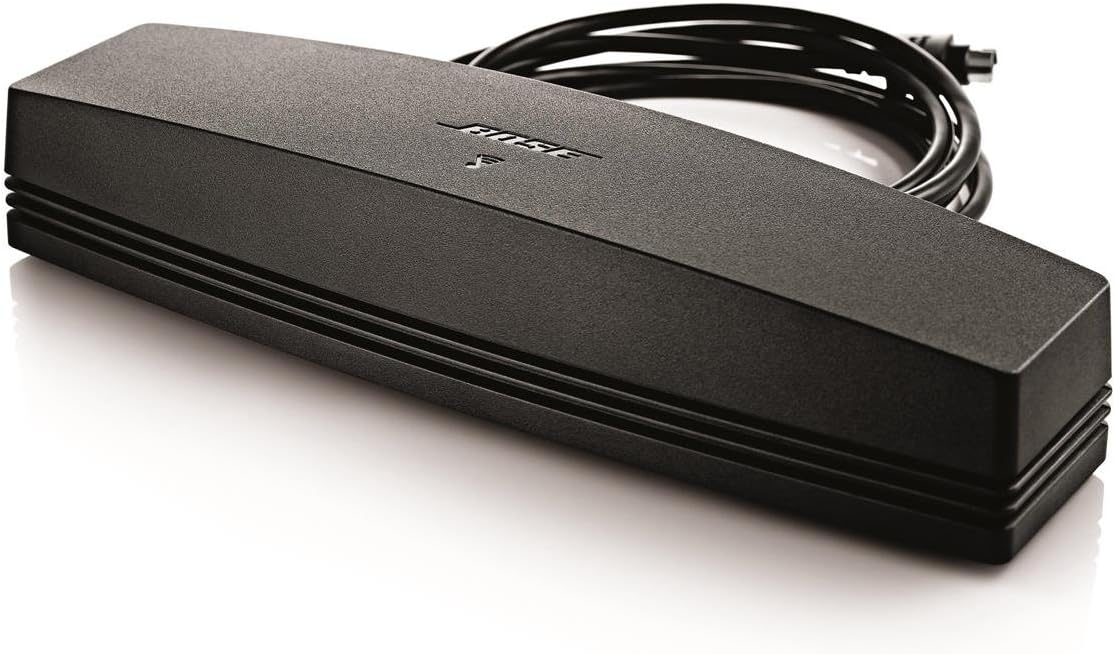
Figure 2: The Bose Sound Touch Series II Wireless Adapter shown with its connected cable, illustrating its compact design and readiness for integration into a home audio system.
2. App Installation
Download the free Bose SoundTouch app on your smartphone or tablet. The app is available on the Apple App Store for iOS devices and Google Play Store for Android devices. Search for "Bose SoundTouch" and follow the on-screen instructions to install.
3. Network Connection
Open the SoundTouch app and follow the guided setup process to connect your adapter to your home Wi-Fi network. This process typically involves selecting your Wi-Fi network and entering the password. Once connected, the adapter will be ready for streaming.
For Bluetooth connectivity, enable Bluetooth on your device and select the Bose Sound Touch adapter from the list of available devices. Refer to the app for specific pairing instructions.
Operating Instructions
Using the SoundTouch App
The SoundTouch app is your primary control interface for the wireless adapter. From the app, you can:
- Browse and play music from various streaming services (e.g., Spotify, Pandora).
- Access thousands of internet radio stations.
- Play music stored on your computer or network-attached storage (NAS).
- Adjust volume and control playback.
Presets
The Sound Touch system features six programmable presets. These allow you to save your favorite music, playlists, or radio stations for instant access. You can activate presets directly from the SoundTouch app or, if your Bose system supports it, via its remote control. To set a preset, simply play the desired content and hold down a preset number in the app until it saves.
Bluetooth Streaming
In addition to Wi-Fi, the adapter supports Bluetooth connectivity. This allows you to stream audio directly from any Bluetooth-enabled device, such as a smartphone or tablet, without needing a Wi-Fi network connection for the adapter itself. To pair, select the adapter from your device's Bluetooth settings.
Maintenance
Cleaning
To clean the adapter, use a soft, dry cloth. Do not use any liquids or abrasive cleaners. Ensure the device is unplugged before cleaning.
Software Updates
Bose may release software updates to improve performance and add new features. Updates can typically be performed via the SoundTouch app. In some cases, a USB flash drive (included) may be required for manual updates. Always ensure your adapter's software is up to date for optimal performance and compatibility.
Troubleshooting
| Problem | Possible Cause | Solution |
|---|---|---|
| No sound from system. | Incorrect connection; system not selected; volume too low. | Verify all cables are securely connected. Ensure the correct input source is selected on your Bose system. Increase volume on both the app and your Bose system. |
| Adapter not connecting to Wi-Fi. | Incorrect Wi-Fi password; adapter out of range; network interference; outdated software. | Double-check Wi-Fi password. Move adapter closer to router. Restart router and adapter. Ensure adapter software is updated. |
| Bluetooth device not pairing. | Bluetooth not enabled on device; adapter not in pairing mode; device too far. | Ensure Bluetooth is enabled on your device. Follow app instructions to put adapter in pairing mode. Move device closer to adapter. |
| SoundTouch app not responding. | App glitch; device issues. | Close and restart the app. Restart your smartphone/tablet. Ensure your app is the latest version. |
Specifications
| Feature | Detail |
|---|---|
| Product Dimensions | 5.12 x 10.08 x 9.84 inches |
| Item Weight | 12 ounces |
| Manufacturer | Bose Corporation |
| ASIN | B011U9G5IK |
| Item Model Number | 738599-0110 |
| Special Feature | Pandora, Spotify integration |
| Connectivity Technology | Bluetooth, Wi-Fi |
| Color | Black |
Warranty and Support
For detailed warranty information and technical support, please visit the official Bose website or contact Bose customer service. You can also find additional resources and FAQs on the Bose Store on Amazon.
It is recommended to register your product with Bose to receive updates and support notifications.
Ask a question about this manual
Ask about setup, troubleshooting, compatibility, parts, safety, or missing instructions. Manuals+ will review the question and use this page’s manual context to help answer it.