
Crown XLS1002
Crown XLS1002 Professional Power Amplifier User Manual
Model: XLS1002
1. Introduction
This manual provides detailed instructions for the safe and efficient operation of your Crown XLS1002 2-Channel Class D DriveCore Professional Power Amplifier. Please read this manual thoroughly before operating the unit and retain it for future reference.
The Crown XLS1002 amplifier is designed for high performance and efficiency, featuring DriveCore technology. It delivers significant power output while remaining lightweight. Key features include advanced DSP capabilities, integrated PureBand™ Crossover System, and Peakx™ Limiters for optimal sound and speaker protection.
2. Safety Information
Always follow basic safety precautions when using this product to reduce the risk of fire, electric shock, and injury to persons. This includes, but is not limited to:
- Do not expose this apparatus to rain or moisture.
- Do not block any ventilation openings. Install in accordance with the manufacturer's instructions.
- Do not install near any heat sources such as radiators, heat registers, stoves, or other apparatus (including amplifiers) that produce heat.
- Only use attachments/accessories specified by the manufacturer.
- Refer all servicing to qualified service personnel. Servicing is required when the apparatus has been damaged in any way.
3. Product Overview
Front Panel
The front panel of the Crown XLS1002 features controls and indicators for easy operation and monitoring.

Figure 3.1: Front view of the Crown XLS1002 amplifier, showing the LCD display, control knobs for channels 1 and 2, and power indicators.
Rear Panel
The rear panel provides all necessary input and output connections for integrating the amplifier into your audio system.
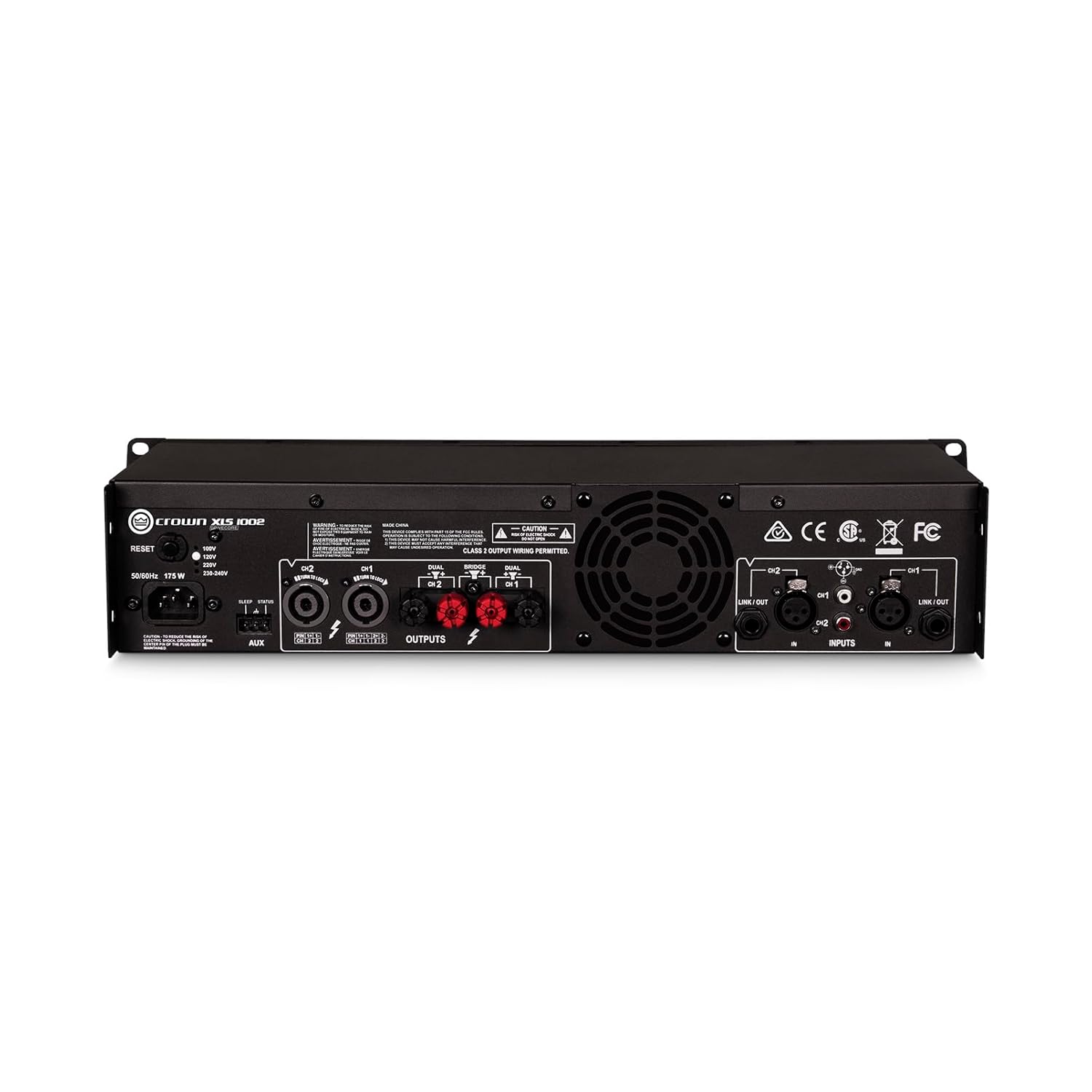
Figure 3.2: Rear view of the Crown XLS1002 amplifier, highlighting the XLR, 1/4", and RCA inputs, along with Speakon and binding post outputs.
4. Setup and Connections
4.1 Unpacking and Placement
Carefully remove the amplifier from its packaging. Ensure all components are present. Place the amplifier in a well-ventilated area, ideally in a standard 19-inch equipment rack. The unit is lightweight, less than 11 lb (5 kg), making rack mounting convenient.
4.2 Input Connections
The XLS1002 offers versatile input options:
- XLR Inputs: For professional balanced audio signals.
- 1/4" (TRS) Inputs: For balanced or unbalanced audio signals.
- RCA Inputs: For unbalanced consumer-level audio signals.
Connect your audio source (mixer, pre-amplifier, etc.) to the appropriate input jacks on the rear panel. Ensure secure connections for optimal signal integrity.
4.3 Output Connections
Connect your loudspeakers to the amplifier's output terminals:
- Combo Speakon Outputs: For secure and high-current speaker connections.
- Binding Post Outputs: For traditional bare wire or banana plug connections.
Ensure correct polarity (+ to + and - to -) when connecting speakers. The amplifier supports various impedance levels, including 4 ohms and 2 ohms, and can be bridged for 8-ohm loads.
4.4 Power Connection
Connect the supplied AC power cord to the amplifier's power inlet and then to a suitable AC power outlet. The amplifier features a remote power trigger for seamless integration into larger systems.
5. Operating Instructions
5.1 Powering On/Off
Press the power button on the front panel to turn the amplifier on. The LCD display will illuminate, indicating the unit is operational. To power off, press the power button again.
5.2 Gain Control
Adjust the gain knobs for Channel 1 and Channel 2 on the front panel to control the input sensitivity. Start with lower gain settings and gradually increase to achieve the desired volume without distortion.
5.3 DSP Features and Crossovers
The XLS1002 includes advanced Digital Signal Processing (DSP) capabilities. Use the front panel controls and LCD display to access and configure these features:
- Bandpass Filters: Configure a bandpass filter per channel for precise frequency control.
- PureBand™ Crossover System: Utilize the integrated crossover system for optimal performance and control, allowing you to tailor the frequency response for different speaker setups (e.g., separating low frequencies for subwoofers).
- Peakx™ Limiters: These limiters provide maximum output without risking damage to your speakers by preventing clipping.
Refer to the on-screen menu for detailed navigation and parameter adjustment of the DSP functions.
5.4 Input Sensitivity Selection
The amplifier offers selectable input sensitivity (1.4Vrms or 0.775Vrms) to match various audio sources. This setting can be adjusted via the menu on the LCD display.
6. Maintenance
6.1 Cleaning
Clean the exterior of the amplifier with a soft, dry cloth. Do not use liquid cleaners or aerosols. Ensure ventilation grilles are free from dust and debris to maintain proper airflow.
6.2 Cooling System
The XLS1002 features efficient forced-air fans to prevent excessive thermal buildup. Ensure adequate space around the unit for proper ventilation. Do not block the fan vents.
7. Troubleshooting
If you experience issues with your XLS1002 amplifier, refer to the following common troubleshooting steps:
- No Power: Check the power cord connection and the AC outlet. Ensure the power button is pressed.
- No Sound: Verify all input and output cables are securely connected. Check the source device and speaker connections. Ensure gain controls are not set to minimum.
- Distorted Sound: Reduce the input gain or source volume. Check speaker impedance compatibility. Ensure Peakx™ Limiters are active if needed.
- Overheating: Ensure adequate ventilation around the amplifier. Clear any obstructions from the fan vents.
For more detailed troubleshooting or persistent issues, please consult the full user manual PDF or contact Crown customer support.
8. Specifications
| Feature | Specification |
|---|---|
| Power Output (4 ohms) | 350W x 2 |
| Power Output (2 ohms) | 550W x 2 |
| Power Output (8 ohms bridged) | 700W x 1 |
| Amplifier Type | Class D with DriveCore Technology |
| DSP | Variable high-, low-, and band-pass crossovers |
| Inputs | XLR, TRS (1/4"), RCA |
| Outputs | Combo Speakon, Binding Posts |
| Dimensions (L x W x H) | 7.7 x 19 x 3.5 inches |
| Weight | 8.6 Pounds (less than 11 lb / 5 kg) |
| Model Number | XLS1002 |
| Manufacturer | Crown |
9. Warranty and Support
For detailed warranty information and technical support, please refer to the official Crown website or the full user manual PDF.
Additional protection plans may be available for purchase to extend coverage beyond the standard manufacturer's warranty.
You can download the official user manual (PDF) here.
Related documentsXLS1002


Ask a question about this manual
Ask about setup, troubleshooting, compatibility, parts, safety, or missing instructions. Manuals+ will review the question and use this page’s manual context to help answer it.