
Introduction
Thank you for choosing the Roscoe Thera-Med HP1215 Medium Dual Moist Dry Heating Therapy Pad. This manual provides essential information for the safe and effective use of your heating pad. Please read all instructions carefully before use and retain this manual for future reference.
Important Safety Information
WARNING: To reduce the risk of burns, electric shock, fire, and injury, this product must be used in accordance with the following instructions:
- Always use on a flat, non-flammable surface.
- Do not leave the heating pad unattended while in use.
- Keep away from children and pets.
- Do not use if the heating pad or cord is damaged or wet.
- Unplug the heating pad and allow it to cool completely before storing.
- Avoid using the pad for extended periods or while sleeping to prevent burns.
- Do not sit on, lean against, or crush the heating pad during use.
- Do not use pins or other metallic objects to fasten the pad.
- Do not use on infants, invalids, or persons insensitive to heat.
- Consult a physician before use if you have any medical conditions.
Product Features
- Dual Application: Can be used for dry or moist heat therapy.
- Flexible Pad: Conforms to body contours for targeted relief.
- Soft Cover: Extra-soft, machine washable (100% polyester) for comfort.
- Hand Controller: Ergonomically designed with simple one-button operation and color-coded LED indicators.
- Long Cord: 8-foot extra-long cord for flexible positioning.
- Heat Settings: Four heat settings (Warm, Low, Medium, High).
- Auto Shut-Off: 40-minute automatic shut-off feature for safety.
Setup
Before first use, ensure the heating pad and its components are free from damage. Unroll the heating pad and lay it flat. Ensure the cover is properly fitted.
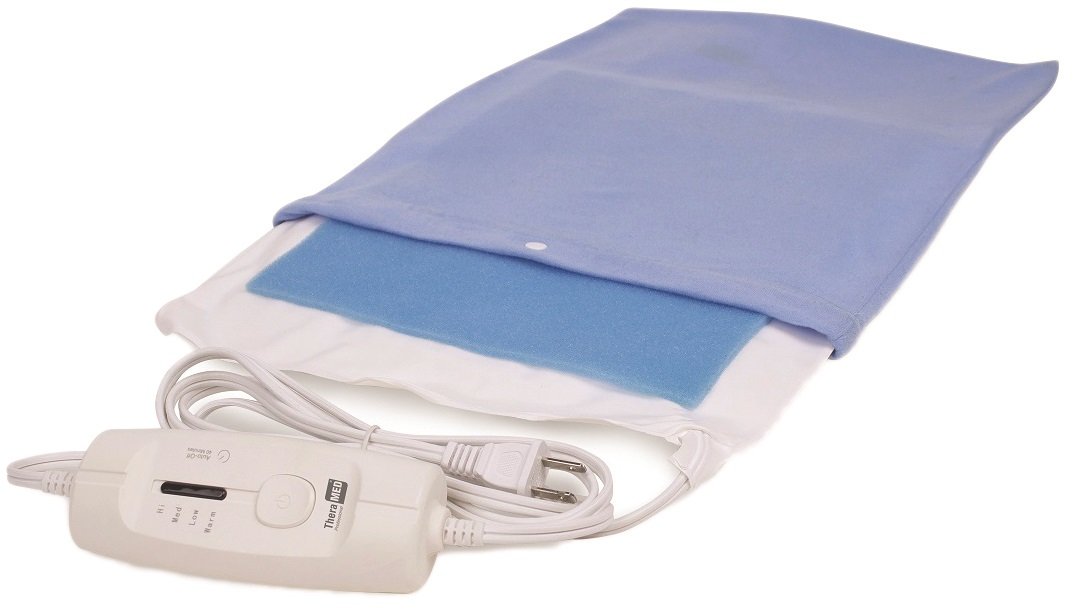
Image: A woman demonstrates the use of the Roscoe Thera-Med heating pad, positioned on her lower back for targeted heat therapy. She is holding the control unit, which allows for easy adjustment of heat settings.
Operating Instructions
General Use:
- Plug the heating pad into a standard electrical outlet.
- Press the power button on the hand controller to turn the unit on. The LED indicator will illuminate.
- Select the desired heat setting (Warm, Low, Medium, High) using the controller. The color-coded LED will indicate the current setting.
- Place the pad on the desired area of the body, ensuring it is positioned correctly for optimal heat therapy.
- The heating pad will automatically shut off after 40 minutes. To restart, press the power button again.
- After use, unplug the pad from the electrical outlet.
Moist Heat Application:
For moist heat therapy, dampen the sponge insert (if included) or lightly mist the fabric cover with water. Do not soak the pad. Ensure the pad is not dripping wet. Insert the dampened sponge into the designated pocket or place the lightly misted pad directly on the area requiring therapy. Proceed with general operating instructions.
Dry Heat Application:
For dry heat therapy, ensure the heating pad cover is completely dry. Proceed with general operating instructions.
Maintenance and Care
Cleaning the Cover:
- Always unplug the heating pad before cleaning.
- Allow the pad to cool completely.
- Remove the polyester cover.
- The cover is machine washable. Wash on a gentle cycle with cold water.
- Tumble dry on low heat or air dry. Do not bleach or iron.
- Ensure the cover is completely dry before reattaching it to the heating pad.
Storage:
Store the heating pad in a cool, dry place when not in use. Avoid placing heavy objects on the pad during storage, as this may damage the internal heating elements.
Troubleshooting
| Problem | Possible Cause | Solution |
|---|---|---|
| Heating pad does not heat up. | Not plugged in correctly; power outage; unit damaged. | Ensure the plug is fully inserted into the outlet. Check the power source. If damaged, discontinue use and contact customer support. |
| Heating pad heats intermittently or shuts off too soon. | Automatic shut-off activated; loose connection. | The unit has a 40-minute auto shut-off. Press the power button to restart. Check all connections. |
| LED indicator not lighting up. | Unit not powered on; electrical issue. | Press the power button. Ensure the unit is plugged into a working outlet. |
If troubleshooting steps do not resolve the issue, please contact Roscoe Medical customer support.
Specifications
- Model Number: HP1215
- Brand: Roscoe Medical
- Material: Sponge, Polyester
- Number of Heat Settings: 4 (Warm, Low, Medium, High)
- Auto Shut-Off: 40 minutes
- Cord Length: 8 feet
- Color: Red (Pad cover may vary)
- Package Dimensions: Approximately 12.3 x 6.1 x 3 inches
- Weight: Approximately 1.2 Pounds
Warranty and Support
For warranty information or technical support, please refer to the documentation included with your purchase or contact Roscoe Medical directly. Keep your purchase receipt as proof of purchase.
Roscoe Medical Contact Information: Please visit the official Roscoe Medical website or refer to your product packaging for the most current contact details.