
1. Introduction
This manual provides essential information for the installation, operation, and maintenance of your Raymarine RD418HD Hi-Def Digital Radar Dome. The RD418HD combines advanced HD Digital signal processing with a compact scanner design, suitable for various vessel types. It is designed to deliver clear and accurate radar imagery for enhanced navigation and situational awareness.
The RD418HD is compatible with Raymarine a, c, and e Series Multifunction Displays, offering a 256-color radar display for detailed target presentation.
2. Setup
2.1 Unpacking and Inspection
Carefully unpack all components. Verify that all items are present, including the RD418HD radar dome and the 10-meter cable (A80228). Inspect all components for any signs of damage incurred during shipping. If any damage is found, contact your dealer immediately.
2.2 Mounting Considerations
The radar dome should be mounted in a location that provides an unobstructed view of the horizon, free from interference from masts, antennas, or other structures. Ensure the mounting surface is strong enough to support the weight of the dome and withstand environmental forces. Refer to the mounting template (if supplied) for precise hole drilling.
2.3 Electrical Connections
Connect the supplied 10-meter cable to the radar dome and your compatible Raymarine Multifunction Display. Ensure all connections are secure and watertight. The system requires a 12V or 24V DC power supply. Verify correct polarity before applying power.
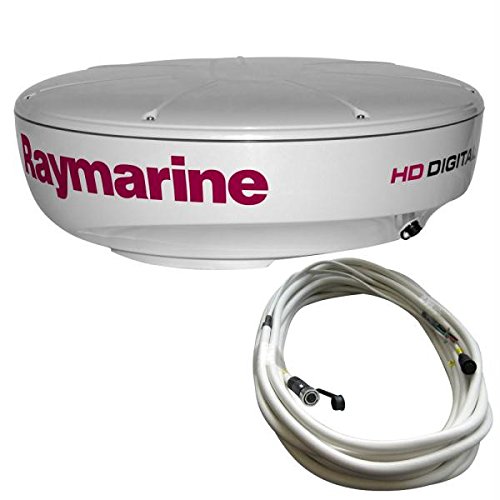
Figure 1: Raymarine RD418HD Radar Dome with its connecting cable. This image shows the compact design of the 18-inch radar dome, highlighting its robust construction and the integrated cable for power and data transmission to a compatible display unit.
3. Operation
3.1 Powering On and Initial Scan
Once properly installed and connected, power on your Multifunction Display. The radar dome will initiate a self-test and begin scanning. The HD Digital signal processing will automatically adjust to changing environmental and sea conditions, providing a clear radar picture.
3.2 Display Features
- 256-Color Display: Provides a rich, detailed presentation of targets with selectable color palettes for optimal viewing in various light conditions.
- Adaptive Digital Receiver: Automatically adjusts sensitivity and filtering to optimize target detection, reducing clutter from rain, fog, and sea.
- High-Speed Target Tracking: Features a 48rpm rotation speed for rapid and accurate tracking of moving targets.
- Fast Digital Receiver Processor: Ensures quick processing of radar returns for real-time updates.
3.3 Operating Modes
The RD418HD offers several automatic operating modes to optimize performance for specific conditions:
- Harbor Mode: Optimized for close-range navigation in congested areas.
- Coastal Mode: Suitable for navigation along coastlines.
- Offshore Mode: Designed for long-range detection in open waters.
- Buoy Mode: Enhances detection of small, reflective targets like buoys.
- Bird Mode: Automatically optimizes the receiver to detect sea birds, which can indicate the presence of fish schools.
3.4 Dual-Range Mode
Utilize the dual-range mode to monitor both long and short ranges simultaneously on your display. This feature allows for comprehensive situational awareness without switching between range settings.
4. Maintenance
4.1 Cleaning
Periodically clean the exterior of the radar dome with a soft cloth and fresh water to remove salt spray, dirt, and other debris. Avoid using abrasive cleaners or solvents, as these can damage the dome's finish. Ensure the radome surface is clear of obstructions for optimal performance.
4.2 Cable and Connection Inspection
Regularly inspect all cables and connections for signs of wear, corrosion, or damage. Ensure all connectors are securely fastened and watertight. Damaged cables or loose connections can lead to intermittent operation or system failure.
4.3 Environmental Protection
While the RD418HD is designed to withstand harsh marine environments, proper installation and regular inspection contribute to its longevity. Ensure the mounting area remains stable and free from excessive vibration.
5. Troubleshooting
This section provides basic troubleshooting steps for common issues. For more complex problems, contact Raymarine customer support or a certified service technician.
5.1 No Power to Radar Dome
- Check all power connections from the vessel's power supply to the Multifunction Display and the radar dome cable.
- Verify that the vessel's battery voltage is within the specified operating range.
- Inspect any inline fuses or circuit breakers for the radar system.
5.2 No Radar Image on Display
- Ensure the radar dome is powered on and rotating.
- Check the connection cable between the radar dome and the Multifunction Display for damage or loose connections.
- Verify that the radar application is selected and active on your Multifunction Display.
5.3 Poor Radar Performance / Excessive Clutter
- Clean the radar dome surface to ensure it is free from dirt, salt, or obstructions.
- Adjust the gain, sea clutter, and rain clutter settings on your Multifunction Display.
- Ensure the radar dome is mounted correctly and has an unobstructed view.
- Check for potential sources of electromagnetic interference near the radar dome.
6. Specifications
| Feature | Specification |
|---|---|
| Model | RD418HD |
| Array Size | 18 inches |
| Horizontal Beam Width | 4.9 degrees |
| Vertical Beam Width | 25 degrees |
| Power Output | 4 kW |
| Maximum Range | 48 nautical miles |
| Rotation Speed | 48 rpm (high speed) |
| Cable Length (Included) | 10 meters |
| Model Number (Mfr Part) | CW48880 |
| UPC | 723193774496 |
| Item Weight | 0.01 Pounds (Note: This weight may be for packaging or a component, not the full dome.) |
7. Warranty & Support
For detailed information regarding the warranty coverage for your Raymarine RD418HD Hi-Def Digital Radar Dome, please refer to the warranty documentation provided with your product or visit the official Raymarine website. Warranty terms and conditions may vary by region and product.
If you require technical assistance, troubleshooting beyond the scope of this manual, or service, please contact Raymarine customer support. You can find contact information and additional resources on the official Raymarine website:
When contacting support, please have your product model (RD418HD) and serial number readily available.


