
1. Introduction
This manual provides instructions for the setup, operation, and maintenance of your Bose SoundTouch 130 Home Theater System. This system is designed to deliver clear, spacious audio for your entertainment, featuring a soundbar, a wireless Acoustimass module for bass, and a control console with multiple HDMI inputs. It also supports wireless music streaming via Wi-Fi and Bluetooth.
2. What's in the Box

Image: All components of the Bose SoundTouch 130 Home Theater System, including the soundbar, wireless Acoustimass module, control console, and universal remote control.
Verify that all components listed below are present in your package:
- SoundTouch 130 soundbar speaker
- Wireless Acoustimass module
- Control console
- SoundTouch wireless adapter II
- Universal remote control
- HDMI cable
- Speaker cable
- Power cords (for soundbar, Acoustimass module, control console)
- USB cable (for updates)
- ADAPTiQ headset
3. Setup
3.1. Component Placement
Position the soundbar in front of your television, ensuring it is not obstructed. The wireless Acoustimass module can be placed anywhere in the room, even out of sight, as it connects wirelessly to the system. The control console should be placed near your TV and other media devices.
3.2. Connecting the System
- Connect the Soundbar to the Control Console: Use the provided speaker cable to connect the soundbar to the "Speaker Connection" port on the back of the control console.
- Connect Media Devices to the Control Console: Connect your external devices (e.g., cable box, Blu-ray player, game console) to the HDMI inputs on the back of the control console. The console features four HDMI inputs labeled "CBL-SAT", "BD-DVD", "Game", and "AUX".
- Connect the Control Console to your TV: Use the provided HDMI cable to connect the "HDMI TV" output on the control console to an available HDMI input on your television. For optimal performance, use an HDMI ARC (Audio Return Channel) port on your TV if available.
- Power Connections: Connect the power cords to the soundbar, wireless Acoustimass module, and control console, then plug them into active power outlets.
- Initial Power On: Turn on your TV and the Bose SoundTouch 130 system. Follow any on-screen prompts for initial setup.
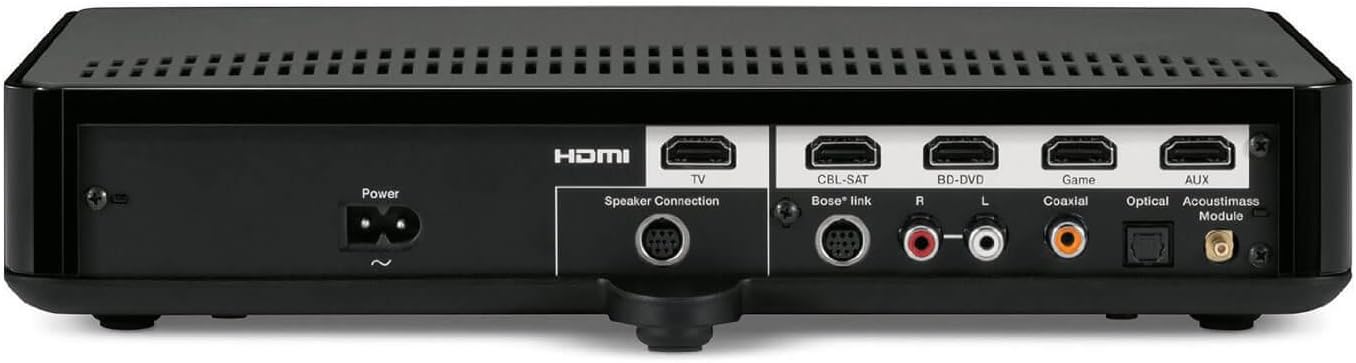
Image: Rear panel of the control console showing HDMI inputs (TV, CBL-SAT, BD-DVD, Game, AUX), speaker connection, and other audio inputs (RCA, Coaxial, Optical, Acoustimass Module).
3.3. ADAPTiQ Audio Calibration
The ADAPTiQ audio calibration system customizes the sound to your room's acoustics for consistent, high-quality performance. Connect the ADAPTiQ headset to the control console and follow the on-screen instructions to perform the calibration. This process measures your room's characteristics and adjusts the system's sound output accordingly.
4. Operating the System
4.1. Using the Universal Remote Control

Image: The universal remote control for the Bose SoundTouch 130 system, showing various buttons for source selection, volume, navigation, and media playback.
The included universal remote control simplifies your entertainment experience by controlling the SoundTouch 130 system and connected devices. Refer to the remote control guide for programming instructions for your specific TV and other components.
- Source Selection: Use the dedicated buttons (CBL-SAT, BD-DVD, GAME, AUX) to switch between connected devices.
- Volume Control: Adjust the system volume using the + and - buttons.
- Power: Turn the system on or off.
- Navigation: Use the directional pad and OK button to navigate menus on your TV or connected devices.
4.2. SoundTouch Wireless Music Streaming
The SoundTouch 130 system allows you to stream music wirelessly via your existing home Wi-Fi network or Bluetooth devices. The SoundTouch wireless adapter II enables this functionality.
- Wi-Fi Connection: Download the SoundTouch app on your smartphone or tablet. Follow the in-app instructions to connect your system to your home Wi-Fi network. This enables streaming from services like Spotify, Pandora, and Internet radio.
- Bluetooth Connection: Activate Bluetooth on your mobile device. Select the Bose SoundTouch 130 from the list of available devices to pair and stream audio directly.
The SoundTouch app provides comprehensive control over your music sources and playback.
5. Maintenance
5.1. Cleaning
To clean the surfaces of the soundbar, Acoustimass module, and control console, use a soft, dry cloth. Do not use liquid cleaners or solvents, as they may damage the finish. Ensure all components are unplugged from power before cleaning.
5.2. Software Updates
Periodically check for software updates for your SoundTouch system through the SoundTouch app or the Bose support website. Updates can provide new features and performance improvements. Use the provided USB cable for manual updates if instructed by Bose support.
6. Troubleshooting
| Problem | Possible Solution |
|---|---|
| No Sound: |
|
| Wireless Acoustimass Module Not Connecting: |
|
| Remote Control Not Working: |
|
| SoundTouch App Issues: |
|
7. Specifications
| Feature | Detail |
|---|---|
| Model Number | 738484-1100 |
| Product Dimensions (L x W x H) | 39.88 x 12 x 21.31 inches |
| Item Weight | 38.6 pounds |
| Brand | Bose |
| Connectivity Technology | Bluetooth |
| Color | Black |
| Speaker Type | Stereo |
| Control Console HDMI Inputs | 4 (CBL-SAT, BD-DVD, Game, AUX) |
| Remote Control Batteries | 1 CR2 battery required |
| Soundbar Speaker Dimensions (H x W x D) | 4.9" x 36.8" x 2.4" (7.8 lbs) |
| Acoustimass Module Dimensions (H x W x D) | 11.3" x 7.6" x 14.8" (13.8 lbs) |
| Control Console Dimensions (H x W x D) | 2.5" x 12.3" x 8.2" (3.28 lbs) |
8. Support and Warranty
For technical assistance, product registration, or warranty information, please visit the official Bose support website or contact Bose customer service. Keep your purchase receipt for warranty claims.
Additional resources, including the full PDF user manual, may be available on the Bose website.


