
Introduction
Thank you for choosing the Marea B35252/3 Digital Men's Watch. This manual provides essential information for the proper setup, operation, maintenance, and troubleshooting of your new timepiece. Please read these instructions carefully to ensure optimal performance and longevity of your watch.
Product Overview
The Marea B35252/3 is a stylish digital watch designed for men, featuring a robust gold-colored stainless steel case, a comfortable brown leather strap, and a clear digital display. It is powered by a reliable quartz movement and includes an alarm function. The watch is water-resistant up to 5 ATM, making it suitable for everyday use.
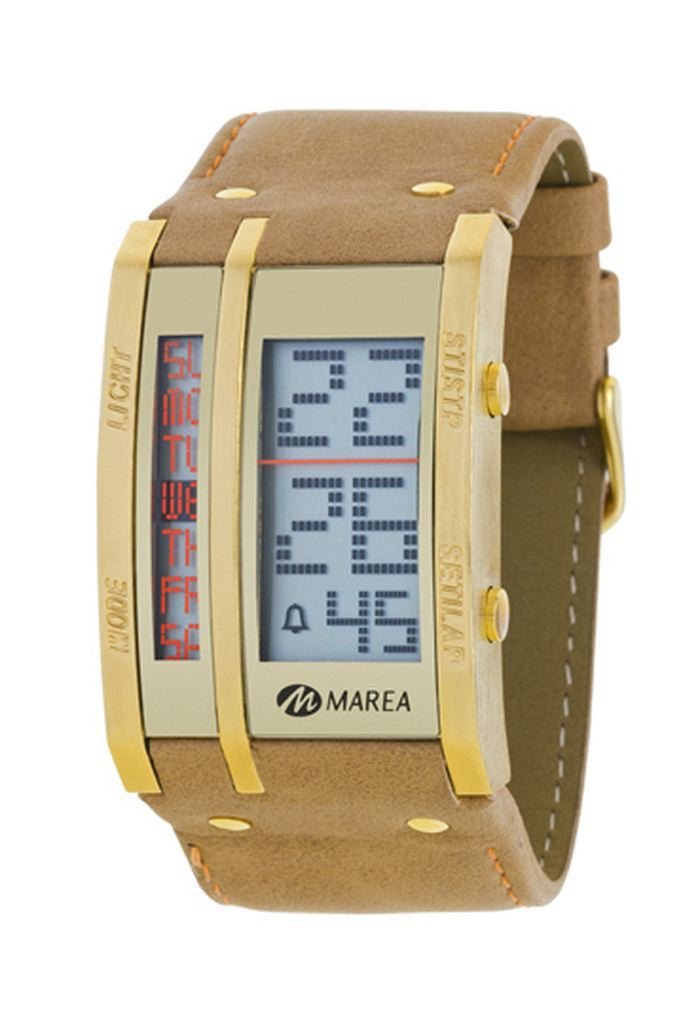
Figure 1: Marea B35252/3 Digital Men's Watch. This image shows the Marea B35252/3 digital watch with its gold-colored rectangular case, brown leather strap, and digital display.
Key Components:
- Digital Display: Shows time, date, and other functions.
- Function Buttons: Typically located on the sides of the watch case, used for setting and mode selection.
- Watch Case: Gold-colored stainless steel housing.
- Watch Strap: Brown leather for comfortable wear.
Setup
Battery Installation (Initial Use):
Your Marea B35252/3 watch comes with one product-specific battery already installed. If the display is blank or dim upon first use, it may indicate that the battery is in a power-saving mode or needs activation. In most cases, the watch will be ready to use directly out of the box.
Initial Time Setting:
- Identify Buttons: Locate the buttons on the side of your watch. Digital watches typically have a "MODE" button and "ADJUST" or "SET" buttons.
- Enter Time Setting Mode: Press the "MODE" button repeatedly until the time display starts flashing, or a "SET" indicator appears.
- Adjust Time: Use the "ADJUST" or "SET" buttons (often labeled with arrows or "+"/"-") to change the hours, minutes, and seconds. Press "MODE" again to cycle through the different time units (hours, minutes, seconds).
- Confirm Setting: Once the correct time is set, press the "MODE" or a dedicated "CONFIRM" button to exit the setting mode. The display should stop flashing.
- Set Date (if applicable): Follow a similar procedure to set the date, usually accessible after setting the time in the same mode cycle.
Note: Specific button functions may vary slightly. Refer to the markings on your watch for precise button identification.
Operating Instructions
Viewing Time and Date:
In normal timekeeping mode, the watch displays the current time. Pressing the "MODE" button briefly may cycle through different display formats (e.g., 12-hour/24-hour) or show the date.
Setting the Alarm:
- Enter Alarm Mode: Press the "MODE" button until the alarm time is displayed, often indicated by an "AL" or bell icon.
- Adjust Alarm Time: Use the "ADJUST" or "SET" buttons to set the desired alarm hour and minute.
- Activate/Deactivate Alarm: There is usually a separate button or a combination of buttons to turn the alarm ON or OFF. Look for an alarm icon on the display to confirm its status.
- Exit Alarm Mode: Press the "MODE" button to return to normal timekeeping.
Other Functions:
Depending on the specific model, your watch may include additional functions such as a stopwatch, timer, or backlight. Cycle through the "MODE" button to discover and operate these features. Detailed instructions for these functions would follow a similar pattern of entering a mode, adjusting values, and confirming.
Maintenance
Cleaning Your Watch:
- Wipe the watch case and display with a soft, dry cloth.
- For the leather strap, use a slightly damp cloth and mild soap if necessary, then dry thoroughly. Avoid excessive moisture.
- Do not use harsh chemicals or abrasive materials, as these can damage the watch's finish.
Water Resistance (5 ATM / 50 Meters):
Your Marea B35252/3 watch is water-resistant to 5 ATM (50 meters). This means it is suitable for everyday use and can withstand splashes, rain, and brief immersion in water. However, it is not recommended for swimming, showering, or diving. Avoid pressing buttons while the watch is wet, as this can compromise the water seal.
Battery Replacement:
When the watch display becomes dim or stops functioning, it's time to replace the battery. We recommend having the battery replaced by a qualified watch technician to ensure the water resistance seal is properly maintained.
Strap Care:
The leather strap can be affected by sweat, moisture, and direct sunlight. To prolong its life, avoid prolonged exposure to water and direct sunlight. Clean it periodically as described above and allow it to air dry naturally.
Troubleshooting
| Problem | Possible Cause | Solution |
|---|---|---|
| Display is blank or dim. | Low or depleted battery. | Replace the battery (professional service recommended). |
| Time is incorrect. | Time not set correctly or accidentally reset. | Refer to the "Initial Time Setting" section to reset the time. |
| Alarm does not sound. | Alarm is not activated or set incorrectly. | Ensure the alarm is turned ON and the correct time is set in the "Setting the Alarm" section. |
| Buttons are unresponsive. | Watch may be in a locked mode or internal malfunction. | Try removing and reinserting the battery (if comfortable) or seek professional service. |
Specifications
- Brand: Marea
- Model: B35252/3
- Display Type: Digital
- Movement: Quartz
- Case Material: Alloy Steel (Gold-colored)
- Case Diameter: 34.00 mm
- Case Thickness: 14.00 mm
- Strap Material: Leather
- Strap Color: Brown
- Dial Color: Gold
- Water Resistance: 5 ATM (50 Meters)
- Special Features: Alarm
- Battery: 1 product-specific battery (included)
- Item Weight: 560 grams
Warranty and Support
Your Marea B35252/3 watch is covered by a manufacturer's warranty. For specific details regarding the warranty period and coverage, please refer to the warranty card included with your purchase or contact your retailer.
For technical support or service inquiries, please contact the retailer where you purchased the watch or visit the official Marea website for contact information.
