
Introduction
This manual provides detailed instructions for the safe and efficient operation, setup, and maintenance of your KRUPS EC314 12-Cup Programmable Digital Coffee Maker. Please read all instructions carefully before first use and retain this manual for future reference.

Image: Front view of the KRUPS EC314 12-Cup Programmable Digital Coffee Maker, showcasing its stainless steel and black design with the glass carafe in place.
Important Safety Instructions
- Read all instructions before using the appliance.
- Do not touch hot surfaces. Use handles or knobs.
- To protect against fire, electric shock, and injury to persons, do not immerse cord, plugs, or coffee maker in water or other liquid.
- Close supervision is necessary when any appliance is used by or near children.
- Unplug from outlet when not in use and before cleaning. Allow to cool before putting on or taking off parts, and before cleaning the appliance.
- Do not operate any appliance with a damaged cord or plug or after the appliance malfunctions, or has been damaged in any manner. Return appliance to the nearest authorized service facility for examination, repair or adjustment.
- The use of accessory attachments not recommended by the appliance manufacturer may result in fire, electric shock, or injury to persons.
- Do not use outdoors.
- Do not let cord hang over edge of table or counter, or touch hot surfaces.
- Do not place on or near a hot gas or electric burner, or in a heated oven.
- Always attach plug to appliance first, then plug cord into the wall outlet. To disconnect, turn any control to "off", then remove plug from wall outlet.
- Do not use appliance for other than intended use.
- The carafe is designed for use with this appliance. It must never be used on a range top.
- Do not place a hot carafe on a wet or cold surface.
- Do not use a cracked carafe or a carafe having a loose or weakened handle.
- Do not clean carafe with cleansers, steel wool pads, or other abrasive materials.
- Scalding may occur if the lid is removed during the brewing cycles.
Product Components
Familiarize yourself with the parts of your coffee maker:
- Water Reservoir with Level Indicator
- Control Panel with LCD Screen and Rotating Knob
- Brew Basket
- Gold-Tone Permanent Filter
- Glass Carafe with Stay-Cool Handle
- Warming Plate
- Lid

Image: Close-up of the coffee maker's control panel, showing the digital display, rotating brew knob, and water level indicator on the side.
Setup
- Unpacking: Carefully remove all packaging materials and components.
- Initial Cleaning: Before first use, wash the carafe, lid, and permanent filter in warm, soapy water. Rinse thoroughly. Wipe the exterior of the coffee maker with a damp cloth.
- First Brew Cycle (Cleaning):
- Fill the water reservoir with fresh, cold water up to the 12-cup mark.
- Place the permanent filter into the brew basket. Do not add coffee grounds for this cycle.
- Place the carafe with its lid on the warming plate.
- Plug the coffee maker into a standard electrical outlet.
- Press the BREW button to start a full brewing cycle with only water.
- Once the cycle is complete, discard the water from the carafe. Your coffee maker is now ready for use.
- Setting the Clock:
- Ensure the coffee maker is plugged in.
- Press and hold the CLOCK button (usually located near the display).
- Use the + and - buttons or the rotating knob to set the current time. Pay attention to AM/PM indication.
- Release the CLOCK button to save the time.
Operating Instructions
Basic Brewing
- Fill Water Reservoir: Open the lid and pour fresh, cold water into the water reservoir. Use the water level indicator on the side to fill to your desired number of cups (up to 12 MAX).

Image: A hand holding the glass carafe, pouring water into the coffee maker's open water reservoir.
- Add Coffee Grounds: Place the gold-tone permanent filter into the brew basket. Add the desired amount of ground coffee. A general guideline is one tablespoon of ground coffee per cup, but adjust to your taste.

Image: A close-up view of the gold-tone permanent filter filled with ground coffee, placed inside the brew basket.
- Position Carafe: Ensure the glass carafe with its lid is correctly placed on the warming plate.
- Start Brewing: Press the BREW button. The brewing indicator will illuminate, and the brewing process will begin.
- Pause & Serve: You can temporarily remove the carafe during brewing to pour a cup. The drip stop feature will prevent coffee from dripping for a short period. Return the carafe to the warming plate within 20 seconds to prevent overflow.
- Keep Warm: After brewing, the coffee maker will automatically enter the "Keep Warm" mode, maintaining the coffee's temperature for up to four hours. The display will show the remaining keep-warm time.
Programming Features
- Auto-On Timer:
- Prepare the coffee maker for brewing (water and coffee grounds added).
- Press the AUTO ON 1/2 button. The display will show "AUTO ON 1" or "AUTO ON 2".
- Use the + and - buttons or the rotating knob to set the desired brew start time.
- Press the AUTO ON 1/2 button again to confirm the time. The indicator light will illuminate, signifying the timer is set.
- The coffee maker features dual program settings, allowing for separate weekday and weekend auto-on times.
- Brew Strength (REG/BOLD):
- Before brewing, press the REG/BOLD button to toggle between regular and bold coffee strength. The selected strength will be indicated on the display.
- Small Batch (1-4 Cups):
- When brewing 1 to 4 cups, press the 1-4 button before starting the brew cycle. This optimizes the brewing process for smaller quantities to ensure full flavor.
- Keep Warm Temperature and Time:
- Press the TEMP button to cycle through three preset warming plate temperatures.
- Press the TIME button to adjust the keep-warm duration up to four hours.

Image: Detailed view of the coffee maker's control panel, highlighting the digital display, brew strength, and keep warm settings.
Maintenance
Daily Cleaning
- Always unplug the coffee maker before cleaning.
- Wash the carafe, carafe lid, and permanent filter in warm, soapy water after each use. These parts are not dishwasher safe.
- Wipe the exterior of the coffee maker with a soft, damp cloth. Do not use abrasive cleaners or scouring pads.
- Do not immerse the coffee maker in water or any other liquid.
Descaling
Mineral deposits (limescale) can build up in your coffee maker over time, affecting performance and coffee taste. The CLEAN indicator on the display will illuminate to remind you when descaling is recommended.

Image: Two cups of coffee with coffee beans, emphasizing the importance of descaling for optimal performance.
- Prepare Descaling Solution: Mix 1 part white vinegar with 2 parts cold water, or use a commercial descaling solution designed for coffee makers. Fill the water reservoir with this solution up to the 12-cup mark.
- Start Descaling Cycle: Place the empty carafe with its lid on the warming plate. Press the CLEAN button. The coffee maker will perform a descaling cycle.
- Rinse Cycles: After the descaling cycle is complete, discard the solution. Fill the water reservoir with fresh, cold water and run two full brewing cycles with only water to rinse the system thoroughly.
- The CLEAN indicator will turn off after the descaling process is complete.
Troubleshooting
| Problem | Possible Cause | Solution |
|---|---|---|
| Coffee does not brew. |
|
|
| Coffee tastes weak. |
|
|
| Coffee overflows from brew basket. |
|
|
| "CLEAN" indicator remains on after descaling. | Descaling cycle not fully completed or not enough rinse cycles. | Run additional rinse cycles with fresh water until the indicator turns off. |
Specifications
- Model: EC314
- Capacity: 12 Cups (60 oz)
- Power: 110 Volts, 1300 Watts
- Dimensions (D x W x H): 9.6" x 9.6" x 15.9"
- Weight: 9.9 Pounds
- Material: Stainless Steel, Plastic
- Filter Type: Reusable Gold-Tone Filter
- Special Features: Programmable, Auto-On, Brew Strength Control, 1-4 Cup Setting, Adjustable Keep Warm Temperature & Time, Pause & Serve, Descale Reminder.
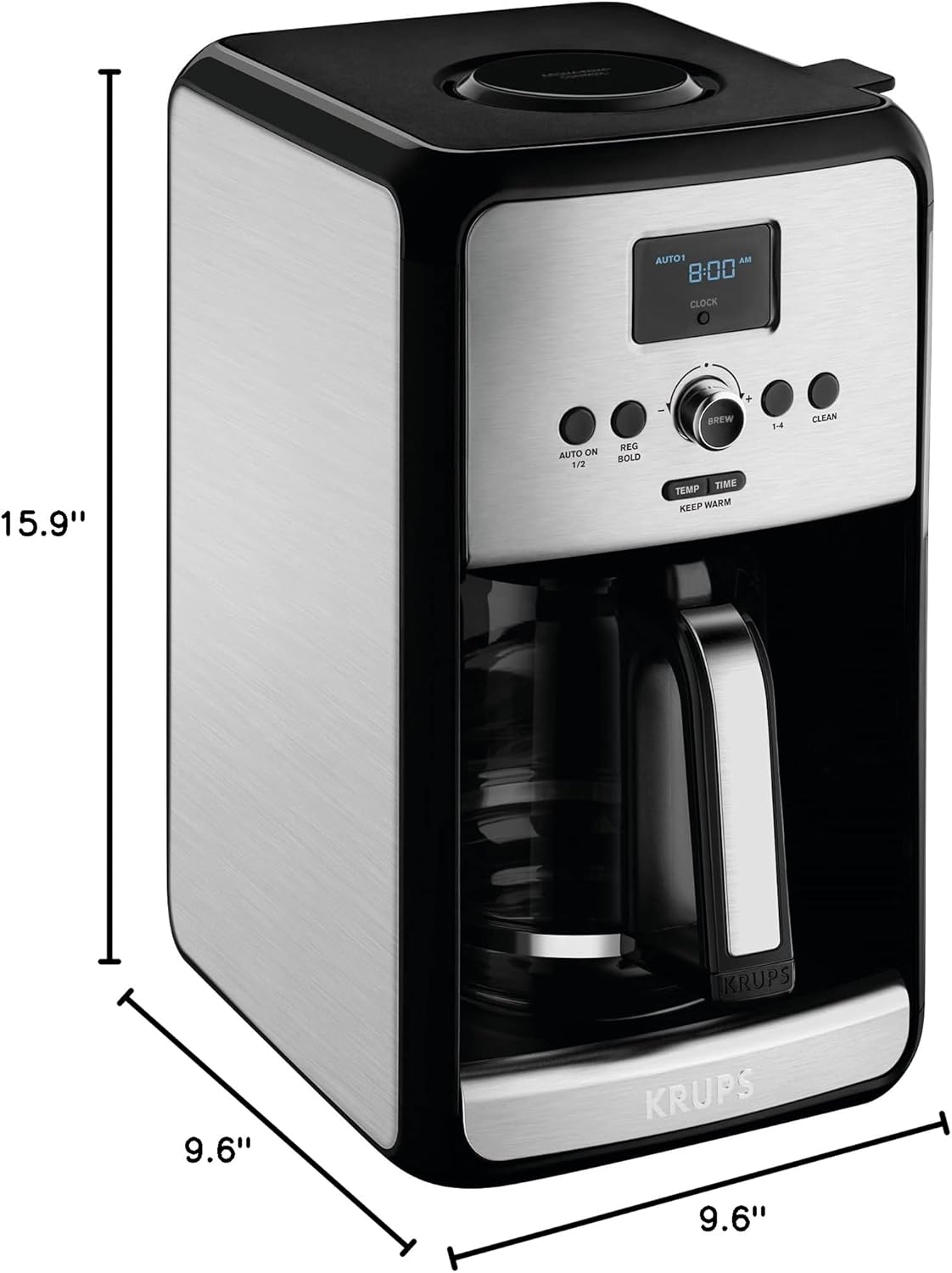
Image: Diagram showing the dimensions (depth, width, height) of the KRUPS EC314 coffee maker.
Warranty and Support
For warranty information, product registration, or technical support, please refer to the official KRUPS website or contact KRUPS customer service. Keep your proof of purchase for warranty claims.
Online Support: Visit www.krups.com for FAQs, product information, and service center locations.
Customer Service: Contact information can typically be found on the KRUPS website or in the packaging materials.


