
1. Introduction
This manual provides detailed instructions for the safe and efficient use of your Micromax J3 keypad mobile phone. Please read this manual thoroughly before operating your device and keep it for future reference.
The Micromax J3 is a sleek and stylish keypad mobile phone designed for essential communication, featuring a 1.77-inch screen, auto call recording, a bright torch, and wireless FM radio.
2. Package Contents
Upon opening the package, ensure all items listed below are present and in good condition:
- Micromax J3 Transceiver (Mobile Phone)
- Battery
- Charger
- User Manual

Image: Micromax J3 Keypad Mobile Phone, front and back view.
3. Device Layout
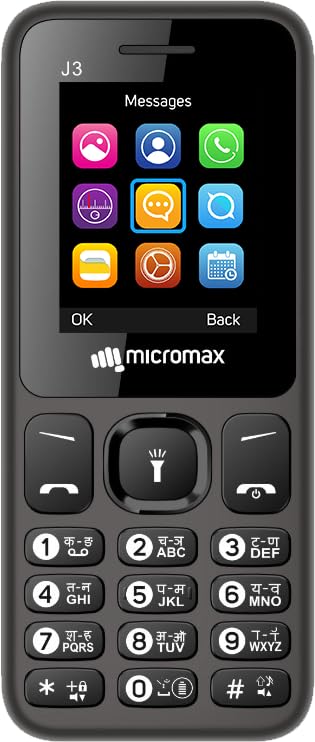
Image: Front view of the Micromax J3, showing the screen and keypad.
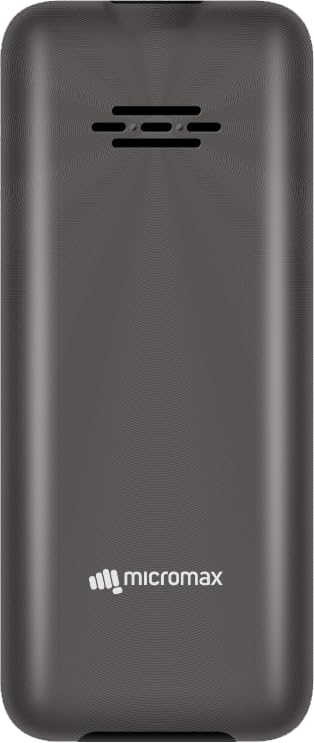
Image: Back view of the Micromax J3, showing the speaker grille and Micromax logo.

Image: Side view of the Micromax J3, highlighting the integrated torch light.
4. Setup
4.1. Installing the Battery and SIM Card(s)
- Gently remove the back cover of the phone.
- Insert the SIM card(s) into the designated slot(s). The Micromax J3 supports Dual SIM functionality.
- Insert the battery into its compartment, ensuring the contacts align correctly.
- Replace the back cover until it clicks securely into place.
4.2. Charging the Device
Before first use, fully charge the battery. Connect the charger to the phone's charging port and plug it into a power outlet. The battery indicator on the screen will show charging status. Disconnect the charger once the battery is full.

Image: Illustration of the 800 mAh battery and power saving mode, indicating extended battery life.
5. Operating Instructions
5.1. Power On/Off
- To power on, press and hold the Power/End Call key until the screen lights up.
- To power off, press and hold the Power/End Call key, then select "Power off" from the options.
5.2. Basic Functions
- Making Calls: Enter the phone number using the keypad and press the Call key (green button).
- Answering Calls: Press the Call key (green button) when the phone rings.
- Sending Messages: Navigate to the 'Messages' menu, select 'Write message', enter your text, and send it to the desired contact.
- Keypad Lock: To lock the keypad, press the Left Soft key followed by the '*' key. To unlock, repeat the sequence.
5.3. Special Features
- Auto Call Recording: The device supports folder-wise auto call recording. This feature allows you to automatically record phone conversations and organize them for easy access.
- Bright Torch: Activate the built-in bright torch for illumination in dark environments. Refer to the device layout for the torch location.
- Wireless FM Radio: Enjoy your favorite radio stations without needing to connect headphones as an antenna. Access the FM Radio application from the main menu.
- Power Saving Mode: Extend your phone's battery life by activating the power saving mode, which optimizes device settings to conserve power.
- Regional Language Support: The Micromax J3 supports 22 regional languages for both reading and writing, enhancing usability for diverse users.
- Anti-Theft Feature: Keep track of your phone with the integrated anti-theft feature, providing an added layer of security.
- Music & Video Player: Play your favorite music and videos directly on your device.

Image: A visual summary of key features: Music & Video, Sleek Design, 1.77" Screen, Vibration, Anti-theft, Bright Torch, Number Talk Back, Durable 800 mAh Battery with Power Saving Mode, Wireless FM Radio, and Auto Call Recording.
6. Maintenance
- Keep the device dry. Precipitation, humidity, and all types of liquids or moisture can contain minerals that will corrode electronic circuits.
- Do not use or store the device in dusty, dirty areas. Its moving parts and electronic components can be damaged.
- Do not store the device in high temperatures. High temperatures can shorten the life of electronic devices, damage batteries, and warp or melt certain plastics.
- Do not store the device in cold temperatures. When the device returns to its normal temperature, moisture can form inside the device and damage electronic circuit boards.
- Do not attempt to open the device other than as instructed in this manual.
- Do not drop, knock, or shake the device. Rough handling can break internal circuit boards and fine mechanics.
- Do not use harsh chemicals, cleaning solvents, or strong detergents to clean the device.
- Use only the supplied or approved replacement battery and charger.
7. Troubleshooting
Common Issues and Solutions:
- Phone does not power on: Ensure the battery is correctly inserted and fully charged. Connect the charger and try again.
- Battery not charging: Check if the charger is properly connected to both the phone and the power outlet. Ensure the charger is not damaged.
- No network signal: Check if the SIM card is correctly inserted. Move to an area with better network coverage. Contact your service provider if the issue persists.
- Call recording not working: Ensure the auto call recording feature is enabled in the phone settings. Check if there is sufficient storage space for recordings.
- Torch not working: Ensure the torch is activated correctly. Check if the battery level is critically low.
8. Specifications
| Feature | Specification |
|---|---|
| Model Number | J3 |
| Operating System | Spreadtrum |
| RAM | 32 MB |
| Memory Storage Capacity | 32 MB |
| Screen Size | 4.49 cm (1.77 inches) |
| Battery Capacity | 800 mAh Lithium Ion |
| Connectivity | Bluetooth, USB |
| Special Features | Auto Call Recording, Bright Torch, FM Radio, Power Saving Mode |
| Device Interface | Keypad, Microphone |
| Audio Jack | 3.5 mm |
| Form Factor | Bar |
| Color | Grey |
| Product Dimensions | 15 x 0.8 x 5.5 cm |
| Item Weight | 200 g |
| Manufacturer | Micromax Informatics Ltd |
9. Warranty and Support
The Micromax J3 comes with a standard 1 Year Warranty from the manufacturer, Micromax Informatics Ltd. For warranty claims or technical support, please contact Micromax customer service or visit their official website.
Manufacturer: Micromax Informatics Ltd


