
1. Product Overview
This manual provides instructions for the Newmowa NB-11L/11LH Battery (2 Pack) and Dual USB Charger Kit. This kit is designed to provide reliable power for your compatible Canon cameras, offering a convenient and efficient charging solution.
The kit includes two NB-11L/11LH compatible batteries and one dual USB charger, along with a micro USB cable.
1.1. Package Contents
- 2 x Newmowa NB-11L/11LH Compatible Batteries (3.6V, 680mAh)
- 1 x Newmowa Dual USB Charger
- 1 x Micro USB Cable
1.2. Compatible Camera Models
The Newmowa NB-11L/11LH batteries and charger are compatible with various Canon camera models, including but not limited to:
- Canon PowerShot A2300 IS
- Canon PowerShot A2400 IS
- Canon PowerShot A2500
- Canon PowerShot A2600
- Canon PowerShot A3400 IS
- Canon PowerShot A3500 IS
- Canon PowerShot A4000 IS
- Canon ELPH 110 HS
- Canon ELPH 115 HS
- Canon SX400 IS
- Canon SX400 IS II
- And other select cameras using NB-11L/11LH batteries.
This image displays several Canon PowerShot and ELPH camera models, such as A2300 IS, A4000 IS, ELPH 110 HS, and SX400 IS, indicating their compatibility with the NB-11L/11LH battery kit.
2. Setup and First Use
Before using your new batteries, it is recommended to fully charge them. Follow these steps for initial setup:
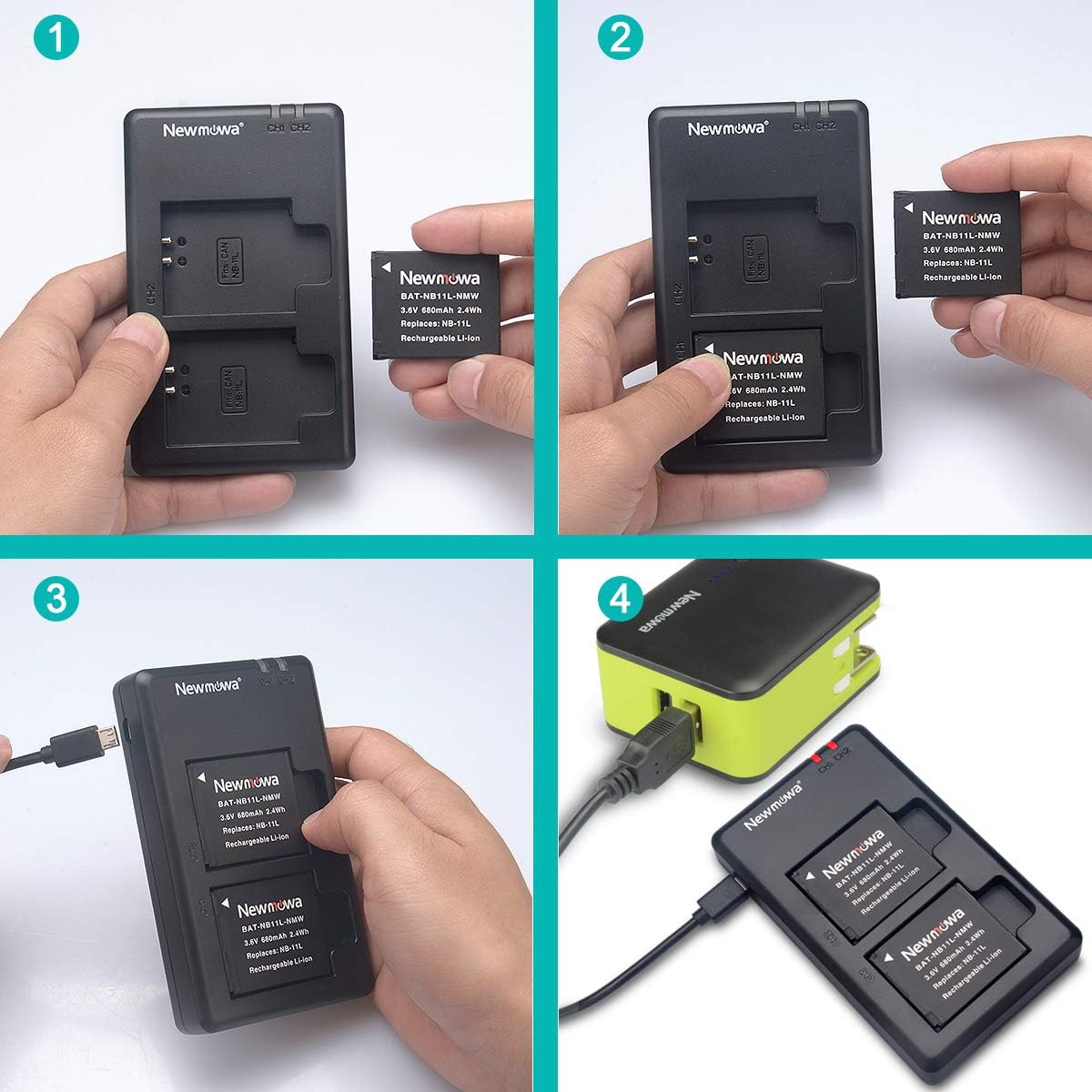
- Insert Batteries: Carefully insert one or two NB-11L/11LH batteries into the charging slots of the Newmowa Dual USB Charger. Ensure the battery contacts align correctly with the charger pins.
- Connect Power: Connect the provided micro USB cable to the charger's input port.
- Connect to Power Source: Plug the other end of the micro USB cable into a compatible USB power source, such as a USB wall charger, car charger, power bank, or laptop USB port.
- Observe Charging Indicators: The LED indicator lights on the charger will illuminate. A red light indicates that the battery is currently charging. A green light indicates that the battery is fully charged or no battery is present in the slot.
This image illustrates the step-by-step process of placing the NB-11L battery into the Newmowa dual charger and connecting the micro USB cable to a power source.
3. Operating Instructions
3.1. Charging Process
The Newmowa Dual USB Charger is designed to charge one or two batteries simultaneously. Each charging slot has an independent LED indicator.
- Red Indicator: The battery in the corresponding slot is currently charging.
- Green Indicator: The battery in the corresponding slot is fully charged. If no battery is inserted, the light will also be green when the charger is powered.

This image highlights the LED indicators on the Newmowa dual charger, showing a red light for charging and a green light for a fully charged battery or an empty slot.
3.2. Multiple Charging Options
The charger offers versatile power input options, allowing you to charge your batteries conveniently in various situations:
- USB Wall Charger: Use a standard USB wall adapter.
- Car Charger: Charge on the go using a USB car adapter.
- Power Bank: Connect to an external battery pack for portable charging.
- Laptop/Computer: Use a USB port on your laptop or desktop computer.

This image displays icons representing different ways to power the Newmowa dual charger: a USB wall charger, a power bank, a laptop, and a car charger, emphasizing its versatility.
3.3. Using Charged Batteries
Once fully charged, remove the batteries from the charger and insert them into your compatible Canon camera according to your camera's instruction manual. The batteries are ready for use.
4. Maintenance and Safety
4.1. Battery Care
- Store batteries in a cool, dry place away from direct sunlight and extreme temperatures.
- Avoid fully discharging batteries for extended periods.
- If storing for a long time, charge batteries to about 50-60% capacity.
- Keep battery contacts clean and free from dirt or debris.
4.2. Charger Care
- Clean the charger with a soft, dry cloth. Do not use liquid cleaners.
- Avoid exposing the charger to water or high humidity.
- Do not disassemble the charger.
4.3. Safety Guidelines
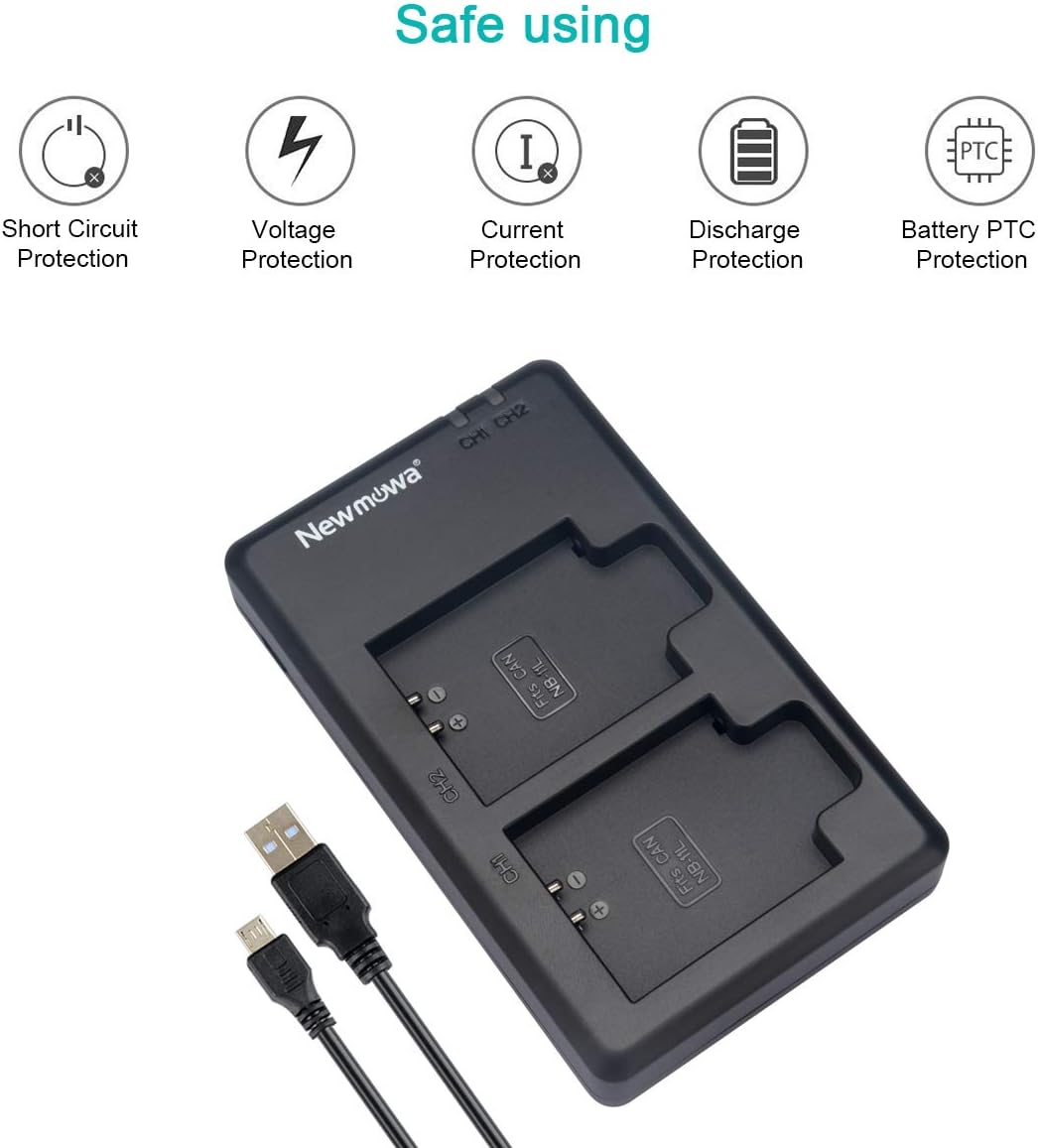
The Newmowa charger and batteries are built with multiple protection features to ensure safe operation:
- Over-charging Protection: Prevents batteries from being overcharged.
- Short-circuit Protection: Guards against electrical shorts.
- High-temperature Protection: Monitors and prevents overheating.
- Surge Protection: Protects against power surges.
- Current Protection: Regulates charging current.
- Discharge Protection: Prevents excessive discharge of batteries.
- Battery PTC Protection: Additional protection for the battery cell.
Caution: Do not expose batteries to high temperatures, disassemble, or short circuit. Dispose of batteries properly according to local regulations.

This image visually represents the comprehensive safety features integrated into the Newmowa charger, such as protection against short circuits, over-voltage, over-current, over-discharge, and PTC protection for the battery.
5. Troubleshooting
| Problem | Possible Cause | Solution |
|---|---|---|
| Charger LED does not light up. | No power supply or faulty connection. | Ensure the micro USB cable is securely connected to both the charger and the power source. Try a different USB port or power adapter. |
| LED remains green when battery is inserted. | Battery is already fully charged or not properly inserted. | Remove and re-insert the battery, ensuring proper contact. If it remains green, the battery is likely fully charged. |
| Battery does not hold charge well. | Battery degradation or improper charging. | Ensure the battery is fully charged before use. Over time, all rechargeable batteries degrade. If the issue persists, consider replacing the battery. |
| Charger or battery feels warm during charging. | Normal operation or potential overheating. | A slight warmth is normal. If it becomes excessively hot, disconnect immediately and contact customer support. Ensure proper ventilation around the charger. |
6. Product Specifications
| Feature | Specification |
|---|---|
| Battery Model | NB-11L / NB-11LH (Compatible) |
| Battery Voltage | 3.6V |
| Battery Capacity | 680mAh (2.4Wh) |
| Charger Input Voltage | 5V (via Micro USB) |
| Charger Output Voltage | 5V |
| Charger Type | Dual USB Charger |
| Safety Features | Over-charging, Short-circuit, High-temperature, Surge, Current, Discharge, Battery PTC Protection |
| Item Model Number | NB-11L-DU |
| Item Weight | Approximately 4.2 ounces (total kit) |
| Dimensions (Package) | 5.94 x 2.95 x 2.24 inches |
7. Warranty and Customer Support
Newmowa provides a 1-year warranty for this product, covering manufacturing defects and malfunctions under normal use. For any issues or inquiries, please contact Newmowa customer service.
Newmowa is committed to providing 24-hour friendly customer service to assist you with any questions or concerns regarding your product.
For support, please refer to the contact information provided with your purchase or visit the official Newmowa website.