
1. Introduction
This manual provides instructions for the proper use and maintenance of your Weighmax GM25 Digital Kitchen Scale. This scale is designed for accurate measurement of food items and mail, featuring a durable tempered glass platform and an easy-to-read LCD backlight display. Please read this manual thoroughly before operating the device.
2. Package Contents
Verify that all items are present in the package:
- Weighmax GM25 Digital Kitchen Scale
- 2 x AAA Batteries
- User Manual (this document)
3. Product Features
The Weighmax GM25 Digital Kitchen Scale offers the following features:
- High Capacity: Weighs up to 25 lbs (11 kg).
- Precision: Sensitivity of 0.1 oz (2.86 g).
- Multiple Units: Four weighing units available: pounds and ounces (lb. oz.), kilograms and grams (kg g), milliliters (ml), and fluid ounces (fl.oz). Suitable for both solids and liquids.
- Durable Platform: Extra-large tempered glass weighing platform (9" x 6.6" x 0.8").
- Tare Function: Allows weighing of items in a container by subtracting the container's weight.
- Power: Operates on 2 AAA batteries (included).
- Low Battery Indicator: Alerts when batteries need replacement.
- LCD Backlight: Provides clear readings in various lighting conditions.

Figure 1: Top view of the Weighmax GM25 Digital Kitchen Scale, featuring a magenta tempered glass platform and an LCD display showing '0.0'.
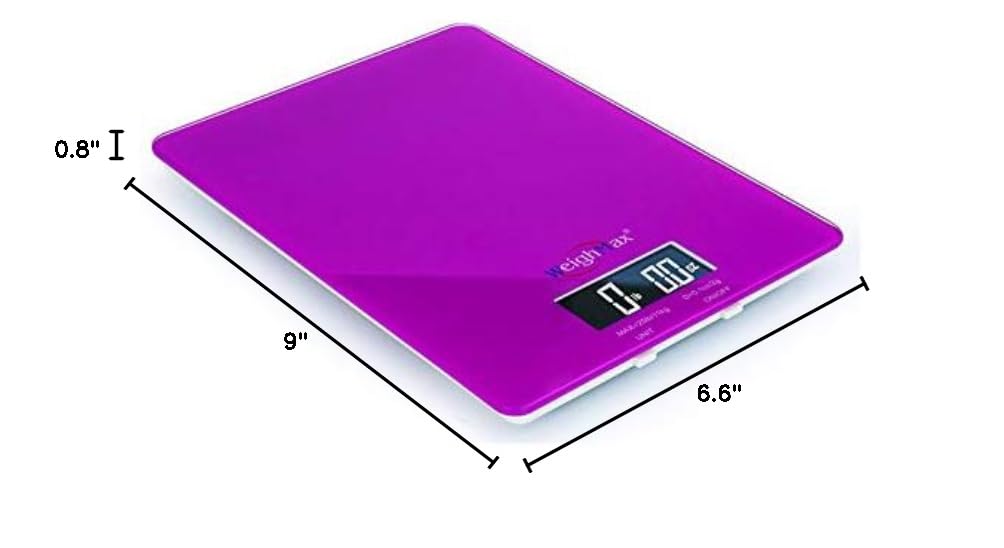
Figure 2: Dimensions of the Weighmax GM25 Digital Kitchen Scale, indicating a length of 9 inches, a width of 6.6 inches, and a height of 0.8 inches.
4. Safety Information
To ensure safe operation and prolong the life of your scale, please observe the following safety guidelines:
- Do not immerse the scale in water or other liquids.
- Clean the scale with a damp cloth; do not use abrasive cleaners.
- Place the scale on a flat, stable surface during use to ensure accurate readings.
- Avoid dropping the scale or subjecting it to strong impacts, as this may damage the tempered glass or internal components.
- Do not overload the scale beyond its maximum capacity of 25 lbs (11 kg).
- Remove batteries if the scale will not be used for an extended period to prevent leakage.
- Keep out of reach of children.
5. Setup
5.1. Battery Installation
- Locate the battery compartment on the underside of the scale.
- Open the battery compartment cover.
- Insert the two AAA batteries, ensuring correct polarity (+ and -) as indicated inside the compartment.
- Close the battery compartment cover securely.
5.2. Placement
Place the scale on a hard, flat, and level surface. Uneven surfaces can affect accuracy.
6. Operating Instructions
6.1. Power On/Off
- To turn on the scale, press the ON/OFF button. The display will show "0.0" or "0" when ready for use.
- To turn off the scale, press and hold the ON/OFF button for a few seconds. The scale will also automatically shut off after a period of inactivity to conserve battery life.
6.2. Changing Measurement Units
The scale can measure in four different units: lb. oz., kg g, ml, and fl.oz.
- With the scale powered on, press the UNIT button to cycle through the available units.
- Select the desired unit before placing items on the scale.
6.3. Weighing Items
- Ensure the scale is on a flat, stable surface and powered on.
- Select the desired measurement unit using the UNIT button.
- Gently place the item(s) to be weighed onto the center of the tempered glass platform.
- Read the weight displayed on the LCD screen.
6.4. Tare Function
The Tare function allows you to weigh multiple ingredients in the same container or to weigh an item without including the weight of its container.
- Place an empty container on the scale platform. The display will show the container's weight.
- Press the TARE button (often combined with ON/OFF or UNIT, refer to button labels on your scale). The display will reset to "0.0" or "0".
- Add the item(s) you wish to weigh into the container. The display will now show only the net weight of the added item(s).
- To clear the tare, remove all items from the scale and press the TARE button again, or turn the scale off and on.
7. Maintenance and Care
- Cleaning: Wipe the scale surface with a soft, damp cloth. Do not use chemical cleaning agents or abrasive materials.
- Storage: Store the scale in a cool, dry place. Avoid extreme temperatures and high humidity.
- Battery Replacement: When the low battery indicator appears on the display, replace both AAA batteries promptly to ensure continued accuracy and prevent battery leakage.
8. Troubleshooting
| Problem | Possible Cause | Solution |
|---|---|---|
| Scale does not turn on. | Batteries are dead or incorrectly installed. | Check battery polarity. Replace batteries with new AAA batteries. |
| Inaccurate readings. | Scale is on an uneven surface; overloaded; or needs recalibration. | Place scale on a flat, stable surface. Do not exceed 25 lbs (11 kg). If issues persist, contact customer support. |
| Display shows "Lo" or "Err". | Low battery or overload error. | Replace batteries. Remove excess weight if overloaded. |
| Scale does not return to zero. | Residual weight or internal sensor issue. | Ensure nothing is on the scale. Press TARE button. If problem persists, turn off and restart. |
9. Specifications
| Feature | Detail |
|---|---|
| Model Number | GM25 |
| Capacity | 25 lbs (11 kg) |
| Sensitivity / Readout Accuracy | 0.1 oz (2.86 g) |
| Measurement Units | lb. oz., kg g, ml, fl.oz |
| Platform Material | Tempered Glass |
| Product Dimensions | 9 x 6.6 x 0.8 inches |
| Power Source | 2 x AAA Batteries (included) |
10. Warranty and Support
The Weighmax GM25 Digital Kitchen Scale comes with a 10-year limited warranty. This warranty covers defects in materials and workmanship under normal use.
For warranty claims, technical support, or any questions regarding your product, please contact Weighmax customer service. Please retain your proof of purchase for warranty validation.
Contact information for Weighmax customer service is typically found on the product packaging or the official Weighmax website.