Introduction
This manual provides comprehensive instructions for the installation, operation, and maintenance of your Avidsen 100113 Additional Solar Siren. This siren is designed to enhance the security of your property by providing an audible and visual deterrent when paired with compatible Avidsen alarm systems, specifically models 100108 and 100111. It operates wirelessly at 868 MHz and features solar charging capabilities for sustained performance.
Safety Information
- Read all instructions carefully before installation and use.
- Ensure the siren is mounted securely to prevent falling.
- Do not attempt to open or repair the device yourself. Refer to qualified personnel.
- Keep away from extreme temperatures, direct water immersion, and corrosive substances.
- Dispose of batteries according to local regulations.
- The siren produces a loud sound. Avoid prolonged exposure to prevent hearing damage.
Package Contents
Please check that all items are present in the package:
- 1 x Avidsen 100113 Additional Solar Siren
- Mounting hardware (screws, wall plugs)
- User Manual (this document)
Note: Batteries are required but not included with this product.
Setup
1. Choosing a Location
Select a location for the siren that receives ample direct sunlight throughout the day to ensure optimal solar charging. The location should also be within effective wireless range of your Avidsen alarm system (100108 or 100111) and provide maximum audible coverage.
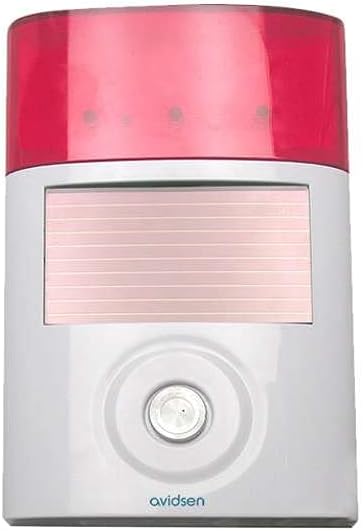
Figure 1: Front view of the Avidsen 100113 Solar Siren. The top section is a red translucent cover for the flashing lights, below which is a rectangular solar panel. A circular button is located at the bottom center, with the "avidsen" logo beneath it.
2. Battery Installation
- Locate the battery compartment on the back or bottom of the siren.
- Open the compartment cover.
- Insert the required batteries (refer to the specifications for battery type) ensuring correct polarity (+/-).
- Close the battery compartment cover securely.
3. Mounting the Siren
- Hold the siren in the chosen location and mark the drilling points for the mounting screws.
- Drill pilot holes at the marked points.
- Insert wall plugs if mounting on masonry or drywall.
- Secure the siren to the wall using the provided screws. Ensure it is firmly attached.
4. Pairing with Avidsen Alarm System
The Avidsen 100113 siren operates at 868 MHz and must be paired with a compatible Avidsen alarm system (models 100108 or 100111). Refer to your main alarm system's user manual for specific instructions on adding wireless accessories. Generally, the process involves:
- Putting your main alarm system into pairing mode.
- Activating the pairing function on the 100113 siren (often by pressing a learn button or triggering it).
- Confirming successful pairing on the main alarm system.
A successful pairing will typically result in a confirmation sound or light indication from both the siren and the alarm system.
Operating Instructions
Once paired with your Avidsen alarm system, the 100113 solar siren will operate automatically in conjunction with the alarm system's status.
- Arming/Disarming: When your main alarm system is armed or disarmed, the siren will typically provide a short confirmation chirp (if configured).
- Alarm Trigger: In the event of an alarm trigger from your main system, the 100113 siren will activate, emitting a loud audible alarm and flashing its integrated lights to deter intruders and alert neighbors.
- Solar Charging: The integrated solar panel continuously charges the internal batteries during daylight hours, ensuring the siren remains powered.
Maintenance
- Solar Panel Cleaning: Periodically clean the solar panel with a soft, damp cloth to remove dust, dirt, or debris that may obstruct sunlight and reduce charging efficiency. Do not use abrasive cleaners.
- Battery Check: Although solar-powered, the siren relies on rechargeable batteries. If the siren's performance degrades or it fails to activate, check the condition of the batteries. Replace them if necessary, using the recommended type.
- Physical Inspection: Regularly inspect the siren for any physical damage, loose mounting, or signs of wear.
Troubleshooting
| Problem | Possible Cause | Solution |
|---|---|---|
| Siren does not activate. |
|
|
| Siren sound is weak or inconsistent. |
|
|
| Solar charging seems ineffective. |
|
|
Specifications
| Brand | Avidsen |
| Model Number | 100113 |
| Part Number | 100113 |
| Product Dimensions | 50.01 x 30 x 19.99 cm |
| Item Weight | 320 g |
| Power Source | Solar Powered |
| Batteries Required | Yes (not included) |
| Wireless Frequency | 868 MHz |
| Compatible Alarm Systems | Avidsen 100108, Avidsen 100111 |
| Date First Available | 11 July 2016 |
Warranty and Support
Avidsen products are designed for reliability and performance. For information regarding warranty coverage, technical support, or service, please refer to the warranty card included with your product or visit the official Avidsen website. Keep your purchase receipt as proof of purchase for warranty claims.
For further assistance, you may contact Avidsen customer service through their official channels.


