
BLACK+DECKER BDCDD12C
BLACK+DECKER 12V MAX Cordless Drill/Driver Instruction Manual
Model: BDCDD12C
1. Introduction
The BLACK+DECKER 12V MAX Cordless Drill/Driver (BDCDD12C) offers a perfect combination of power and performance in a compact size. Designed for versatility, it is 35% smaller than previous 12V NiCad versions, allowing for easier access into tight corners and confined spaces. Its powerful 550 RPM motor and 11-position clutch provide precision control for a wide range of drilling and driving tasks. Enhanced features like an integrated LED work light, keyless chuck, and ergonomic handle contribute to convenience and improved user experience.
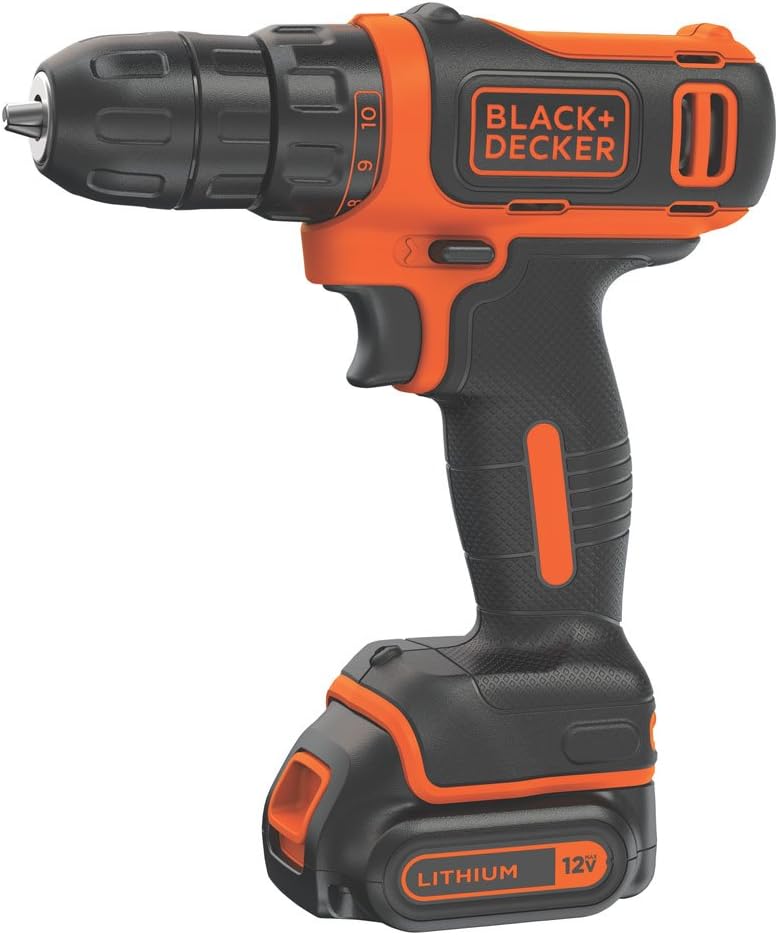
Figure 1: BLACK+DECKER 12V MAX Cordless Drill/Driver (BDCDD12C)
2. What's Included
Your BLACK+DECKER 12V MAX Cordless Drill/Driver kit includes the following components:
- BDCDD12C Drill/Driver Unit
- 12V MAX* Lithium-Ion Battery
- Battery Charger
- Double-Ended Bit (Phillips/Flathead)
- User Manual (This document)
3. Specifications
| Feature | Specification |
|---|---|
| Brand | BLACK+DECKER |
| Model Number | BDCDD12C |
| Power Source | Battery Powered |
| Voltage | 12 Volts |
| Maximum Rotational Speed | 550 RPM |
| Maximum Chuck Size | 10 Millimeters |
| Item Weight | 0.5 Pounds (8 ounces) |
| Product Dimensions | 9.38"L x 2.75"W x 8.13"H |
| Battery Capacity | 1.5 Amp Hours |
| Special Features | Cordless, Lightweight, Compact, Keyless Chuck, LED Work Light, 11-Position Clutch |
4. Setup
4.1 Charging the Battery
Before first use, fully charge the 12V MAX Lithium-Ion Battery. The charger indicates the charging status with an LED light. A flashing green light indicates charging, and a solid green light means the battery is fully charged.
Video 1: Demonstrates how to connect the battery to the charger and observe the charging indicator light.
4.2 Installing the Battery
To install the battery, align the battery pack with the base of the drill handle and slide it firmly into place until it clicks. Ensure it is securely latched to prevent accidental detachment during operation.
Video 2: Shows the process of attaching and detaching the battery from the drill unit.
5. Operating Instructions
5.1 Forward/Reverse Selector
The forward/reverse selector switch is located above the trigger. Push the switch to the left for forward (clockwise) rotation, and to the right for reverse (counter-clockwise) rotation. Center the switch to lock the trigger and prevent accidental activation.
Video 3: Illustrates the use of the forward/reverse selector switch and its effect on drill rotation.
5.2 11-Position Clutch
The 11-position clutch allows you to select the appropriate torque setting for your task, preventing over-driving screws or damaging materials. Rotate the collar behind the chuck to adjust the clutch setting. Lower numbers are for driving small screws into soft materials, while higher numbers are for driving large screws into hard materials or for drilling.

Figure 2: Overview of drill features, highlighting the 11-position clutch.

Figure 3: A user demonstrating the adjustment of the 11-position clutch for precision control.
5.3 LED Work Light
The integrated LED work light automatically illuminates when the trigger is pressed, providing visibility in dimly lit areas or when working in tight spaces. This ensures clear sight of your work surface for improved accuracy.

Figure 4: The drill's LED work light in action, illuminating a dark work area.
5.4 Keyless Chuck and Bit Changes
The keyless chuck allows for quick and easy bit changes without the need for additional tools. To insert a bit, twist the chuck counter-clockwise to open the jaws, insert the bit, and then twist clockwise to tighten securely. To remove, simply twist counter-clockwise to loosen.
Video 4: Demonstrates the quick and easy process of changing bits using the keyless chuck.
6. Maintenance
To ensure optimal performance and longevity of your BLACK+DECKER drill, regular maintenance is recommended:
- Cleaning: Keep the tool's ventilation slots clear and free of debris. Use a clean, dry cloth to wipe down the exterior. Do not use water or chemical cleaners.
- Battery Care: Store batteries in a cool, dry place away from direct sunlight. Avoid fully discharging the battery before recharging to prolong its lifespan.
- Bit Storage: Store drill bits in a dry place to prevent rust and maintain sharpness.
7. Troubleshooting
If you encounter issues with your drill, refer to the following common troubleshooting tips:
- Drill not operating: Ensure the battery is fully charged and properly inserted into the drill. Check the forward/reverse selector is not in the locked (center) position.
- Reduced power/short battery life: The battery may need recharging. Ensure the battery is not stored in extreme temperatures.
- Bit slipping in chuck: Ensure the chuck is tightened securely around the bit. The bit may be worn and require replacement.
- Overheating: Ensure ventilation slots are not blocked. Allow the tool to cool down if it feels excessively hot during prolonged use.
For more complex issues, please refer to the official user manual PDF or contact customer support.
8. Warranty and Support
The BLACK+DECKER 12V MAX Cordless Drill/Driver (BDCDD12C) comes with a 2-year limited warranty from the manufacturer. This warranty covers defects in material or workmanship. Please retain your proof of purchase for warranty claims.
For detailed warranty information, technical support, or to purchase protection plans, please visit the official BLACK+DECKER website or refer to the comprehensive User Manual (PDF) provided with your product.
Additional protection plans are available for purchase:
- 3-Year Protection Plan
- 4-Year Protection Plan
- Complete Protect (monthly billing option)
Related documentsBDCDD12C


Ask a question about this manual
Ask about setup, troubleshooting, compatibility, parts, safety, or missing instructions. Manuals+ will review the question and use this page’s manual context to help answer it.