
Introduction
Thank you for choosing the Reveal Solar Bluetooth Speaker. This portable speaker combines sustainable bamboo design with solar charging capabilities and a power bank function. This manual provides essential information for setting up, operating, and maintaining your speaker.
Product Overview
The Reveal Solar Bluetooth Speaker features a durable bamboo casing, integrated solar panels, and a built-in battery for extended playback and device charging.

Figure 1: Front view of the Reveal Solar Bluetooth Speaker, highlighting quality sound and wireless connectivity.

Figure 2: Rear view of the speaker, illustrating the solar panel, USB output port for charging devices, and the micro-USB input for traditional charging.

Figure 3: The speaker held in hands, demonstrating its compact and portable size, with views of both the bamboo front and solar panel back.
Charging the Speaker
Your speaker can be charged using two methods: solar power or a USB cable.
Solar Charging
Place the speaker with its solar panel facing direct sunlight. The solar panel is located on the back of the unit. For optimal charging, ensure the panel is unobstructed. Charging time varies based on sunlight intensity.
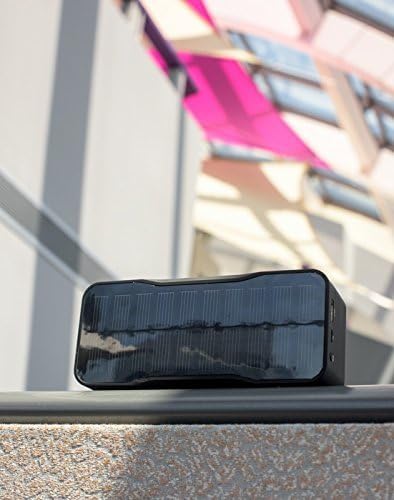
Figure 4: The solar panel on the back of the speaker, designed for efficient charging under sunlight.
USB Charging
When solar power is not available, use the provided USB cable to charge the speaker. Connect the micro-USB end to the speaker's charging port and the USB-A end to a compatible USB power adapter (not included) or a computer USB port.
- A full charge provides approximately 12 to 15 hours of playback.
- The internal lithium-ion battery stores charge for use when sunlight is not available.
Bluetooth Pairing and Operation
Pairing Your Device
- Power on the speaker by sliding the "ON/OFF" switch.
- The speaker will enter Bluetooth pairing mode automatically, indicated by a flashing LED light.
- On your smartphone, tablet, or computer, enable Bluetooth and search for available devices.
- Select "Reveal Speaker" (or similar name) from the list of devices.
- Once paired, the LED indicator will become solid, and you will hear an audible confirmation.
- The speaker has a Bluetooth range of up to 33 feet (10 meters).
Playing Audio
After successful pairing, you can play audio from your connected device. Use the volume controls on your device or the speaker to adjust the sound level.
Line-In Audio
For devices without Bluetooth, connect an audio cable (not included) from your device's headphone jack to the speaker's "IN" port.
Using as a Portable Charger
The Reveal Solar Bluetooth Speaker can also function as a portable power bank to charge your mobile devices.
- Ensure the speaker has sufficient charge.
- Connect your smartphone, tablet, or other USB-powered device to the speaker's USB "OUT" port using your device's charging cable.
- The speaker will begin charging your device. You can continue to play music while charging.
Maintenance and Care
- Keep the speaker dry. Avoid exposure to water or excessive moisture.
- Clean the bamboo surface with a soft, dry cloth.
- Ensure the solar panel is clean and free of dust or debris for efficient charging.
- Store the speaker in a cool, dry place when not in use.
Troubleshooting
| Problem | Solution |
|---|---|
| Speaker does not power on. | Ensure the battery is charged. Connect the speaker to a USB power source for charging. |
| Cannot pair via Bluetooth. |
|
| Poor sound quality or distortion. |
|
| Device not charging from speaker. |
|
| Solar charging is slow or ineffective. |
|
Specifications
| Feature | Detail |
|---|---|
| Model Number | 14SB0821NTR |
| Speaker Output Power | 4Ω 3.3W + 3.3W (Total 6.6W) |
| Audio Output Mode | Mono |
| Connectivity Technology | Bluetooth, USB, Line-In |
| Bluetooth Range | Up to 33 feet (10 meters) |
| Power Source | Solar, Internal Lithium-Ion Battery |
| Battery Capacity | 4400mAh |
| Battery Life | 8-15 hours (depending on usage and charging method) |
| Frequency Response | 130Hz - 20KHz |
| Signal to Noise Ratio | ≥ 80 dB |
| Distortion | ≤ 1% |
| Item Dimensions (D x W x H) | 3.3" x 8" x 3.8" |
| Item Weight | 1.1 Pounds |
| Compatible Devices | Smartphone, Tablet, MP3 Player, Laptop |

Figure 5: Dimensional drawing of the speaker, indicating its length, width, and height.
Official Product Video
Video 1: An official video demonstrating the features and use of the Reveal Bamboo Solar Powered Bluetooth Speaker.
Warranty and Support
The Reveal Solar Bluetooth Speaker comes with a 1-year warranty from the date of purchase. This warranty covers manufacturing defects and ensures peace of mind regarding product quality.
For warranty claims, technical support, or any inquiries, please refer to the contact information provided with your purchase or visit the official Reveal website.