
Introduction
This manual provides detailed instructions for the installation, operation, and maintenance of your VTech CS6919-26 DECT 6.0 Cordless Phone System. This system includes two full-duplex handsets and a base unit, designed for reliable communication. Please read this manual thoroughly to ensure proper use and to take full advantage of all available features.
Package Contents
Before beginning installation, verify that your package contains the following items:
- VTech CS6919-26 Base Unit
- Two (2) Cordless Handsets
- Two (2) Handset Chargers
- Two (2) Power Adapters for Base Unit and Charger
- Two (2) Rechargeable Battery Packs
- One (1) Telephone Line Cord
- Wall Mount Bracket (optional)
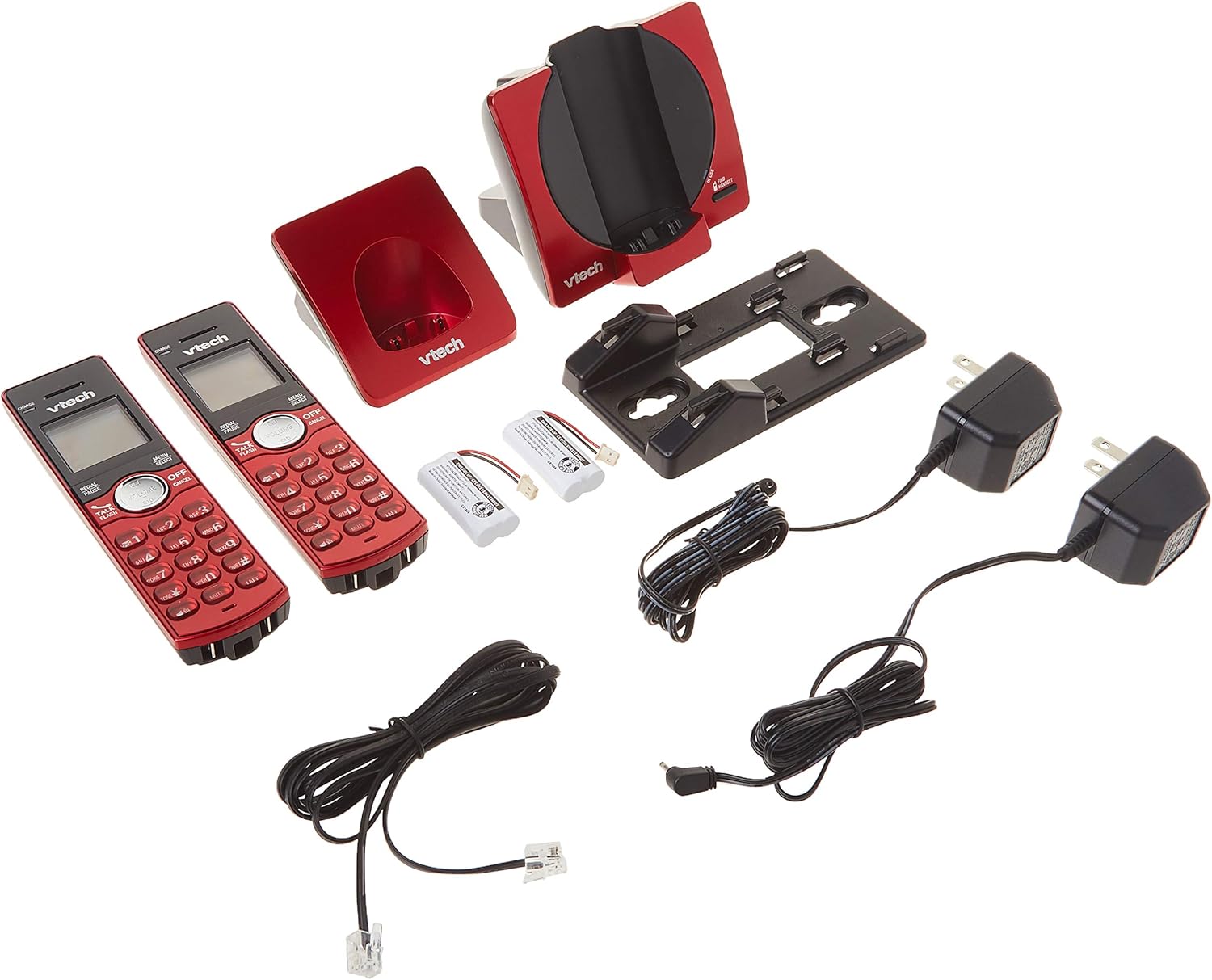
Image: All components of the VTech CS6919-26 Cordless Phone System, including the base unit, two handsets, two chargers, power adapters, battery packs, and telephone line cord.
Setup
1. Battery Installation
- Open the battery compartment cover on the back of each handset.
- Connect the battery pack plug securely into the jack inside the compartment.
- Place the battery pack with the label facing up, as indicated.
- Replace the battery compartment cover.
2. Base Unit and Charger Connection
- Plug one end of the telephone line cord into the TEL LINE jack on the back of the base unit.
- Plug the other end of the telephone line cord into a telephone wall jack.
- Plug the small end of the base unit power adapter into the POWER jack on the back of the base unit.
- Plug the large end of the base unit power adapter into an electrical outlet not controlled by a wall switch.
- For each handset charger, plug the small end of its power adapter into the POWER jack on the back of the charger.
- Plug the large end of each charger power adapter into an electrical outlet not controlled by a wall switch.

Image: Rear view of the VTech CS6919-26 handsets and base unit, illustrating the battery compartments and connection ports for power and telephone line.
3. Initial Charging
Place each handset face forward in its respective base unit or charger. The CHARGE light on the handset will illuminate, indicating proper charging. Allow the handsets to charge for at least 16 hours before initial use to ensure optimal battery performance.

Image: Two VTech CS6919-26 cordless handsets, red in color, resting in their charging cradles. The handsets feature a black display and keypad with red buttons.
4. Handset Registration
The handsets included in this package are pre-registered to the base unit. If a handset becomes unregistered or if you purchase additional handsets (up to 5 total), refer to the full user manual for registration procedures.
5. Wall Mounting (Optional)
The base unit is designed to be table-mountable or wall-mountable. Use the included wall mount bracket and follow the instructions provided in the full user manual for secure wall installation.
Operating Instructions
Making and Receiving Calls
- To Make a Call: Press TALK/FLASH or any dial key, then dial the phone number.
- To Answer a Call: When the phone rings, press TALK/FLASH or any dial key.
- To End a Call: Press OFF/CANCEL or place the handset in the charger.
Full-Duplex Handset Speakerphone
To activate the speakerphone during a call, press the SPEAKER button. This allows both parties to speak and be heard simultaneously, enhancing conversation clarity.
Caller ID/Call Waiting
The handset display shows the caller's name and number (if available) for incoming calls. The system stores up to 30 caller ID entries. If you subscribe to call waiting, you will hear a tone when another call comes in while you are on the phone. Press FLASH to switch between calls.
Phonebook Directory
Store up to 50 names and numbers in the phonebook directory for quick dialing. Access the phonebook by pressing MENU/SELECT and navigating to the Phonebook option.
Intercom Between Handsets
To initiate an intercom call between two handsets, press INT on one handset and select the desired handset to call.
Conference Calls
The system supports conferencing between an outside line and up to two cordless handsets. Refer to the full user manual for detailed instructions on setting up a three-way conference call.
Redial and Mute
- Redial: Press REDIAL/PAUSE to view the last 10 dialed numbers. Press TALK/FLASH to dial a selected number.
- Mute: During a call, press MUTE/DELETE to temporarily silence your microphone. Press it again to unmute.
Volume Control
Adjust the earpiece or speakerphone volume during a call by pressing the VOLUME buttons on the side of the handset.
Quiet Mode
Activate Quiet Mode to silence all ringers for a set period. This feature is useful for uninterrupted rest. Access this setting through the handset menu.
Call Block
Block unwanted numbers from ringing your phone. You can add numbers to the call block list through the handset menu.
ECO Mode
The system features ECO mode power-conserving technology, which automatically adjusts power consumption for optimal battery life and energy efficiency.
Maintenance
Cleaning
Clean the phone and charger surfaces with a soft, slightly damp cloth. Do not use cleaning sprays or harsh chemicals, as they may damage the finish or electrical components.
Battery Care
To maintain optimal battery life, fully charge the handsets regularly. If the phone will not be used for an extended period, remove the batteries from the handsets.
Troubleshooting
If you experience issues with your phone system, try the following basic troubleshooting steps:
- No Dial Tone: Ensure the telephone line cord is securely plugged into both the base unit and the wall jack. Check that the base unit power adapter is properly connected to a working electrical outlet.
- Cannot Make/Receive Calls: Verify that the handset batteries are charged. Ensure the handset is within range of the base unit. Check if the telephone line is active.
- Poor Sound Quality: Move closer to the base unit. Check for interference from other electronic devices (e.g., Wi-Fi routers, microwaves).
- Handset Not Charging: Ensure the handset is correctly seated in the charger. Check that the charger's power adapter is plugged into a working outlet. Clean the charging contacts on both the handset and charger.
- Display is Blank: Charge the handset battery. If the issue persists, the battery may need replacement.
For more detailed troubleshooting, refer to the comprehensive user manual or VTech's customer support resources.
Specifications
| Model Number | CS6919-26 |
| Technology | DECT 6.0 Digital Technology |
| Handsets Included | 2 (Expandable up to 5) |
| Dimensions (Base Unit) | Approximately 4.49 x 7.09 x 5.98 inches |
| Item Weight | Approximately 1.65 pounds |
| Material | Plastic |
| Power Source | Corded Electric |
| Battery Type | Product Specific Rechargeable Batteries (included) |
| Caller ID Memory | 30 calls |
| Phonebook Directory | 50 names and numbers |
Warranty Information
Specific warranty details for the VTech CS6919-26 Cordless Phone System are typically included with the product packaging or available on the official VTech website. Please refer to these resources for information regarding warranty coverage, terms, and conditions.
Support
For further assistance, technical support, or to access additional resources such as FAQs and detailed user guides, please visit the official VTech support website or contact their customer service department. Contact information can usually be found in the product packaging or on the VTech website.


