
Important Safety Information
Read and understand all instructions before using this product. Failure to follow all instructions listed below may result in electric shock, fire, and/or serious personal injury.
General Safety Warnings
- Eye Safety: This product uses a laser. Do not stare directly into the laser beam. Avoid direct eye exposure.
- Battery Safety: Use only the specified battery type (1 AAA battery). Ensure correct polarity when installing. Remove batteries if the device is not used for extended periods.
- Product Compatibility: This device is designed to work with compatible smartphones. Ensure your phone meets the system requirements for the Ryobi Phone Works app.
- Cleaning: Disconnect the device from your phone and remove the battery before cleaning. Wipe clean with a soft, damp cloth. Do not immerse in liquids.
- Storage: Store the device in a cool, dry place, away from direct sunlight and extreme temperatures.
WARNING: This product can expose you to chemicals including lead, which is known to the State of California to cause cancer and birth defects or other reproductive harm. For more information go to www.P65Warnings.ca.gov.
Product Overview
The Ryobi ES2000 Phone Works Infrared Thermometer is designed to measure surface temperatures remotely by detecting infrared energy. It connects to your smartphone via the headphone jack and utilizes the Ryobi Phone Works app for display and data management.
What's in the Box
- (1) ES2000 Infrared Thermometer
- (1) Phone Mount Clip
- (1) AAA Battery
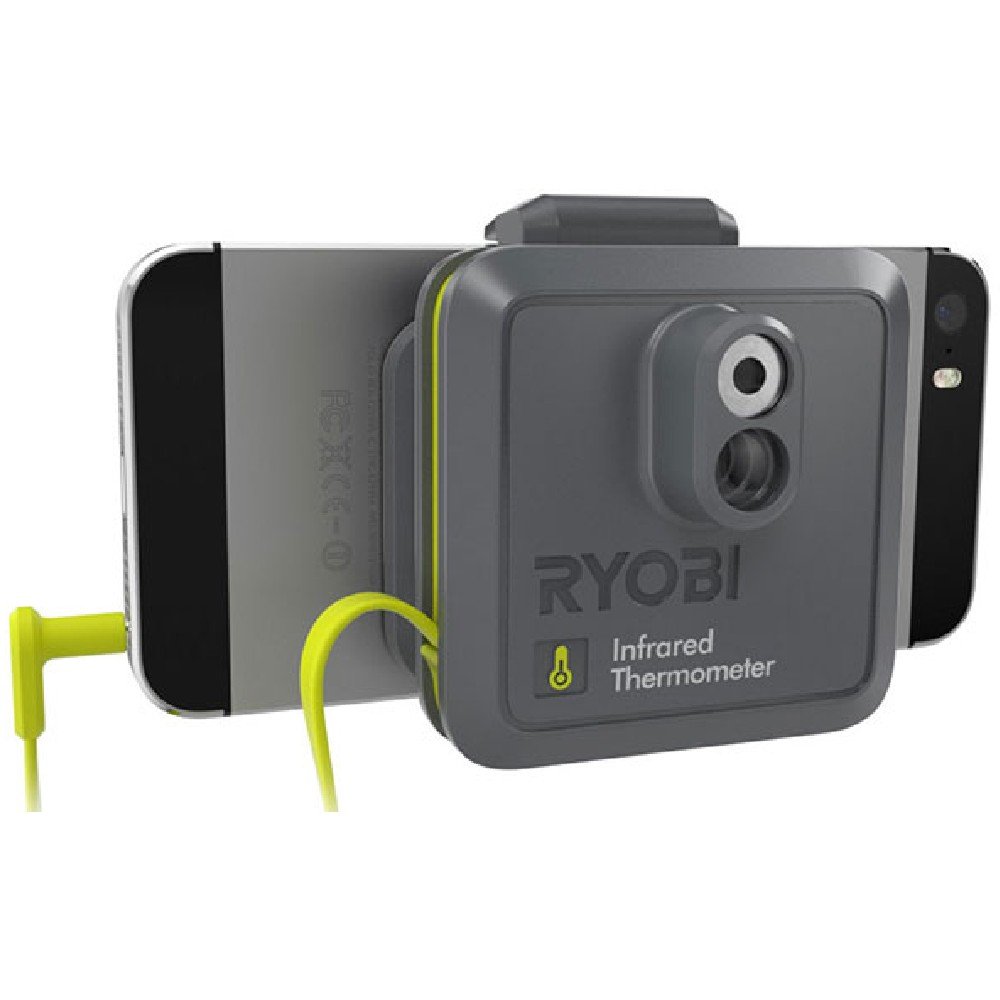
Image: The Ryobi ES2000 Infrared Thermometer connected to a smartphone, showing its compact design and how it integrates with the phone.
Setup
1. Install the AAA Battery
- Locate the battery compartment on the infrared thermometer.
- Open the compartment cover.
- Insert one (1) AAA battery, ensuring the correct positive (+) and negative (-) polarity as indicated inside the compartment.
- Close the battery compartment cover securely.
2. Attach the Phone Mount Clip
The included phone mount clip secures your smartphone to the thermometer for stable use.
- Gently expand the phone mount clip.
- Position your smartphone within the clip, ensuring it is held firmly without obstructing the screen or the thermometer's sensor.

Image: A smartphone with the Ryobi ES2000 Infrared Thermometer attached, showing the app interface with temperature readings and a laser target.
3. Install the Ryobi Phone Works App
The Ryobi ES2000 requires the Ryobi Phone Works app to function. This app is available for download on compatible smartphone app stores.
- Search for "Ryobi Phone Works" in your smartphone's app store (e.g., Apple App Store, Google Play Store).
- Download and install the application.
- Open the app and follow any on-screen prompts for initial setup or permissions.

Image: A screenshot of the Ryobi Phone Works application interface, showing various tool options including the Infrared Thermometer.
4. Connect the Thermometer to Your Smartphone
The thermometer connects to your smartphone via the headphone jack.
- Ensure your smartphone's volume is turned up.
- Plug the thermometer's connector firmly into your smartphone's headphone jack.
- The Ryobi Phone Works app should automatically detect the connected thermometer. If not, try restarting the app or re-inserting the connector.
Operation
Taking Temperature Measurements
Once the thermometer is connected and the app is running, you can begin taking measurements.
- In the Ryobi Phone Works app, select the "Infrared Thermometer" function.
- Point the thermometer's sensor at the surface you wish to measure. A laser pointer will indicate the center of the measurement area.
- Press the trigger or activation button on the thermometer (or within the app, if available) to take a reading.
- The temperature reading will be displayed on your smartphone screen within the app.

Image: A user holding a smartphone with the Ryobi ES2000 attached, pointing the laser at a ceiling vent to measure its temperature, displayed on the phone screen.
Interpreting Readings
The app may offer features such as:
- Real-time Display: Continuous temperature updates as you scan surfaces.
- Data Logging: Ability to save measurements, often with associated photos or notes.
- Unit Conversion: Option to switch between Celsius and Fahrenheit.

Image: A user measuring the temperature near a window frame with the Ryobi ES2000 and a smartphone, showing the laser dot on the surface.
Maintenance
Cleaning
To ensure accurate readings and prolong the life of your thermometer:
- Disconnect the thermometer from your smartphone and remove the battery before cleaning.
- Wipe the exterior of the device with a clean, soft, damp cloth.
- Do not use abrasive cleaners, solvents, or immerse the device in water.
- Keep the infrared lens clean and free of dust or debris. Use a soft, dry cloth or lens cleaning solution if necessary.
Battery Replacement
When the battery is low, the device's performance may be affected, or the app may indicate a low battery. Replace the AAA battery as described in the "Setup" section.
Storage
Store the Ryobi ES2000 in a dry, protected area when not in use. Avoid storing it in direct sunlight or areas with extreme temperatures or humidity.
Troubleshooting
If you encounter issues with your Ryobi ES2000 Infrared Thermometer, refer to the following common problems and solutions:
| Problem | Possible Cause | Solution |
|---|---|---|
| Device does not power on or connect to the app. | Low or dead battery; improper connection; app issue. | Replace the AAA battery. Ensure the connector is fully inserted into the phone's headphone jack. Restart the Ryobi Phone Works app or your smartphone. |
| Inaccurate temperature readings. | Dirty sensor lens; incorrect measurement technique; extreme ambient conditions. | Clean the infrared sensor lens. Ensure you are measuring within the device's specified range and distance. Allow the device to acclimate to the ambient temperature if moved from an extreme environment. |
| Ryobi Phone Works app crashes or freezes. | App software issue; phone compatibility issue; insufficient phone resources. | Ensure the app is updated to the latest version. Close other applications running on your phone. Try uninstalling and reinstalling the app. Verify your phone meets the app's minimum system requirements. |
| Laser pointer is not visible or weak. | Low battery; laser malfunction. | Replace the AAA battery. If the issue persists, contact customer support. |
If these solutions do not resolve the issue, please contact Ryobi customer support for further assistance.
Specifications
| Feature | Detail |
|---|---|
| Brand | RYOBI |
| Model | ES2000 |
| Connectivity Technology | Infrared (via smartphone headphone jack) |
| Display Type | Digital (via smartphone app) |
| Power Source | Battery Powered |
| Number of Batteries | 1 AAA battery required |
| Product Care Instructions | Wipe Clean |
| Reusability | Reusable |
Warranty & Support
For warranty information, service, or technical support, please contact Ryobi customer service directly. Keep your purchase receipt as proof of purchase.
Ryobi Customer Service: Refer to the contact information provided in your product packaging or visit the official Ryobi website for the most up-to-date support details.