
Pro'sKit CP-376KX
Pro'sKit CP-376KX Professional Modular Crimping Tool User Manual
Model: CP-376KX
1. Introduction
The Pro'sKit CP-376KX is a professional-grade modular crimping tool designed for efficient and reliable termination of network and telephone cables. This versatile tool integrates crimping, stripping, and cutting functions into a single, robust unit, making it an essential tool for network technicians and DIY enthusiasts.
It is engineered to work with both solid and stranded wires and features a smooth ratcheting mechanism to ensure consistent, positive connections. The durable metal frame and built-in dies are designed for rigidity and long-term performance.
Key Features:
- Material: High-quality Steel construction with a blue finish.
- Multi-functionality: Capable of crimping, stripping, and cutting.
- Modular Plug Compatibility: Supports 8P8C/RJ-45, 6P6C/RJ-12, 6P4C/RJ-11, 4P4C, 4P2C/RJ22 plugs, and DEC/Off-set 6P6C plugs.
- Integrated Stripper: Includes a built-in stripper for precise wire preparation and a round cable stripper.
- Ratcheting Mechanism: Ensures consistent and secure crimps.
- Durable Design: Middle carbon steel frame, hardened and black oxide finished for longevity.
- Ergonomic Handle: TPR + P.P. handle for comfortable grip.
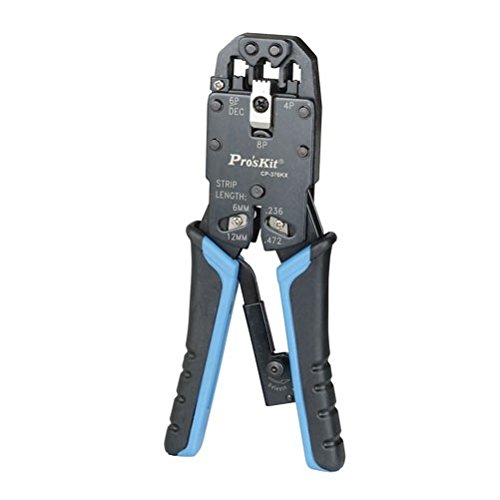
Figure 1: The Pro'sKit CP-376KX Professional Modular Crimping Tool. This image shows the tool's compact design, blue and black handles, and the various crimping dies (8P, 6P, 4P) visible at the head of the tool, along with the strip length indicators.
2. Setup
The Pro'sKit CP-376KX tool is designed for immediate use out of the package. No assembly is required.
Initial Inspection:
- Carefully remove the tool from its packaging.
- Inspect the tool for any visible damage that may have occurred during shipping.
- Ensure the handles move freely and the ratcheting mechanism operates smoothly.
- Verify that the cutting and stripping blades are sharp and free from nicks.
If any damage is observed, do not use the tool. Contact customer support for assistance.
3. Operating Instructions
This section provides detailed instructions on how to effectively use the Pro'sKit CP-376KX for its primary functions: cutting, stripping, and crimping.
3.1. Cutting Cables
The tool features a built-in cutter for cleanly severing network or telephone cables to the desired length.
- Open the tool handles fully.
- Locate the cutting blade, typically positioned near the pivot point or at the rear of the crimping dies.
- Place the cable into the cutting slot, ensuring it is perpendicular to the blades.
- Squeeze the handles firmly and evenly until the cable is completely cut.
3.2. Stripping Cable Jacket
The CP-376KX includes two stripping mechanisms: a general stripper for flat cables and a dedicated round cable stripper.
3.2.1. Stripping Flat Cables (e.g., telephone wire)
- Identify the stripping blade located on the front of the tool, near the crimping dies.
- Insert the end of the cable into the stripping slot. The tool provides indicators for common strip lengths (e.g., 6mm / .236 inches and 12mm / .472 inches). Align the cable end with the desired strip length mark.
- Gently squeeze the handles to engage the blade with the cable jacket.
- Pull the cable away from the tool while maintaining slight pressure on the handles to remove the stripped jacket.
3.2.2. Stripping Round Cables (e.g., Ethernet cable)
An integrated round cable stripper is located on the side of the tool for efficient stripping of round network cables.
- Open the tool handles.
- Locate the round cable stripping slot, typically on the side of the tool's head.
- Insert the round cable into the slot.
- Rotate the tool around the cable 1-2 times to score the jacket.
- Remove the cable from the slot and pull off the scored jacket.

Figure 2: Back of the Pro'sKit CP-376KX packaging. This image illustrates the various functions of the tool, including the different crimping dies (8P, 6P, 4P), strip length indicators (6mm, 12mm), and the integrated round cable stripper. It also highlights the straight motion and precise crimping capabilities.
3.3. Crimping Modular Plugs
The CP-376KX supports various modular plug types. Ensure you select the correct die for your plug.
- After stripping the cable, arrange the individual wires according to the desired wiring standard (e.g., T568A or T568B for RJ-45). Trim the wires to the appropriate length, ensuring they are even.
- Carefully insert the prepared wires into the modular plug, ensuring each wire reaches the end of its respective channel and the cable jacket is seated correctly within the plug's strain relief.
- Open the tool handles fully.
- Select the appropriate crimping die on the tool (e.g., 8P for RJ-45, 6P for RJ-11/RJ-12, 4P for RJ-22).
- Insert the modular plug firmly into the selected crimping die. Ensure the plug is seated correctly and flush with the die.
- Slowly and firmly squeeze the handles together until the ratcheting mechanism completes its cycle and releases. This ensures a full and proper crimp. Do not release the handles prematurely.
- Remove the crimped plug from the tool.
- Inspect the crimp:
- Verify that all pins are fully seated and flush with the plug surface.
- Check that the cable jacket is securely held by the plug's strain relief.
- Gently tug on each wire to ensure it is securely crimped and does not pull out.
For best results, practice on scrap cable and plugs before working on critical installations.
4. Maintenance
Proper maintenance will extend the life and ensure the continued performance of your Pro'sKit CP-376KX crimping tool.
4.1. Cleaning
- After each use, especially after cutting or stripping, remove any wire fragments or insulation debris from the cutting blades and crimping dies. A small brush or compressed air can be used.
- Wipe down the tool with a clean, dry cloth to remove dirt, dust, or moisture.
- Avoid using harsh chemicals or abrasive cleaners, as these can damage the tool's finish or components.
4.2. Lubrication
- Periodically apply a small amount of light machine oil to the pivot points and the ratcheting mechanism.
- Operate the tool several times after lubrication to distribute the oil evenly.
- Wipe off any excess oil to prevent dust accumulation.
4.3. Storage
- Store the tool in a clean, dry environment to prevent rust and corrosion.
- Keep the tool in its original packaging or a dedicated tool pouch to protect it from impacts and debris.
- Store out of reach of children.
5. Troubleshooting
This section addresses common issues you might encounter while using the Pro'sKit CP-376KX tool.
| Problem | Possible Cause | Solution |
|---|---|---|
| Poor Crimp Quality (pins not fully seated, wires loose) |
|
|
| Cable Jacket Not Stripping Cleanly |
|
|
| Tool Handles Sticking or Difficult to Operate |
|
|
If you encounter issues not listed here or if the suggested solutions do not resolve the problem, please contact Pro'sKit customer support.
6. Specifications
| Attribute | Detail |
|---|---|
| Model Number | CP-376KX |
| Brand | Pro'sKit |
| Material | Middle Carbon Steel Frame, hardened and black oxide finished |
| Handle Material | Thermoplastic Elastomer (TPE) + Polypropylene (P.P.) |
| Color | Blue |
| Item Weight | 100 Grams |
| Product Dimensions (LxWxH) | 2.5 x 10 x 22 cm (25 x 100 x 220 Millimeters) |
| Application | 8P8C/RJ-45, 6P6C/RJ-12, 6P4C/RJ-11, 4P4C and 4P2C/RJ22 plugs, and DEC/Off-set 6P6C plugs |
| Hardness (HRC) | HRA45° nor 48° |
| Country of Origin | Taiwan |
| Included Components | 1 Professional Modular Crimps Strips and Cuts Tool |
| EAN/UPC | 4710810394188 |
7. Warranty and Support
For warranty information, technical support, or service inquiries regarding your Pro'sKit CP-376KX tool, please contact the manufacturer or your local distributor.
Manufacturer: NABROCO TOOLS & TECHNOLOGIES PVT LTD
Manufacturer Contact: +91 7042836466
Manufacturer Website: www.prokits.com.tw
Please have your model number (CP-376KX) and purchase details ready when contacting support.
Ask a question about this manual
Ask about setup, troubleshooting, compatibility, parts, safety, or missing instructions. Manuals+ will review the question and use this page’s manual context to help answer it.