
SOBO WP-800M
SOBO WP-800M Super Wave Maker Aquarium Pump Instruction Manual
Model: WP-800M
1. Introduction
The SOBO WP-800M Super Wave Maker is designed to create natural water currents within your aquarium, promoting a healthier environment for aquatic life. This device helps circulate water, distribute nutrients, and prevent stagnant areas, which is crucial for the well-being of fish and corals. Please read this manual thoroughly before installation and operation to ensure proper use and longevity of the product.
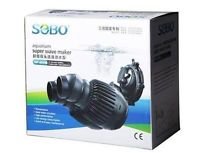
Figure 1: SOBO WP-800M Super Wave Maker product packaging. The image displays the retail box of the wave maker, featuring the SOBO brand logo and product name.
2. Safety Instructions
To prevent injury or damage to the product, always observe the following safety precautions:
- Always disconnect the power supply before performing any maintenance, installation, or removal of the wave maker from the aquarium.
- Ensure your hands are dry before plugging in or unplugging the power cord.
- Do not operate the wave maker if the power cord or plug is damaged.
- This device is intended for indoor use in aquariums only. Do not use it for any other purpose.
- Keep the power cord away from sharp objects and hot surfaces.
- Ensure the wave maker is fully submerged in water during operation. Running it dry can cause damage.
- Do not attempt to disassemble or repair the unit yourself. Refer to qualified personnel for service.
3. Product Components
The SOBO WP-800M Super Wave Maker typically includes the following components:
- Wave Maker Pump Unit
- Suction Cup Mount
- Power Cord with Plug
4. Installation and Setup
Follow these steps to properly install your SOBO WP-800M Super Wave Maker:
- Unpack: Carefully remove all components from the packaging. Inspect for any damage.
- Placement: Select an appropriate location within your aquarium. The wave maker should be placed where it can create optimal water flow without directly blasting sensitive corals or fish. Consider placing it near the top or middle of the tank, directed towards open areas.
- Secure: Attach the wave maker to the aquarium glass using the provided suction cup mount. Ensure the suction cups are clean and firmly pressed against the glass to prevent the unit from detaching.
- Submerge: Ensure the entire wave maker pump unit is fully submerged in water before connecting to power.
- Connect Power: Once securely placed and submerged, connect the power cord to a suitable electrical outlet.
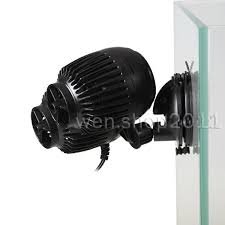
Figure 2: SOBO WP-800M Super Wave Maker attached to aquarium glass. This image shows the wave maker unit with its suction cup mount securely fastened to the side of an aquarium.
5. Operating Instructions
Once installed and powered on, the SOBO WP-800M Super Wave Maker will begin to operate, generating water movement within your aquarium. The device is designed for continuous operation to maintain consistent water circulation.
- Initial Start-up: After plugging in, the pump will start immediately. Observe the water flow pattern and adjust the position of the wave maker if necessary to achieve desired circulation.
- Flow Direction: The direction of the water flow can be adjusted by carefully rotating the pump unit on its mount.
- Continuous Operation: For optimal aquarium health, the wave maker is typically run continuously.
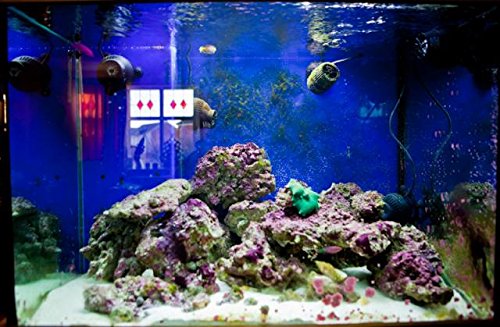
Figure 3: An aquarium featuring the SOBO WP-800M Super Wave Maker in operation. The image shows the wave maker submerged and circulating water among rocks and aquatic plants.
6. Maintenance
Regular maintenance ensures the efficient and long-lasting performance of your wave maker.
- Disconnect Power: Always unplug the wave maker from the power outlet before performing any maintenance.
- Remove from Tank: Carefully remove the wave maker from the aquarium.
- Clean Impeller: The impeller is the rotating part that creates water flow. Over time, it can accumulate debris, algae, or mineral deposits. Gently remove the front cover and then the impeller. Clean the impeller and its housing with a soft brush and clean water. Avoid using harsh chemicals.
- Clean Housing: Wipe down the exterior of the pump unit and the suction cup mount.
- Reassemble: Carefully reassemble the impeller and cover. Ensure all parts are correctly seated.
- Reinstall: Place the cleaned wave maker back into the aquarium and reconnect power.
Perform this cleaning routine monthly or as needed, depending on the accumulation of debris in your aquarium.
7. Troubleshooting
If you encounter issues with your SOBO WP-800M Super Wave Maker, refer to the following common problems and solutions:
| Problem | Possible Cause | Solution |
|---|---|---|
| Wave maker does not start | No power supply Impeller jammed | Check power connection and outlet Disconnect power, remove and clean impeller |
| Weak water flow | Impeller dirty or obstructed Unit not fully submerged | Disconnect power, clean impeller and housing Ensure wave maker is completely underwater |
| Excessive noise or vibration | Impeller damaged or unbalanced Debris in impeller housing Improper mounting | Disconnect power, inspect impeller for damage, clean thoroughly Ensure suction cups are firmly attached to the glass |
8. Specifications
| Feature | Detail |
|---|---|
| Model Number | WP-800M |
| Manufacturer | SOBO |
| Country of Origin | China |
| Product Dimensions (LxWxH) | 13 x 8 x 13 cm |
| Item Weight | 750 g |
| Type | Water Circulator / Wave Maker |
9. Warranty Information
This product is covered by a standard manufacturer's warranty against defects in materials and workmanship. The duration and terms of the warranty may vary by region and retailer. Please retain your proof of purchase for any warranty claims. For specific warranty details, refer to the documentation provided with your purchase or contact your retailer.
10. Customer Support
If you have any questions, require technical assistance, or need to report a problem that cannot be resolved using the troubleshooting guide, please contact your retailer or the SOBO customer service department. Contact information can typically be found on the product packaging or the manufacturer's official website.
Ask a question about this manual
Ask about setup, troubleshooting, compatibility, parts, safety, or missing instructions. Manuals+ will review the question and use this page’s manual context to help answer it.