
Introduction
Thank you for purchasing the Intempo EE1094WHT Portable Tailgate Speaker. This manual provides essential information for the safe and efficient operation of your device. Please read these instructions thoroughly before use and retain them for future reference.
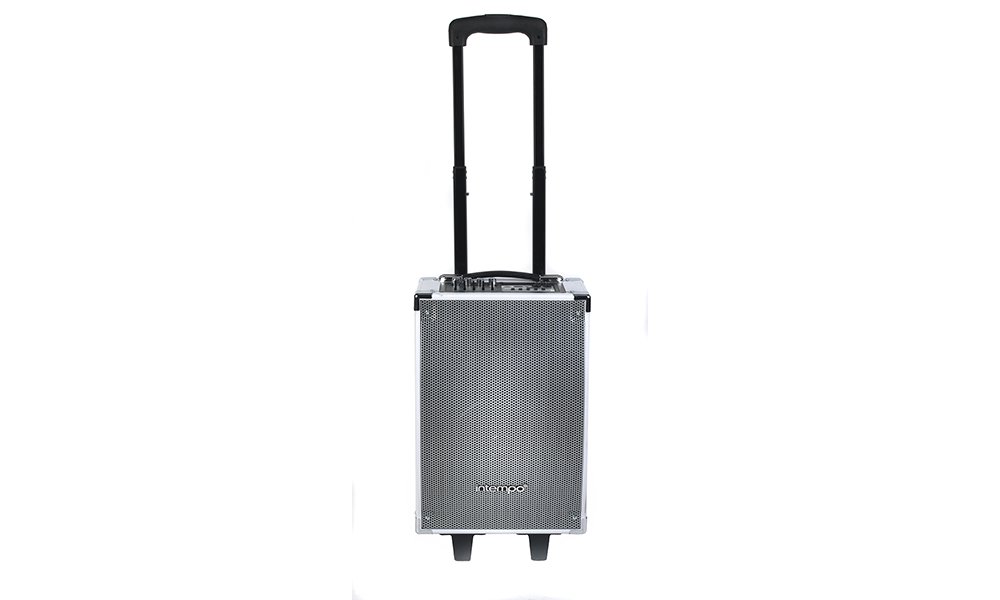
Figure 1: Intempo EE1094WHT Portable Tailgate Speaker. This image shows the speaker with its extendable handle fully raised, highlighting its portability.
Important Safety Instructions
- Read all instructions before operating the speaker.
- Keep the speaker away from water, moisture, and extreme temperatures.
- Do not attempt to disassemble or repair the unit yourself. Refer all servicing to qualified personnel.
- Use only the power adapter supplied with the device.
- Ensure proper ventilation; do not block any ventilation openings.
- Avoid prolonged exposure to loud volumes to prevent hearing damage.
Package Contents
Please check the box for the following items:
- Intempo EE1094WHT Portable Tailgate Speaker
- Wired Microphone
- Power Adapter
- User Manual (this document)

Figure 2: Speaker with included wired microphone, ready for karaoke or vocal performances.
Product Features
- Multiple Connectivity Options: USB, TF card, SD card, AUX-in, and Bluetooth for versatile music playback.
- Karaoke Functionality: Bluetooth connectivity and a microphone input allow for wireless music streaming and singing along.
- Guitar Input: Dedicated input for connecting a guitar, expanding musical possibilities.
- 5-Band Equalizer: Adjust treble and bass frequencies (100Hz, 300Hz, 1KHz, 3KHz, 10KHz) to customize your sound.
- Portable Design: Equipped with two wheels and an extendable handle for easy transport.
- Rechargeable Battery: Built-in battery provides approximately 3 hours of playback on a full charge.
- Durable Construction: Features corner protectors for enhanced durability.
Setup
1. Charging the Speaker
- Connect the supplied power adapter to the DC IN port on the speaker.
- Plug the power adapter into a suitable wall outlet.
- The battery indicator on the control panel will show charging status. Allow approximately 3-4 hours for a full charge.
- Disconnect the power adapter once fully charged or when operating on battery power.
2. Initial Power On
- Ensure the speaker is charged or connected to power.
- Locate the Power switch, usually on the rear or side panel.
- Flip the switch to the 'ON' position. The display panel will illuminate.

Figure 3: The base of the speaker with its integrated wheels and feet, designed for easy movement and stable placement.
Operating Instructions
Control Panel Overview

Figure 4: Detailed view of the speaker's control panel, showing various inputs, volume knobs, equalizer sliders, and playback controls.
Familiarize yourself with the control panel components:
- Main Vol: Master volume control knob.
- Guitar Vol: Volume control for the guitar input.
- Mic Vol: Volume control for the microphone input.
- Echo: Adjusts the echo effect for the microphone.
- Equalizer Sliders: Five sliders to adjust audio frequencies (100Hz, 300Hz, 1KHz, 3KHz, 10KHz).
- TF Card Slot: For TransFlash (MicroSD) cards.
- USB Port: For USB flash drives.
- Line In (AUX): 3.5mm audio input for external devices.
- Mic Input: 6.35mm input for wired microphone.
- Guitar Input: 6.35mm input for guitar.
- Mode Button: Switches between input modes (Bluetooth, USB, TF/SD, AUX).
- Playback Controls: Play/Pause, Previous Track, Next Track.
- BT Charge Indicator: Shows Bluetooth status and battery charge.
1. Bluetooth Pairing
- Power on the speaker.
- Press the Mode button until "Bluetooth" or "BT" appears on the display, or the Bluetooth indicator light flashes. The speaker is now in pairing mode.
- On your smartphone or Bluetooth-enabled device, go to Bluetooth settings and search for available devices.
- Select "EE1094WHT" or "Intempo Speaker" from the list.
- Once paired, the speaker will emit a confirmation sound, and the Bluetooth indicator light will stop flashing and remain solid.
- You can now play audio from your device through the speaker.
2. USB / TF Card / SD Card Playback
- Insert a USB flash drive or a TF/SD card (pre-loaded with MP3 audio files) into the corresponding slot on the control panel.
- The speaker will automatically switch to USB or TF/SD mode and begin playing music. If not, press the Mode button to select the correct input.
- Use the Play/Pause, Previous Track, and Next Track buttons to control playback.
3. AUX Input
- Connect one end of a 3.5mm audio cable (not included) to the Line In (AUX) port on the speaker.
- Connect the other end of the cable to the headphone jack or audio output of your external device (e.g., MP3 player, laptop).
- Press the Mode button until "AUX" appears on the display.
- Control playback and volume from your external device.
4. Microphone and Karaoke Function
- Plug the wired microphone into the Mic Input port.
- Adjust the Mic Vol knob to control the microphone's volume.
- Use the Echo knob to add an echo effect to your vocals.
- For karaoke, play music via Bluetooth, USB, TF/SD, or AUX, and sing along through the microphone.
5. Guitar Input
- Connect your guitar to the Guitar Input port using a 6.35mm jack cable (not included).
- Adjust the Guitar Vol knob to control the guitar's volume.
6. Equalizer Adjustment
Use the five equalizer sliders to fine-tune the audio output. Move the sliders up to boost a frequency band or down to cut it. Experiment to find your preferred sound profile.
- 100Hz: Controls deep bass frequencies.
- 300Hz: Controls mid-bass frequencies.
- 1KHz: Controls midrange frequencies (vocals, instruments).
- 3KHz: Controls upper midrange/lower treble.
- 10KHz: Controls high treble frequencies.
Maintenance
- Cleaning: Wipe the speaker's exterior with a soft, dry cloth. Do not use abrasive cleaners or solvents.
- Storage: Store the speaker in a cool, dry place when not in use.
- Battery Care: To prolong battery life, avoid fully discharging the battery frequently. Charge the speaker regularly, even if not in use for extended periods.
- Transportation: Utilize the integrated wheels and extendable handle for easy and safe transport.
Troubleshooting
| Problem | Possible Cause | Solution |
|---|---|---|
| No power | Battery is discharged; Power cable not connected. | Charge the speaker's battery; Ensure the power adapter is securely connected to the speaker and a power outlet. |
| No sound | Volume is too low; Incorrect input mode selected; Device not properly connected. | Increase the Main Vol knob; Press the Mode button to select the correct input (Bluetooth, USB, AUX); Reconnect your device. |
| Bluetooth not pairing | Speaker not in pairing mode; Device Bluetooth is off; Speaker too far from device. | Ensure speaker is in Bluetooth mode (flashing indicator); Turn on Bluetooth on your device; Move device closer to the speaker (within 10 meters). |
| Microphone not working | Microphone not plugged in; Mic Vol is too low. | Ensure microphone is securely plugged into the Mic Input; Increase the Mic Vol knob. |
Specifications
| Brand | INTEMPO |
| Model Number | EE1094WHT |
| Connectivity Technology | Bluetooth, USB |
| Speaker Type | Bluetooth, Portable |
| Compatible Devices | iPhone, iPad, iPad Air, iPad Mini, iPad 3, iPod Nano, Samsung, Blackberry, Android, Tablets |
| Surround Sound Channel Configuration | 2.0 |
| Color | White |
| Power Source | Electric Cable (Rechargeable Battery) |
| Dimensions (Approx.) | 28L x 22W x 47H cm |
| Battery Life (Approx.) | 3 hours |
Warranty and Support
Warranty Information
This product comes with a standard manufacturer's warranty. Please refer to the warranty card included in your package or contact your retailer for specific warranty terms and conditions. Keep your proof of purchase for warranty claims.
Customer Support
For technical assistance, troubleshooting, or service inquiries, please contact Intempo customer support. Contact details can typically be found on the product packaging or the official Intempo website.


